
If your QA team is still checking login flows manually before every release, you’re leaving bugs in production and hours on the table. Automated UI testing changes that. It replaces the manual grind with scripts that simulate real user actions, run in minutes, and catch issues your team would’ve missed at 4 PM on a Friday.
This guide covers everything: what automated UI testing is, how to implement it, which tools actually work, and why AI is making the old manual-first approach look slow.
What is Automated UI Testing?
Automated UI Testing is the practice of using software tools to automatically test an application’s user interface and verify that it works as expected. Instead of relying on manual testers to click buttons, fill out forms, or navigate workflows, automated tests simulate these user interactions and instantly verify that the application responds correctly.
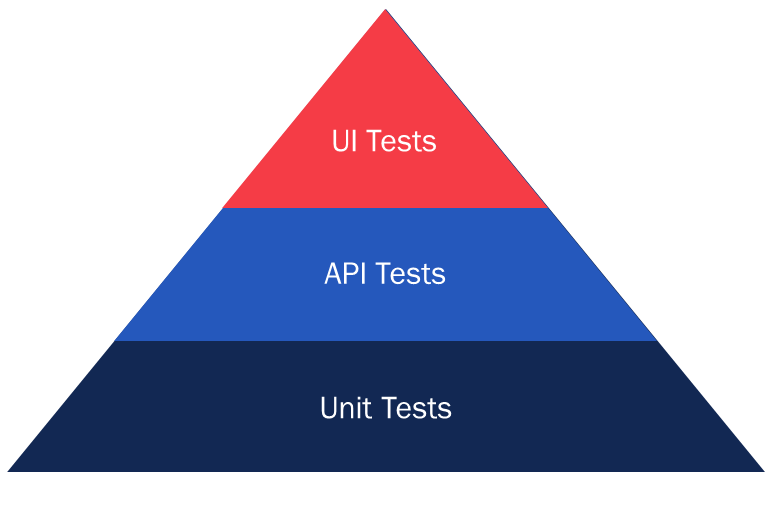
These tests validate key aspects of the user experience, including functionality, visual elements, navigation flows, and user interactions across different browsers and devices. By running tests automatically and repeatedly, teams can detect issues earlier, accelerate release cycles, and reduce the effort required for repetitive regression testing. It sits at the top of the testing pyramid.
Automated UI Testing vs Manual UI Testing
Most teams treat this as an either-or decision. The real question is which approach fits which test, and getting that wrong wastes time in both directions.
Manual UI testing involves a tester opening the app, following a defined set of steps, and visually verifying the behavior. Every click, every result, every judgment call is human-driven. It’s slow and doesn’t scale, but it catches things scripts miss, especially when behavior is ambiguous or the feature is brand new.
Automated UI testing replaces the tester with scripts. The same steps are executed mechanically, and the results are compared against expected outcomes. No human in the loop during the run.
The tester’s job shifts from executing tests to writing and maintaining the scripts that do it.
When manual testing wins
- The feature is brand new and expected behavior isn’t fully defined – a script only verifies what you explicitly tell it to; a tester catches that a new dropdown ‘feels wrong’ even when it technically passes.
- The test requires judgment – is this button too small on mobile? Does this error message make sense to a confused user? Binary pass/fail can’t answer those questions.
- The test will run once or twice – writing, validating, and maintaining a script costs more than just running it manually.
When automation wins
- The test runs every sprint, release, or pull request.
- Coverage needs to span 10+ browser/OS/device combinations.
- Expected behavior is defined precisely enough to script reliably.
- Your team ships faster than manual testing can keep up with.
The decision rule
One question covers most cases: Will this test run more than 3 times? If yes, automate it. Tests that require human judgment stay manual regardless of run frequency.
The hybrid reality
Mature QA teams run both. Automated suites handle regression and cross-browser testing.
Manual testers focus on exploratory sessions, new feature validation, and UX review. One covers the repetitive layer. The other handles the judgment layer. That split is what makes consistent quality possible without a linearly growing QA headcount.
BotGauge’s Autonomous QA as a Solution is built on this exact split: AI agents own the automated layer, and a dedicated domain FDE pod owns the judgment layer. You get both without hiring for either.
Why Teams Choose to Automate UI Testing
Something specific usually forces the decision. A production bug slips through that manual testing should’ve caught. The regression cycle before each release goes up to 3 days. A new sprint starts, and the QA team is already behind. Someone realizes they’ve been manually testing the same 50 flows every single week for 6 months.
Those are the real triggers. Here are the situations that consistently push teams toward UI testing automation:
- You ship weekly or faster. Manual testing cycles that take 2-3 days don’t fit inside a 1-week sprint. Something gets skipped. Usually, the wrong thing.
- You have a QA bottleneck before every release. Developers are waiting on QA sign-off. That wait time is the cost of not automating.
- You test across more than 3 browsers or devices. Doing that manually is either incomplete or exhausting. Usually both.
- The same regression flows run every sprint. If a tester repeats the exact same steps every 2 weeks, that’s a candidate for automation.
- You’ve had a production bug that testing should’ve caught. That one hurts. It’s also usually the moment teams stop debating and start automating.
- Headcount is scaling faster than quality. Adding more manual testers to cover more surface area gets expensive fast.
Benefits of Automated UI Testing
42% of users won’t return to a site because of poor UI functionality. For fast-moving teams, UI automated testing pays off in a few specific ways.
- Regression cycles reduce from days to minutes: A 200-test suite that previously took 3 days of manual work now runs in under 20 minutes in CI. Teams that shipped weekly start shipping daily.
- Low Defect Escape Rate: Tests run on every code push, not just before release. Bugs surface when they’re introduced, not 3 sprints later when they’ve compounded into something harder to trace. Shift-left studies consistently show a 10x lower fix cost for bugs caught at the component stage vs production.
- Significant Cross-browser coverage: Manually testing Chrome, Firefox, Safari, and Edge across 5 device sizes means 20 combinations. Automated, that’s a single test run. Teams that used to spot-check 3 combinations now cover all 20 on every release.
- Automated CI/CD testing: Modern AI test automation tools plug into GitHub Actions, Jenkins, GitLab CI, and every major pipeline. Tests run automatically with every commit. Every pull request triggers a test run. Developers get pass/fail feedback in minutes. Releases stop being guesswork.
- Cost per defect reduces over time: The setup investment is real. But once scripts exist, they run for free. A team of 4 spending 2 days on manual regression before every release burns roughly 96 engineer-hours a month on that alone. Automation converts most of that to 20 minutes.
- Testers work on harder problems: When scripts handle the repetitive layer, QA engineers shift to exploratory testing, edge case analysis, and new feature validation, which is the real work that actually needs human judgment.
Challenges in Automating UI Testing
These are the technical challenges that catch teams off guard.
Flaky tests
A test that passes on one run and fails on the next with no code changes in between is flaky. The most common cause is timing: asynchronous operations such as API responses, animations, and lazy-loaded content complete at varying speeds. A test that asserts an element exists before the component has finished rendering will fail intermittently.
Hard-coded sleeps (Thread.sleep(3000)) mask the problem without solving it. Explicit waits that poll for a specific DOM condition, network idle state, or element visibility are the only reliable fix.
Brittle locators
Four locator patterns fail regularly – XPath expressions based on DOM position, dynamically generated IDs, CSS classes used for styling that get renamed during refactors, and text-based selectors that break when copy changes.
The reliable approach is data-testid attributes added explicitly for automation, or ARIA roles and labels that reflect the component’s semantic purpose. Both survive visual and structural UI changes.
Shadow DOM and iframes
Third-party widgets – payment forms, embedded maps, chat tools are frequently run inside shadow DOM or iframes. Standard WebDriver selectors can’t pierce shadow DOM boundaries without explicit handling. In Selenium, you need JavascriptExecutor to query shadow roots. In Cypress, you need cy.shadow() or the cypress-shadow-dom plugin. Missing this during test design means entire sections of the UI go untested without any obvious failure signal.
However, autonomous testing solutions like BotGauge self-heal tests whenever the DOM or workflow changes, making your UI testing robust and reliable.
Async rendering in Single-Page Applications (SPAs)
React, Vue, and Angular render UI asynchronously. Clicking a button and immediately asserting the result fails if the component hasn’t re-rendered yet. The fix is waiting for a specific post-action state: the loading spinner to disappear, a success message to appear, or the URL to update.
Relying on arbitrary delays instead of observable state changes is the single most common cause of flakiness in modern web app test suites.
Test data isolation
Tests that share a database or user account fail unpredictably. Test A creates a record. Test B expects no records to exist. Both run in parallel. Test B fails. Each test needs to create its own data, reset the state before running, and clean up after.
Fixtures, API-level setup, and rolling back database transactions after each test are standard approaches. Skipping isolation is the primary reason suites fall apart when you try to run them in parallel.
Environment parity
Tests that pass locally fail in CI more often than teams expect. Headless Chrome renders fonts and animations differently from headed Chrome. Screen resolution in CI defaults to 1280×720 unless specified. Browser driver versions between local and CI diverge.
Pinning driver versions, explicitly setting viewport dimensions, and mocking external APIs in CI eliminate most of this variability.
Maintenance at scale
When a design system component changes internally, a Button’s HTML structure moves from <button> to <div role=’button’>; every test touching that component potentially breaks. At 50 tests, that’s an afternoon. At 500 it’s a week.
The mitigation: wrap component interactions in shared page objects so one change fixes all tests, and treat data-testid attributes as a stable contract that UI changes must preserve.
Types of Automated UI Tests
A mature UI testing automation strategy includes all of these types of UI testing, prioritized by risk and run frequency.
- Functional testing: This verifies that UI elements work correctly. Does clicking ‘Add to Cart’ add the item to the cart? Does submitting a form with an invalid email show an error? Functional tests are the foundation of any UI automation strategy.
💡Know how BotGauge automates functional testing 10x faster for web applications.
- Cross-browser and cross-device testing: The same test suite runs across Chrome, Firefox, Safari, Edge, and multiple device viewports. This confirms the UI behaves consistently for every user, regardless of how they access the app.
- End-to-end testing: These simulate complete user journeys, from sign-up to email verification, onboarding, and purchase. They test the full stack through the lens of the UI.
- Accessibility testing: It ensures that the UI meets accessibility standards (WCAG 2.1), including keyboard navigation, screen reader compatibility, color contrast, and ARIA attributes.
- Smoke testing: A lightweight set of critical-path tests that run fast and confirm the app is broadly functional after a deployment.
- Visual regression testing: It captures screenshots of UI components and compares them against baseline images. Any pixel-level change triggers an alert. They catch layout shifts, color changes, and broken styles that functional tests miss entirely.
💡Know how BotGauge automates regression testing in 1 week for web applications.
Example of Automated UI Testing
Here are some of the real automated UI testing examples:
Login flow
The test navigates to the login page, enters a valid email and password, clicks submit, and verifies that the dashboard loads. A second test enters an invalid password and confirms that the error message appears with the correct copy. A third test accounts for the lockout after 5 failed attempts.
E-commerce checkout
The test adds a product to the cart, proceeds to checkout, fills in shipping details, applies a discount code, completes payment with a test card, and verifies that the confirmation page and order number appear correctly.
Form validation
The test submits a contact form with each required field empty, one at a time, and confirms that the right validation message appears for each field. It also tests maximum character limits, handling of special characters, and successful submission.
Navigation and routing
The test clicks every item in the navigation menu and confirms the correct page loads, the URL updates as expected, and the active state is applied to the correct nav item.
Responsive layout
The test resizes the viewport to 375px (mobile), 768px (tablet), and 1440px (desktop). It verifies that navigation collapses into a hamburger menu on mobile, the grid layout adjusts correctly, and no content overflows horizontally.
These are the flows users actually take. Automating them means every release is validated against real behavior, not just assumed to work.
Tools Used for Automated UI Testing
The right tool depends on your stack, team skills, and what you’re testing. Here’s a quick list of top UI testing tools used by engineering teams.
For web UI automation
| Tool | Best For | Skill Level | Key Strength |
|---|---|---|---|
| Selenium | Cross-browser web apps, enterprise teams | Intermediate to advanced | Widest language and browser support |
| Cypress | Modern JS apps (React, Vue, Angular) | Intermediate | Fast feedback, developer-friendly DX |
| Playwright | Cross-browser, parallel testing at scale | Intermediate | Reliable, multi-browser from one API |
| TestCafe | Teams avoiding plugin installs | Beginner to intermediate | No browser plugins, easy setup |
For mobile UI automation
| Tool | Platform | Key Strength |
|---|---|---|
| Appium | iOS and Android | Cross-platform, multi-language support |
| Espresso | Android native | Fast, deeply integrated with Android Studio |
| XCUITest | iOS native | Apple’s framework – best for native iOS apps |
AI-powered UI Testing with BotGauge
BotGauge is an Autonomous QA as a Solution (AQaaS) platform built for engineering teams that need real test coverage without building a QA department from scratch. Here’s what that looks like in practice:
You share your UX flows, PRDs, or even a short screen recording with BotGauge. The AI reads your application, generates end-to-end test cases in plain English, and has a domain FDE pod to validate them. From there, tests run automatically in your CI/CD pipeline, and the AI maintains them as your UI changes.
Key capabilities for UI automation testing:
- Generates test cases from PRDs, UX flows, and screenshots using AI agents.
- 80% test coverage in 2 weeks, validated by the domain FDE pod.
- You can run 500+ tests in under 5 minutes, built for fast release cycles. Unlimited parallel runs significantly reduce test execution time.
- Supports CI/CD testing. It seamlessly integrates with your existing CI/CD and DevOps pipeline.
- E2E, smoke, regression, visual, API, and accessibility test coverage from a single platform.
- Self-healing tests adapt automatically when the DOM or workflow changes.
- Dedicated FDE pod for human judgment wherever needed.
- Native CI/CD and DevOps integration support.
- Zero test flakiness. 100% maintenance free. Guaranteed coverage and outcomes delivered in 2 weeks.
- SOC 2 Type II certified, with data encryption and no external model training.
BotGauge isn’t a tool you configure and maintain. It’s an autonomous QA partner that owns the outcome: test creation, execution, maintenance, and reporting. For teams that want 80% UI test coverage without adding headcount or spending 3 months setting up a framework, BotGauge is the direct path.
How AI is Changing UI Test Automation
Traditional UI automation is a labor loop. An engineer writes a test, maps selectors, codes assertions, runs the suite, then fixes what breaks when the UI changes. The tests do exactly what they’re told. They can’t adapt.
AI changes the economics at 2 points: test creation and ongoing maintenance.
Test generation: AI-powered testing tools generate test cases from product requirements, user flows, and screen recordings. BotGauge reads your PRD and automatically generates test cases, including UI test cases.
Self-healing tests: AI-native tools detect when an element has moved or been renamed and update the locator. Teams using self-healing consistently report cutting test maintenance time by 70-80%.
BotGauge’s self-healing agent automatically heals your UI test cases whenever the DOM or workflow changes, significantly reducing the test maintenance by over 90%.
Autonomous execution: AI agents run entire QA cycles end-to-end, from generating tests and executing them to analyzing failures and surfacing bugs with context.
Root cause diagnosis: AI test runners trace failures to actual root causes. A report reads: ‘The checkout button was unclickable on Safari 17 at 768px because a z-index conflict caused the cookie banner to overlay it.’ That cuts debugging from hours to minutes.
Natural language test creation: Writing a test in plain English – ‘log in as a free user and attempt to access the enterprise dashboard, confirm the upgrade prompt appears’, is now executable. NLP-based tools convert that sentence into a running test.
Teams shipping 5x faster switched to AI-native UI testing automation.
How to Implement UI Test Automation
A quick step-by-step guide to implementing UI testing automation:
Step 1: Define scope and goals
Start with high-frequency, high-value paths, such as login, checkout, critical forms, and decide which browsers and devices matter most to your users.
Step 2: Choose your tools
Match the tool to your stack and team skills; if nobody writes code, a no-code tool is where you start.
Step 3: Handle test data properly
Use fixtures and mock APIs, reset state before each test, and keep tests isolated so they’re safe to run in parallel.
Step 4: Integrate with CI/CD
Run the suite automatically on every pull request via GitHub Actions, Jenkins, or GitLab CI, no manual triggers.
Step 5: Review and maintain
Each sprint, fix flaky tests at the root cause, update broken locators, and retire tests for deprecated features.
Teams that want to skip the framework setup phase entirely, from tool selection, POM architecture, CI setup, to ongoing maintenance, are increasingly choosing BotGauge. It handles the infrastructure, generates tests from product specs, and keeps the suite current as the UI changes.
What are the Best Practices for UI Automation Testing
These are the practices that separate teams with reliable automation from teams that gave up.
- Automate stable flows first: Start with login, checkout, and core navigation; skip anything that is actively being redesigned.
- Keep tests independent: Each test resets its own state and runs without depending on another test having run first.
- Use data-testid attributes: Add them to the interface contract so they survive CSS renames and DOM refactors.
- Run tests in parallel: A 200-test suite that takes 40 minutes serially takes around 8 minutes in parallel; most frameworks support this natively, including BotGauge.
- Capture screenshots and logs on failure: A screenshot plus console log pinpoints the failure immediately.
- Shift-left testing: Integrate testing early in development. Tests written alongside features catch bugs before they reach QA. A bug found at the component stage costs 10x less to fix than one found in staging.
- Review tests when the UI changes: Build a process: UI design changes trigger a test review, as part of the design handoff, not after the fact.
- Track flakiness metrics: Monitor which tests fail inconsistently. A 5% flakiness rate across 500 tests means 25 false alarms per run. That trains teams to ignore failures, which is the worst outcome.
- Prioritize by risk: Your payment flow deserves more test coverage than your settings page. Weight your automation investment toward the parts of the app where a bug causes the most damage.
Common Automated UI Testing Mistakes to Avoid
- Automating everything at once. Start with 20 high-value tests and expand deliberately, hundreds of fragile tests built quickly become a maintenance burden, and the team ends up abandoning.
- Writing tests that depend on the test order. If Test A populates data that Test B reads, Test A’s failure cascades into a false failure in Test B. Every test must own its setup and teardown.
- Ignoring mobile. 60% of web traffic is mobile. Touch events, viewport behavior, and bottom navigation need their own coverage, a desktop-only suite misses half the surface area.
- Testing only the happy path. Error states, validation failures, and slow network conditions are where real bugs hide. Edge cases need explicit test cases.
- Skipping maintenance. A suite 6 months out of date will pass on a broken build because the tests no longer reflect the actual UI. That’s false confidence.
- Treating automation as a one-time project. Automation evolves with the product. Teams that set it up once and walk away end up with an abandoned suite within a few release cycles.
Is Automated UI Testing Right for Your Workflow?
Some teams should automate immediately. Others should start small. Here’s a quick read on where you stand.
Automate now if you:
- Run the same regression tests every sprint
- Ships weekly or faster
- Test across multiple browsers or devices
- Have a QA bottleneck before every release
- Had a production bug that manual testing should have caught
Start smaller if:
- Your product is in early-stage development and changes weekly
- You don’t have the technical resources to build and maintain scripts
- Your test cases are highly exploratory and change with every sprint
Consider AI-native automation if:
- You want coverage fast without building a framework from scratch
- Your team lacks dedicated QA engineers
- Test maintenance is your biggest pain point
- You need 80% coverage in weeks, not quarters
For most teams shipping real products at a real pace, the question isn’t whether to automate UI testing. It’s how much of the burden they want to carry themselves.
How to Choose the Right Automated UI Testing Tool
Five questions will tell you most of what you need to know.
1. What’s your tech stack? Cypress shines for React and Vue. Selenium covers almost everything but requires more setup. Appium is the standard for mobile. BotGauge owns an end-to-end testing lifecycle for web applications, using AI agents and an FDE pod.
2. What are your team’s skills? If your QA team doesn’t code, or you don’t have an in-house QA team, or you’re a fast-growing engineering team shipping weekly, an autonomous QA partner like BotGauge will be a perfect fit.
3. What environments do you need to test? Cross-browser coverage at scale requires a cloud testing platform or parallel execution infrastructure. A tool that only runs locally won’t cut it.
4. How does it integrate with your pipeline? A testing tool that can’t plug into your CI/CD pipeline forces manual test runs. Look for native integrations with GitHub, GitLab, Jenkins, and your issue tracker.
5. What’s the total cost of ownership? License cost is just the starting point. Factor in setup time, training, and ongoing maintenance. A ‘free’ open-source tool can cost more in engineer time than a paid solution.
Always run a pilot before committing. Take 10 of your highest-priority test cases and build them in the tool you’re evaluating. See how long it takes, how stable the tests are, and how easy they are to maintain.
Conclusion
UI automation is fundamentally a maintenance problem. The tests you write today have to survive everything your product does next: redesigns, framework upgrades, new components, refactors. Most teams underestimate that cost going in.
The teams that make it work long-term treat automation like product code — stable locators, isolated test data, CI integration, and maintenance built into the sprint. The frameworks exist. The tooling is mature. The challenge is consistency.
For teams that want coverage without building and owning the infrastructure, BotGauge handles the full cycle: AI generates tests from your product specs, human QA experts validate them, self-healing keeps the suite up to date, and 80% coverage is achieved in 2 weeks. The UI test automation is done for you.
Frequently Asked Question
Can I automate UI testing with AI?
Is Selenium used for UI automation?
What's the difference between UI testing and functional testing?
What UI elements should I prioritize for automation?