Your test suite breaks overnight. Nobody touched the application logic. A designer renamed one CSS class. Now 40 tests are red, and your entire CI/CD pipeline is blocked. Sound familiar?
This is the hidden tax every engineering team pays. According to Google’s State of DevOps report, teams spend up to 20% of their engineering capacity maintaining existing tests, not writing new ones.
Self healing test automation is the fix. It uses AI to detect UI changes, automatically update broken locators, and keep your test suite green without human intervention.
In this guide, we break down exactly how it works, where it falls short, and how Botgauge takes it further with Autonomous QA as a Solution (AQaaS).
What Is Self-Healing Test Automation?
Self-healing test automation is an AI-driven capability that automatically detects and repairs broken test scripts when the UI changes. Instead of failing and alerting a human, a self-healing test finds the updated element, updates its locator, and continues running.
The result: your CI/CD pipeline stays unblocked. Your team focuses on writing new tests, not patching old ones.
Key distinction: Self-healing handles UI drift, which is changes to element attributes, positions, or identifiers. It does not mask genuine application bugs. A real regression still fails the test.
Why Is Self-Healing Automation Important?
Modern web and mobile applications keep changing constantly. Agile sprints, continuous delivery, and A/B testing mean your UI is in a state of permanent evolution. Every change is a potential test-breaker.
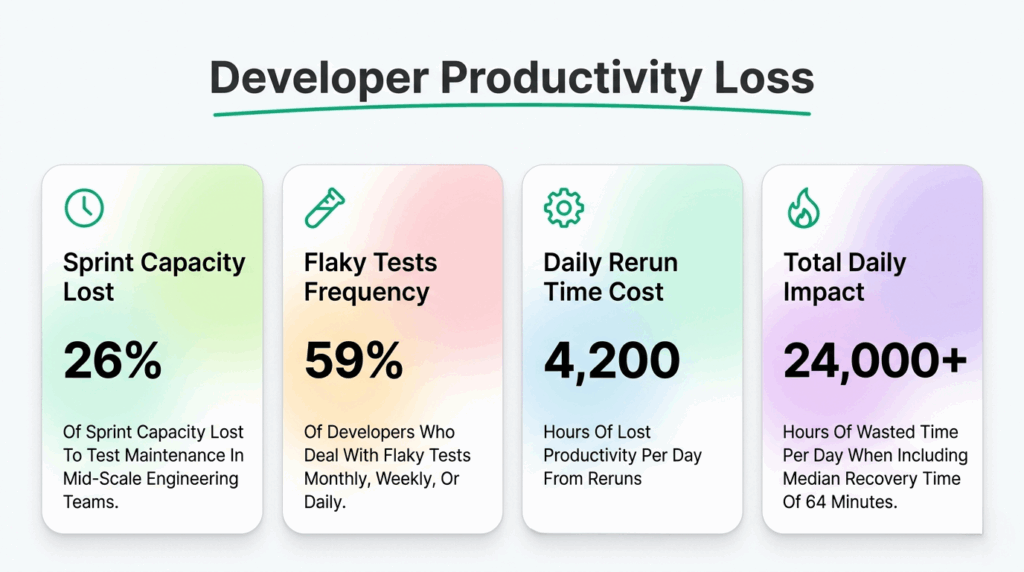
According to a report, 26% of sprint capacity in mid-scale engineering teams goes to test maintenance, not building new tests, not catching real bugs, just keeping existing scripts alive.
That’s one week per month. Gone.
What self-healing Changes
Instead of failing when a locator breaks, a self-healing test:
- Detects the ‘element can’t be found’
- Scans the live DOM for the best-matching candidate
- Updates the locator using AI-driven multi-attribute scoring
- Continues executing without any human intervention
- Logs the change for your team’s review
The CI/CD pipeline stays green. The QA team stays focused on new coverage. Developers trust the suite again because failures mean real problems, not stale XPaths.
The Business Impact Is Measurable
Faster releases – pipelines don’t block on maintenance failures
Lower QA overhead – teams stop firefighting tests and start building
Fewer escaped bugs – genuine failures surface clearly against a green baseline
Higher ROI on automation investment – the tests you built last quarter still work this quarter
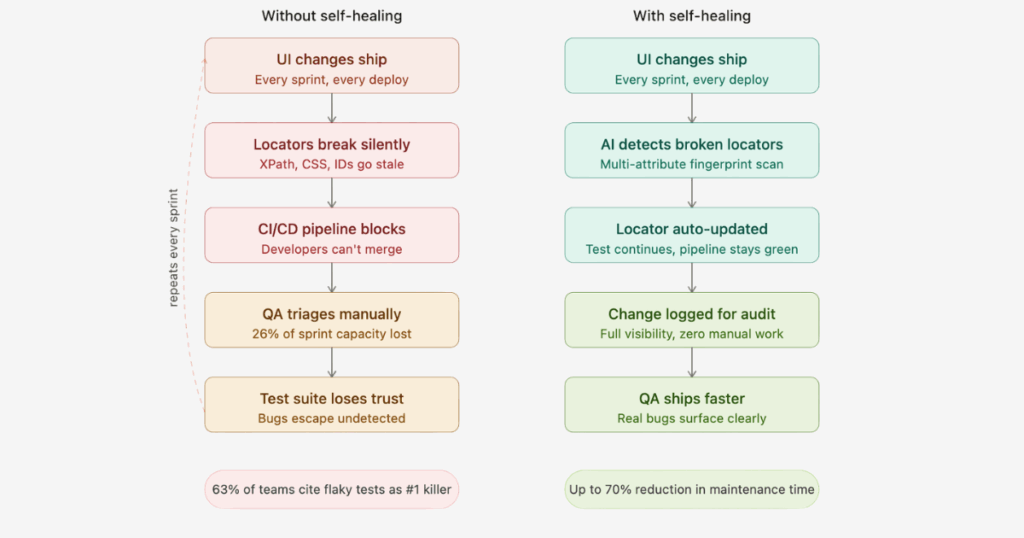
Traditional Automation vs Self-Healing Test Automation
| Factors | Traditional Automation | Self-Healing Test Automation |
|---|---|---|
| Test Maintenance | Manual fixes on every UI change | AI auto-updates tests instantly |
| Locator Strategy | Single brittle selector | Multi-attribute fallback chain |
| Release Speed | Slows CI/CD with broken scripts | Keeps pipelines green automatically |
| QA Team Overhead | High. Involves constant script rework | Low, AI detects code changes and updates tests. Reduces engineering team effort |
| Flaky Test Rate | 20 – 40% of the suite over time | Reduced by up to 90% |
| Cost Over Time | Rises steeply at scale | Reduces as the codebase grows |
How Self-Healing Test Automation Works: The Four Phases
Most teams discover how fragile their test suite is the hard way, a Friday deploy, a UI refactor, and suddenly 30 tests are red by Monday morning. No feature broke. No regression happened. A locator went stale.
Self-healing test automation intercepts that exact moment. It doesn’t wait for a human to open the CI logs. The AI detects the failure, locates the updated element, repairs the script, and keeps the test running, all within the same execution cycle.
Here is exactly how that happens, step by step.
Phase 1: Element Identification and Fingerprinting
Before a single test runs, the self-healing engine does something traditional frameworks never bother with. It builds a detailed profile of every UI element your test will interact with.
This profile, called an element fingerprint, captures more than one locator. It captures the full identity of an element:
- Primary locator: id, name, CSS selector, XPath
- Visual attributes: text content, placeholder text, aria-label, aria-role
- Structural context: parent element, sibling elements, position in the DOM tree
- Geometric data: bounding box coordinates, proximity to landmark elements
Why does this matter? Because any single locator breaks the moment a developer changes it. A fingerprint with 12 attributes can lose 8 of them and still find the correct element; the remaining 4 are enough to score a confident match.
The richer the fingerprint at capture time, the more resilient the healing at runtime.
Phase 2: Test Execution
The test runs exactly as authored, following the same ordered sequence of steps, interacting with elements based on the original script. This phase works identically to how any standard automation framework operates.
The difference is what happens underneath when an element lookup fails.
In a traditional framework, a failed findElement() call throws an exception. Execution stops. The test fails. Someone gets paged.
In a self-healing framework, that same failure is caught before it surfaces. The runner detects the zero-result lookup and silently hands control to the healing engine, without interrupting the test execution thread.
Phase 3: Issue Detection and Analysis
This is where the intelligence lives.
The healing engine receives the failed locator and the stored fingerprint. It now performs a structured DOM scan, not a random search, but a scored comparison of every candidate element against every stored attribute.
Each candidate receives a confidence score. The score reflects the number of fingerprint attributes that match, weighted by each attribute’s reliability. Text content and aria-label tend to score higher than relative DOM position, because structural context changes more frequently than semantic meaning.
The engine then asks: Is the top-scoring candidate confident enough to heal automatically?
- If yes, the engine proceeds to Phase 4
- If the confidence score falls below the threshold, the event is flagged for human review, the test is paused rather than healed with a guess
This distinction is what separates production-grade self-healing from naive locator fallback. A poorly confident heal is worse than a failure; it can produce a false pass.
Phase 4: Self-healing Action
Once the engine identifies a high-confidence match, it does three things in sequence.
First, it updates the locator in memory so the current test execution can continue without interruption. The test resumes from the failed step with the corrected selector.
Second, it persists the corrected locator back to the test script. This is critical. Without persistence, every run re-triggers the healing engine at the same step. With persistence, the next run uses the correct locator from the start; the test script has genuinely learned.
Third, it writes a full audit log entry: which element broke, which attribute changed, what the old locator was, what the new one is, and what confidence score the match received. Your QA team sees a clean record of every healing event.
The result: the CI/CD pipeline stays green, the test continues, and your team knows exactly what was repaired and why.
Real-World Example of Self-Healing Tests
Your test clicks a “Submit” button using:
//button[@id="submit-btn"]A developer refactors the checkout form. The ID changes to checkout-submit. Your traditional test throws NoSuchElementException. Pipeline blocks.
Your self-healing test reaches that step. The locator returns nothing. The healing engine activates. It scans the DOM and scores all button elements. One candidate scores high across text content (“Submit”), aria-role (button), parent container (form), and visual position (bottom-right of form). Confidence: 94%.
The engine updates the locator to:
//button[@id="checkout-submit"]The test continues. The pipeline stays green. The audit log records the change. The next run uses the corrected XPath from the start.
Total human time spent: zero.
How BotGauge Eliminates Test Maintenance At Scale
Most self-healing automation tools fix one thing: the broken locator. They find the renamed element, patch the selector, and call it done.
That works until the UI change isn’t just an ID name change. What if it’s a restructured page? A reordered form? A checkout flow with two new steps in the middle?
At that point, locator-level healing fails silently. The selector gets fixed. The test resumes. But it clicks the wrong thing in the wrong order and passes.
That’s not self-healing. That’s a confident wrong answer. However, BotGauge’s self-healing engine works differently.
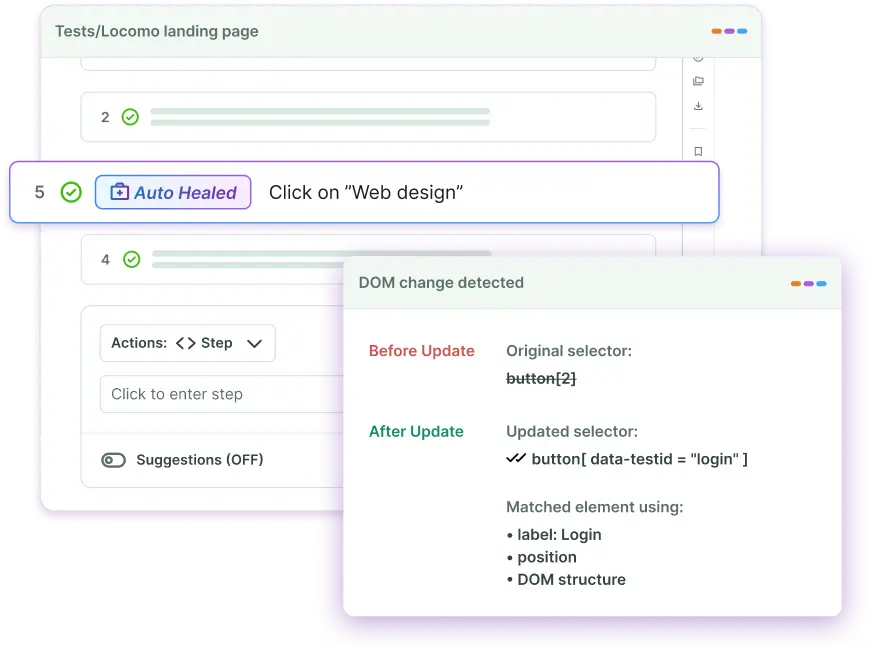
Our self-healing agent re-evaluates the test’s purpose and rewrites the step sequence to reflect the updated flow.
For low-confidence heals, a dedicated QA expert from the BotGauge team steps in to verify and approve the change. You get AI speed where it works, and human judgment where it matters.
This is what we mean by Autonomous QA as a Solution. It is not just smarter test scripts, but a QA function that adapts, self-corrects, and stays aligned with your product as it evolves.
Challenges and Limitations of Self-Healing Test Automation
Self-healing test automation significantly reduces maintenance overhead. But it introduces its own set of risks. Understanding them helps you use them correctly, not blindly.
- It cannot detect true regressions
This is the most dangerous limitation. When a locator breaks, the engine fixes it and moves on. But what if the element was intentionally removed? The test passes. The missing feature goes undetected. Self-healing cannot distinguish UI drift from genuine regression. You need strong test logic alongside it.
- Incorrect healing produces false positives
Dense, complex UIs have multiple elements that score similarly against a fingerprint. The engine picks the highest-confidence match, but high confidence isn’t certainty. A wrong match produces a test that passes against the wrong element. Your suite looks green. Your coverage is not.
- Set up demands real upfront investment
Self-healing doesn’t work out of the box. You need baselines established, AI models trained on your UI patterns, and confidence thresholds configured correctly. Teams that skip this step get unreliable healing from day one.
- It doesn’t fix broken logic
Self-healing repairs locators. It cannot repair broken application logic, failed API responses, incorrect navigation flows, or bad data. If your checkout flow calculates the wrong total, no amount of locator healing will catch it.
- Teams stop writing good tests
This is a slow, invisible problem. When engineers trust the tool to fix breakages, they stop designing stable, resilient tests. Technical debt builds quietly. The suite becomes dependent on healing rather than being built to survive without it.
- Execution time increases
Real-time DOM scanning adds computational overhead to every test run. In large suites, this accumulates. Feedback loops slow down. The CI/CD speed advantage you built starts eroding.
- Major redesigns still require manual work
Self-healing handles incremental UI changes well. It does not handle wholesale redesigns. When navigation restructures, component libraries change, or page layouts are rebuilt from scratch, the healing models require manual retraining and threshold reconfiguration.
- Vendor lock-in is a real risk
Heavy dependence on a single tool’s AI models and healing logic creates compatibility risk. Switching frameworks later means rebuilding your baseline fingerprints from zero. Evaluate vendor portability before committing at scale.
Self-healing is a force multiplier for teams managing fast-moving UIs. But it works best when you treat it as a managed system and not a set-and-forget solution. Pair it with strong test design, regular audit reviews, and human oversight on low-confidence heals. BotGauge reduces test maintenance overhead by up to 90% in less time. Faster releases. Smaller QA backlogs. Happier engineers.
Conclusion
Self-healing test automation is no longer optional. As release cycles compress and UI complexity grows, traditional test maintenance becomes a bottleneck, killing engineering velocity.
The best self-healing systems combine multi-attribute fingerprinting, ML-powered confidence scoring, persistent locator updates, and transparent audit trails. But even the best AI has limits, which is why Botgauge pairs it with dedicated QA expertise.
You do not just get self-healing tests. You get an autonomous QA function that evolves with your product.
Frequently Asked Questions
What is self-healing in Selenium using AI?
What is self-healing in automation testing?
What are the 5 elements of self-healing?
What is self healing in Selenium using AI?
What is Self Healing Mechanism?
Why Do Tests Break so Often?
How self-healing AI eliminates script maintenance?

See this in action within our broader guide to agentic AI testing and AI test automation tools. Visit BotGauge to see self-healing tests firsthand.