At a Glance
CI/CD testing is the practice of embedding automated tests directly into a continuous integration and continuous delivery pipeline, so every code commit is validated automatically rather than tested manually at the end of a release cycle. Quality checks run at every stage, unit tests on commit, integration tests on merge, end-to-end tests before deployment, catching defects while they are still cheap to fix. The hardest part of CI/CD testing at scale is not writing the tests, it is keeping them passing as the application changes; BotGauge addresses this directly with Autonomous QA as a Solution (AQS), where AI agents generate and self-heal tests inside the pipeline on every commit, removing the maintenance burden that otherwise grows as fast as the product does.
What is CI/CD?
CI/CD stands for Continuous Integration and Continuous Delivery, or Continuous Deployment. It is a set of practices that automate building, testing, and releasing software, with the goal of shrinking the time between writing code and getting it safely in front of users.
Continuous Integration is the starting point: merging code changes into a shared repository frequently, often multiple times a day, with each merge automatically triggering a build and a test run. What happens after that build passes is where the other two terms diverge. Continuous Delivery keeps every passing build in a deployable state, ready to go out the door, but still waits for a human to actually approve the release. Continuous Deployment removes even that step, automatically releasing every build that clears its tests, which only works once the test suite itself is trustworthy enough to be the sole gatekeeper. Together, the three form a pipeline that keeps software moving at a consistent, predictable pace instead of lurching forward in large, risky releases.
What is CI/CD Testing?
CI/CD testing is the automated testing layer built into that pipeline. Rather than running tests manually at the end of a development cycle, CI/CD testing embeds quality checks at every stage, from the moment code is committed to the moment it reaches production.
When a developer pushes new code, the CI system automatically runs a suite of tests, typically unit tests first, then integration tests, then broader end-to-end and performance checks as the build moves closer to release. If any test fails, the pipeline halts and the developer is notified immediately, before the broken code can advance any further or affect anyone else’s work.
The Three Pillars of CI/CD
Understanding CI/CD testing means understanding the three pillars it sits on top of.
Continuous Integration focuses on merging code frequently and running automated tests immediately after each merge, catching conflicts, compilation errors, and unit test failures the moment they are introduced rather than days later.
Continuous Delivery ensures that once code passes CI, it stays in a permanently deployable state. Automated tests validate every change, and the system prepares it for release, though a human still approves the final push to production.
Continuous Deployment removes that last manual step. Once a build passes every automated gate, it deploys to production without anyone needing to click approve, which only works if the test suite is trustworthy enough to be the sole gatekeeper.
Common CI/CD Testing Tools
| Tool | Best fit | Notable trait |
|---|---|---|
| Jenkins | Teams wanting maximum flexibility and self-hosted control | Open-source, over 1,800 plugins, steeper learning curve than newer platforms |
| GitLab CI/CD | Teams already using GitLab end to end | Fully integrated DevOps suite, pipelines configured via .gitlab-ci.yml |
| GitHub Actions | Teams centered on GitHub repositories | Native integration, workflow config lives alongside the code |
| CircleCI | Teams that want fast, cloud-native parallelization | Strong parallelism features for splitting large test suites across machines |
| Azure DevOps | Teams already invested in the Microsoft/Azure ecosystem | Deep integration with Azure cloud services |
| Bitbucket Pipelines | Teams using Atlassian’s Jira and Confluence | Native fit inside an existing Atlassian workflow |
No single tool is “best” outright, the right pick depends on which ecosystem your team already lives in and how much of the pipeline you want to self-host versus hand off to a managed platform.
CI/CD Workflow Pipeline
A typical CI/CD pipeline moves through these stages in sequence:
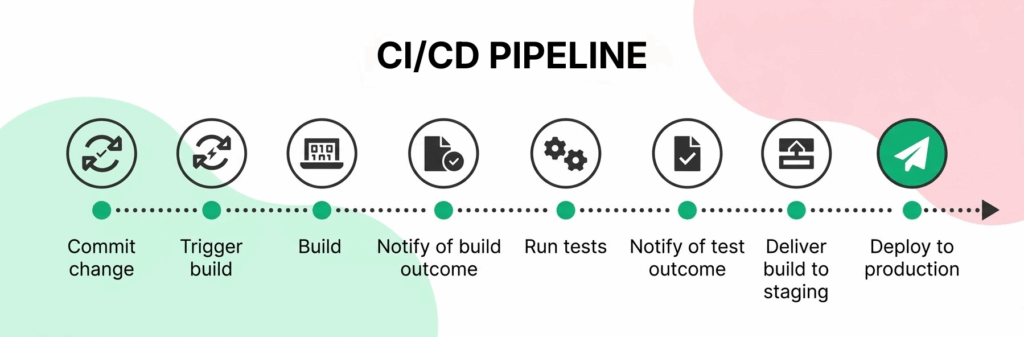
- Code Commit. A developer pushes changes to a version control system such as Git, and every commit is recorded for tracking.
- Build Trigger. The CI/CD platform detects the new commit and automatically starts the pipeline.
- Application Build. The code is compiled and packaged into a deployable artifact, confirming it compiles and its dependencies are properly configured.
- Build Status Notification. The system reports whether the build succeeded or failed.
- Automated Testing. Unit, integration, and end-to-end tests run against the build. Quick feedback here lets developers catch problems while the change is still fresh in their mind.
- Test Results Notification. Results are shared with the team, typically via Slack, email, or the CI dashboard itself.
- Deployment to Staging. A build that passes all tests deploys to a staging environment that mirrors production as closely as possible.
- Production Deployment. After a clean staging run, the application releases to production, either automatically or with a final manual approval.
How is CI/CD Testing Done?
In practice, CI/CD testing comes down to a few disciplined habits rather than a single tool decision.
Start by defining a test strategy before writing any tests. Map out which test types belong at which stage. Unit tests run first because they’re fast. End-to-end tests run later because they take longer and depend on more of the system being in place.
From there, write and maintain test suites alongside the code itself. Practice shift-left testing so quality checks move earlier in the process, not bolted on afterward.
Configure the pipeline itself, using something like a GitHub Actions workflow file or a Jenkinsfile. Define exactly when tests run, which environments they use, and what conditions gate a build from advancing. Finally, integrate security and dependency scanning directly into the same pipeline. That way a vulnerability gets caught alongside a functional bug, not in a separate, easily-skipped process.
Common Challenges in CI/CD Testing
CI/CD testing solves real problems. But running it at scale surfaces problems of its own. A fair guide should cover the failure modes as directly as the benefits.
Flaky tests
Tests that pass or fail inconsistently without any actual code change are the single most corrosive problem in CI/CD, because every flaky failure trains the team to ignore red pipelines, which defeats the entire point of automated gating. Flakiness usually traces back to timing issues (a test checks for something before the app has finished loading) or fragile element locators that break the moment a developer changes an implementation detail.
Long pipeline execution times
A test suite grows, and pipeline feedback slows down with it. A pipeline that takes 40 minutes to report a failure breaks the whole promise of CI/CD: fast feedbacParallelizing test execution and prioritizing fast tests to run first are the standard mitigations, but they add their own configuration overhead.
Environment inconsistencies
A test that passes in a staging environment but fails in production, or vice versa, usually means the two environments have quietly drifted apart, different dependency versions, different data, different configuration. Keeping environments as close to identical as realistically possible is tedious, ongoing work, not a one-time setup task.
Scaling test infrastructure
A test suite built for a ten-person team’s pipeline does not automatically hold up when the team, the codebase, and the release cadence all grow. High-volume pipelines need testing infrastructure, parallel runners, environment provisioning, that scales with demand rather than becoming the new bottleneck.
Test maintenance overhead
This is the quietest, most expensive challenge of all. Automated tests need constant updates as the application changes. A UI change takes a developer ten minutes to ship. Reflecting that same change across every affected test can take a QA engineer hours.
Left unmanaged, this is how test suites decay. Not because the tests were written poorly. Because nobody had the bandwidth to keep updating them as the product moved.
This is the exact problem self-healing test automation solves. A suite that repairs its own broken locators as the UI changes removes that maintenance tax. The tax that otherwise grows in direct proportion to how fast a team ships.
CI/CD Testing: Manual vs. Automated Testing
One of the most common questions teams face when building a CI/CD pipeline is where manual testing still fits. Manual testing means human testers executing test cases without automation. It’s still genuinely valuable for exploratory testing, usability assessment, and edge-case investigation. That’s judgment-driven work. It resists scripting.
Automated testing is different. Automated testing uses scripts and frameworks to execute tests programmatically. It runs the same way every time. And it scales with the codebase in a way manual effort simply cannot.
Most mature CI/CD pipelines automate 80 to 90 percent of testing. The remaining manual effort goes where it belongs: areas too costly to automate, or areas where judgment matters more than repeatability.
Why Automating CI/CD Testing Matters
Automating CI/CD testing is a strategic necessity for teams that want to move fast without quietly trading away quality. Boehm and Basili’s peer-reviewed Software Defect Reduction Top 10 List (IEEE Computer, January 2001) found that fixing a defect after delivery is often about 100 times more expensive than fixing it during requirements and design on large projects, though the ratio narrows to roughly 5:1 on smaller, non-critical ones. Automated tests are what make catching defects early, cheaply, actually possible at the pace CI/CD demands.
A team that automates its CI/CD tests is betting that speed and rigor don’t have to trade off, and mostly that bet pays off. Tests that used to take days now run in minutes, which sounds like a scheduling win until you notice what it actually changes: a developer gets to fix a bug while they still remember writing it, instead of hunting through code they touched two sprints ago. That immediacy is worth more than the raw time saved.
Automation also removes a kind of noise manual testing can’t help but introduce, since two people running the same test case rarely run it quite the same way, and a machine always does. The payoff shows up months later as fewer regressions slipping through and compounding into the kind of defect backlog nobody wants to untangle.
None of it holds together, though, if testing stays walled off as someone else’s job. The teams getting real value from automation are the ones where writing and maintaining tests became everyone’s responsibility, not a QA team’s alone, and where the audit trail testing leaves behind turns out to double as exactly the compliance record regulated industries already need.
Best Practices for CI/CD Pipeline Testing
Building an effective CI/CD testing practice takes more than simply adding tests to a pipeline. Commit code frequently and trigger automated tests on every commit, since rapid feedback is the entire point and infrequent commits just delay discovering a problem. Keep the build pipeline stable by treating a broken build as a high-priority incident, not something that waits until someone gets around to it, since a team that tolerates red builds quickly stops trusting them. Run tests in parallel wherever the infrastructure allows it, since parallelization is usually the single biggest lever for cutting pipeline time without cutting test coverage. And keep ownership of the pipeline shared: CI/CD testing works best when developers, QA engineers, and operations collectively maintain and improve the testing workflow, rather than treating it as one team’s problem to solve alone.
Frequently Asked Questions
What does CI/CD stand for? CI/CD stands for Continuous Integration and Continuous Delivery, or Continuous Deployment. Developers automatically build, test, and deploy code changes through a pipeline as part of a modern software development practice.
What is CI/CD testing? CI/CD testing is the practice of automating and integrating tests throughout the continuous integration and continuous delivery pipeline, so every code change is validated through a structured set of automated checks before it can progress to the next stage.
What is the difference between DevOps and CI/CD? CI/CD is a specific set of automated practices for integrating, testing, and deploying code. DevOps is the broader cultural and organizational practice of breaking down silos between development and operations teams. CI/CD is one of the primary technical mechanisms that makes DevOps practical to implement.
Can CI/CD testing slow down development? Done well, no, it speeds development up by catching defects while they’re cheap to fix and removing the need for a separate, slower manual QA phase. Done poorly, with a bloated, flaky, or poorly parallelized test suite, it absolutely can become the bottleneck it was meant to prevent.
Is CI/CD testing only relevant for large teams? No. Teams of every size benefit from faster feedback, reduced manual effort, and consistent quality checks, small teams arguably benefit more, since they have the least spare capacity to catch defects manually.
How can I learn CI/CD testing? Start with a single pipeline on a real project: pick one CI platform (GitHub Actions is a reasonable default for most teams), write a basic pipeline that builds and runs your existing test suite on every commit, then expand from there into staged deployments and parallelized testing.
Summary
CI/CD enables teams to release software faster by automatically building, testing, and validating every code change throughout the development lifecycle. A strong CI/CD testing strategy catches defects early, keeps pipelines stable, and delivers reliable releases, but it only stays that way if someone is actively managing the failure modes: flaky tests, long execution times, environment drift, and above all, the ongoing maintenance burden of keeping the test suite current as the product changes.
This is exactly where BotGauge fits. With Autonomous QA as a Solution (AQS), AI agents generate, execute, and self-heal end-to-end tests directly inside the CI/CD pipeline, updating automatically as the application’s UI changes, while human QA experts oversee strategy, validation, and the edge cases that still need judgment. It runs on every commit with unlimited parallel test execution, addressing the two challenges covered above (test maintenance overhead and long pipeline execution times) as a direct product of how it works, not an afterthought bolted onto a traditional automation tool. See how autonomous testing fits directly into your CI/CD pipeline, or explore Autonomous QA as a Solution in more depth.