What is Automated Integration Testing: How It Works in CI/CD & Best Practices
Integration bugs don't show up in your unit tests. They show up in production when two services that worked fine on their own suddenly stop working together. This guide breaks down what automated integration testing actually is, the 6 types worth knowing, the tools people use, and the best practices that keep your test suite trustworthy instead of ignored.
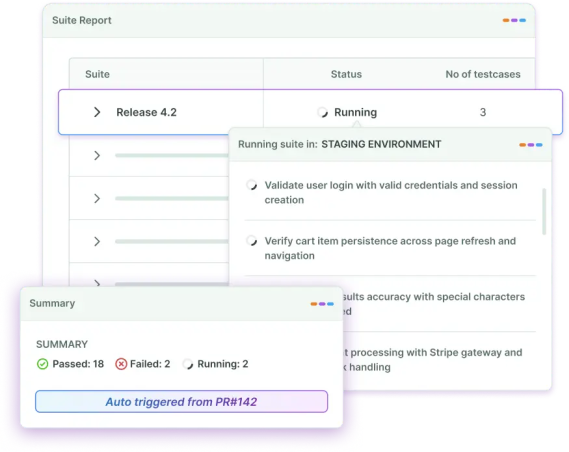
Overview
- Automated integration testing uses scripts and tools, not people, to check whether independently built modules, APIs, or microservices work correctly together.
- It sits between unit testing and system testing.
- 6 main types: Big Bang, Top-down, Bottom-up, Sandwich, API integration, and System/UI integration.
- Key benefits: earlier defect detection, faster releases, lower defect leakage, and better coverage without more headcount.
- Common tools: Postman, REST Assured, Testcontainers, JUnit/Pytest, and Agentic AI testing platforms like BotGauge.
- Best practices: isolate tests, use realistic data, run on every commit, and fix flaky tests instead of ignoring them.
- Biggest challenges: environment setup, flaky tests, and ongoing maintenance as your app changes.
- BotGauge closes the maintenance gap with AI-generated tests and self-healing, so your suite doesn't break every time the UI shifts.
What is Automated Integration Testing: How It Works in CI/CD & Best Practices
Your application may pass unit tests, but failures often happen when services start interacting. A small change to a database schema, API contract, or shared service can break critical workflows without affecting the individual components themselves. This is exactly what automated integration testing is designed to catch.
This guide explains what are automated integration tests, why they matter, how to implement them effectively, the tools you can use, and the best practices for building reliable integration test suites.
What Is Automated Integration Testing?
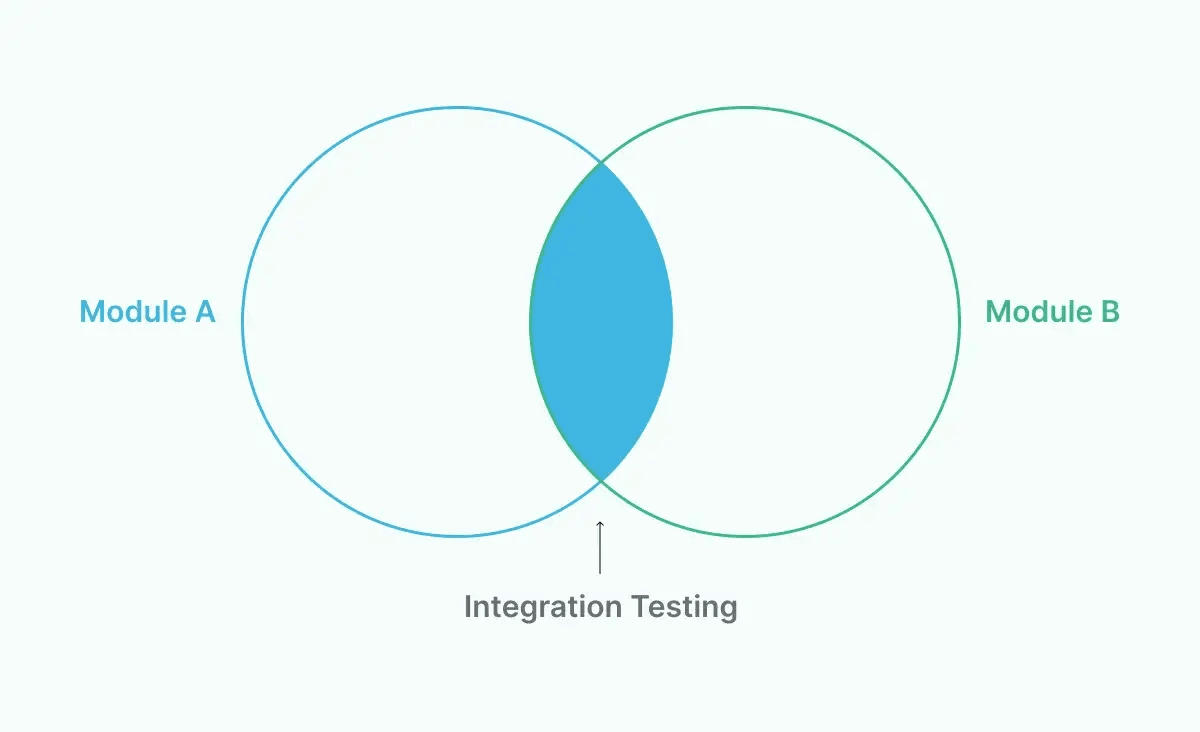
Automated integration testing is the process of using automation tools and test scripts to validate how different software components, services, or APIs work together after integration. It automatically verifies that data flows correctly between interconnected modules, detects communication issues early, and ensures the integrated system behaves as expected without requiring manual testing. It sits between unit testing and end-to-end testing.
Example of Automated Integration Testing
Consider an eCommerce application where a customer places an order. This single action involves multiple integrated services, including the shopping cart, inventory, payment gateway, order management system, and email notification service.
An automated integration test verifies that these components work together correctly. For example, when a customer completes a purchase, the test automatically checks that:
- The payment gateway successfully processes the payment.
- The inventory service updates the product stock.
- The order management system creates a new order.
- The shipping service receives the order details.
- The customer receives an order confirmation email.
Say the payment is successful, but inventory doesn't update. The test catches that immediately, so your devs fix it before it ever hits production.
Automated Integration Testing Vs Manual Integration Testing
Manual integration testing means a person runs through the same interaction paths by hand, every release. It works fine for a five-page app tested once a month. It falls apart the moment you ship multiple times a week.
Automated integration testing runs the same checks in minutes, on every code change, with the same steps every time. No fatigue, no skipped edge cases, no "I'm pretty sure it still works."
The tradeoff: automation takes upfront setup time. That cost pays for itself fast once your release frequency picks up.
Where Integration Testing Fits in the Testing Pyramid
The modern testing pyramid stack looks like this:
- Unit tests (bottom, most numerous): test one function or class in isolation.
- Integration tests: test how components, services, or modules interact.
- System tests: test the entire application as a single unit.
- End-to-end tests (top, fewest): test complete user journeys across the live-like environment.
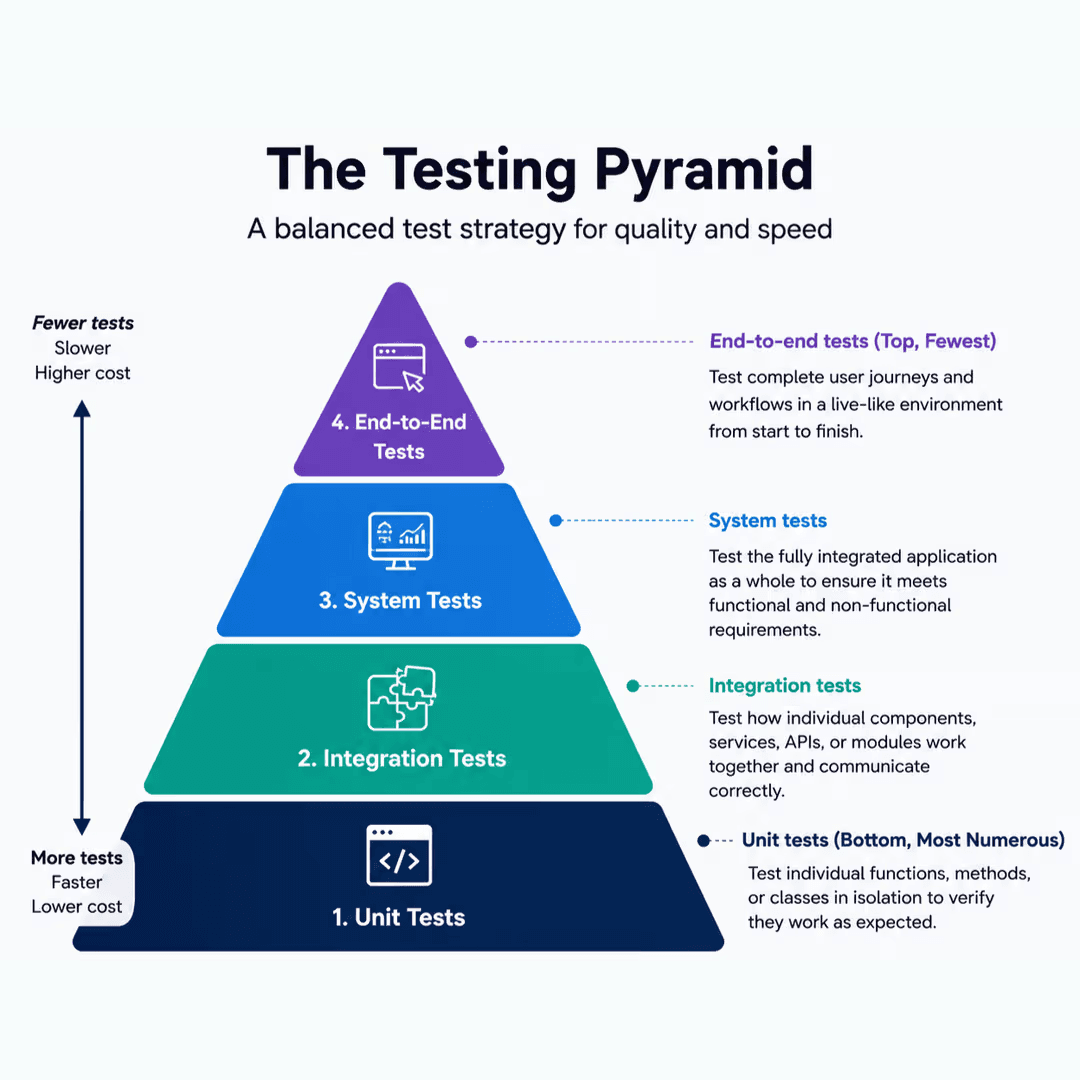
Integration tests should outnumber your end-to-end tests but stay well below your unit test count. If you find yourself writing more E2E tests than integration tests, you're probably testing things twice and paying for it in runtime.
Automate integration tests efficiently with BotGauge
Try for FreeHow Does Continuous Integration Test Automation Help QA?
Continuous integration (CI) means every code commit gets merged into a shared branch and automatically built and tested. Continuous integration test automation is when your integration tests run as part of the pipeline, not as a separate manual step someone remembers to do before a release.
The feedback loop
Here's what changes for a QA team once integration tests run in CI: a developer pushes code. Within minutes, the pipeline builds it, spins up the required services, and runs the integration suite. If something breaks, the developer finds out immediately, not two weeks later during a manual regression pass.
That speed matters more than it sounds. A bug caught 10 minutes after it's written costs a few minutes to fix. The same bug caught during a release cycle costs hours of investigation, because nobody remembers what changed three sprints ago.
QA's role shifts, it doesn't disappear
QAs stop spending their days manually clicking through the same login-to-checkout flow. They spend that time instead on:
- Designing which integration points actually need coverage (not everything does).
- Investigating failures the automation flags.
- Exploratory testing on the scenarios automation can't think of.
Developers also write a chunk of the integration tests, especially at the service-to-service level, since they know the code paths best.
Zero engineering dependency. BotGauge owns your testing end-to-end
Explore AQaaSA minimal CI example
You don't need a complex setup to get integration tests running on every commit. A basic GitHub Actions job looks like this:
name: integration-tests

on: [pull_request]

jobs:
  test:
    runs-on: ubuntu-latest
    steps:
      - uses: actions/checkout@v4
      - name: Start test services
        run: docker compose up -d db redis
      - name: Run integration suite
        run: npm run test:integration
That's it. Every pull request now spins up a database and a cache, runs the integration tests against them, and blocks the merge if anything fails. That is how automated integration testing in DevOps works.
6 Key Types of Automated Integration Testing
Not every integration testing strategy fits every project. Here's the breakdown, with when each one earns its keep.
1. Big Bang testing
All components get integrated at once, then tested as a whole. It is best for small systems with few components.
You may avoid this when your system has more than a handful of moving parts. Isolating the source of a failure becomes a guessing game.
2. Top-down testing
Higher-level modules are tested first, using stubs to simulate lower-level modules that aren't ready. It is best for projects where the UI or top-level logic is built before backend dependencies are implemented.
You may avoid this when your core logic actually lives in the lower-level modules you're stubbing out.
3. Bottom-up testing
Lower-level modules are tested first, with drivers simulating the higher-level modules that call them. It is best for backend-heavy systems where core services need validation before UI exists. You may avoid this when you need early, fast feedback on user-facing flows.
4. Sandwich (hybrid) testing
It combines top-down and bottom-up approaches, testing high and low-level modules simultaneously and meeting in the middle. It is best for large systems where waiting for a strict order would slow delivery. You may avoid this when your team is small. This approach needs more coordination to manage well.
5. API integration testing
Verifies that APIs return correct data, status codes, and handle errors properly when systems talk to each other. It is best for any app relying on internal microservices or third-party APIs (which is most modern apps). You should never skip this testing. This is the one type almost every engineering team needs.
6. System/UI integration testing
Confirms that integrated components behave correctly from the user's perspective, through the UI. It is best for catching issues that only arise when a real user flow touches multiple integrated systems simultaneously. You may avoid this when it is used as a replacement for lower-level integration tests. UI tests are slower and shouldn't carry that weight alone.
Automated Integration Testing Benefits
Automated integration testing helps teams detect communication issues between connected components early in development. By continuously validating integrations, it improves software reliability, reduces manual effort, and accelerates release cycles. Some of the key benefits include:
- Earlier defect detection: Bugs caught at the integration layer, before a release, cost a fraction of what the same bug costs once it's in production and a customer reports it.
- Faster release cycles: Teams running automated integration suites in CI can ship multiple times a day. Manual regression cycles cap you at maybe once a week, if that.
- Lower defect leakage rate: This is the percentage of bugs that reach production despite testing. Teams with solid integration automation typically see this drop significantly, because the gaps between components get checked on every change.
- Reduced mean time to detect (MTTD): When tests run on every commit, you know within minutes which change broke something. Without automation, that same detection can take days.
- Better test coverage without more headcount: Automation scales test execution without scaling the number of people running tests by hand.
Automated Integration Testing Tools
The right tool can simplify integration testing by automating test execution, validating interactions between services, and integrating with your CI/CD pipeline. Whether you're testing APIs, microservices, or complex distributed systems, choosing a tool that fits your technology stack and testing requirements is key to building reliable integration tests.
| Tool | Category | Best for | Limitation |
|---|---|---|---|
| Postman | API | Manual + automated API request testing, collections | Weak for UI or DB-layer integration |
| REST Assured | API (Java) | Automated REST API test scripts | Requires Java/coding skill |
| Testcontainers | Environment | Spinning up real DBs, queues, services in Docker for tests | Adds container overhead to test runs |
| JUnit / TestNG | Framework | Writing/running integration tests in Java, often with Spring Boot | Java-specific |
| Pytest | Framework | Python integration test suites with fixtures | Python-specific |
| WireMock | Mocking | Simulating third-party APIs during tests | Doesn't test the real dependency |
| Selenium | UI | Browser-based UI integration checks | Slower, prone to flakiness without care |
| BotGauge | Agentic AI-driven, no-code | Teams that want integration, API, UI, AI, and functional testing generated and maintained without scripting | Currently web-app focused |
The traditional tools above require someone who can write and maintain test code. That's great if you have the headcount. If your bottleneck is scripting time and test maintenance, not talent, that's where AI test automation platforms change the math.
Automated Integration Testing Best Practices
Following best practices for automation integration testing helps you build reliable, maintainable, and scalable integration tests. By testing real interactions between components and automating execution within your CI/CD pipeline, you can detect integration issues early and deliver stable releases with confidence.
- Isolate your tests: Each test should set up its own state and clean up after itself. Tests that depend on the order they run in will eventually break in ways nobody can reproduce.
- Use realistic test data: Dummy data hides bugs that only show up at production-like volume, with formatting, or in edge cases.
- Mirror production in your test environment: Use containers or infrastructure-as-code so your test environment closely matches production, ensuring a passing test actually means something.
- Prioritize by risk: You don't need to test every integration point equally. Test the ones that touch money, user data, or critical workflows first.
- Run tests on every commit: Waiting until end-of-sprint defeats the purpose. The value is in speed.
- Track real QA metrics: Coverage percentage alone tells you little. Watch pass/fail trends over time, defect density, and how often a "flaky" test turns out to be a real bug.
- Deal with flaky tests: Keep integration tests deterministic by using stable test environments, consistent test data, and proper synchronization between services. Avoid dependencies on unreliable external systems where possible, and ensure tests fail only when a genuine integration issue exists, not because of timing or environment inconsistencies.
Ready to implement automated integration testing? Get the complete checklist and CI/CD template
Download TemplateChallenges of Automated Integration Testing
While automation integration testing improves software quality and speeds up development, it also introduces challenges:
- Environment and dependency management: Getting a test environment that behaves like production, with the right services running, is genuinely hard. AI-assisted environment provisioning and containerization are closing this gap.
- Flaky tests: Network hiccups and timing issues cause false failures. Retry logic and self-healing frameworks significantly reduce this.
- Maintenance overhead: Every UI change and every API contract change can potentially break a test. Platforms with self-healing automation cut this maintenance load down hard.
- Test data management at scale: As your system grows, so does the complexity of generating and cleaning up realistic data. Tools that generate test data on the fly, instead of relying on static fixtures, solve most of this.
- Version and compatibility mismatches: Integrated systems evolve independently, and a version bump on one side can quietly break the other. Contract testing and frequent integration runs catch this early, rather than at release time.
- Slow test runs at scale: Large integration suites can take a long time to execute. Parallelization and smart test selection reduce this.
Unlock unlimited parallelization with BotGauge
Try for FreeSteps to Automate Integration Tests
Automating integration testing involves validating interactions between connected components whenever code changes occur. By following a structured approach and integrating tests into your CI/CD pipeline, you can identify integration issues early and ensure every release remains stable.
Step 1: Define your integration testing goals. What are you actually trying to catch? Data consistency between services? API contract breaks? Be specific.
Step 2: Identify integration points and prioritize by risk. List every place your components talk to each other. Rank by business impact if that connection breaks.
Step 3: Choose your tools and framework. Match the tool to your stack and your team's skill set.
Step 4: Set up an isolated, production-like test environment. Containers make this repeatable across every test run.
Step 5: Write or generate your test cases. Cover the happy path, then the realistic failure paths such as timeouts, bad data, service unavailability.
Step 6: Integrate it into your CI/CD pipeline. Tests that don't run automatically on every change will eventually stop running at all.
Step 7: Monitor, report, and refine. Track failure trends, retire tests that no longer add value, and keep the suite lean enough that people actually trust it.
How BotGauge Helps With Automated Integration Testing
Most of the challenges above come down to one thing: traditional automation demands constant scripting and maintenance from people who already have too much on their plate.
BotGauge takes a different approach. Instead of writing and maintaining test scripts by hand, you feed it PRDs, UX flows, or plain-English descriptions, and its AI agents generate the integration test cases across UI, API, and database layers.
When your DOM or workflow changes, BotGauge's self-healing agent detects the change and updates the affected tests automatically, instead of leaving your team to chase down why a test broke overnight.
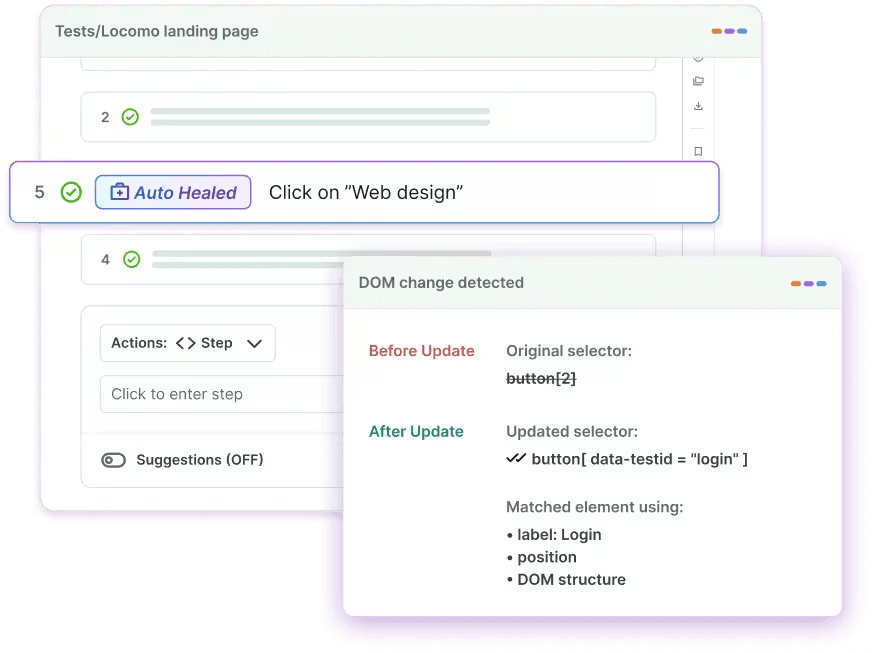
It runs directly inside your CI/CD pipeline, executing the relevant tests on every commit or pull request, and its root cause analysis flags whether a failure is a real defect, a flaky test, or an environment issue, so your team fixes the right thing first.
For teams stuck between "we don't have enough QA headcount to script everything" and "we can't afford to skip integration testing," Autonomous QA as a Solution model is built to close that gap without asking you to hire your way out of it.
Summary
Automated integration testing catches the failures that unit tests can't see and manual testers catch too late: the handshake between your services, APIs, and modules.
Get the types right for your architecture, wire your tests into CI/CD from day one, watch for flaky tests before they erode trust in your suite, and prioritize by risk instead of trying to cover everything equally.
Frequently Asked Questions
TABLE OF CONTENT