An AI model with no context has to guess. It invents selectors that don’t exist on the page, flags bugs that aren’t real, and writes a test that passes once and breaks on the next deploy. BotGauge MCP was built to fix that. It hands the model your actual testing framework, your logs, and your app’s live state through the Model Context Protocol (MCP), so it’s reasoning from what’s really there instead of guessing from a prompt.
This guide walks through what BotGauge MCP is, what MCP itself is and how it works, the security tradeoffs worth weighing before you connect it to anything real, and how to get started inside Claude, Cursor, or GitHub Copilot.
Quick Answer
BotGauge MCP is BotGauge’s test generation and self-healing engine, exposed through the Model Context Protocol so AI assistants like Claude, Cursor, and GitHub Copilot can generate, run, and debug tests using natural language, directly inside the IDE. It connects the AI to your real application state, including the DOM, logs, and execution history, instead of letting it guess. That’s what MCP testing means in practice: fewer hallucinated selectors, faster failure triage, and less manual cleanup after every AI-generated test.
What Is BotGauge MCP?
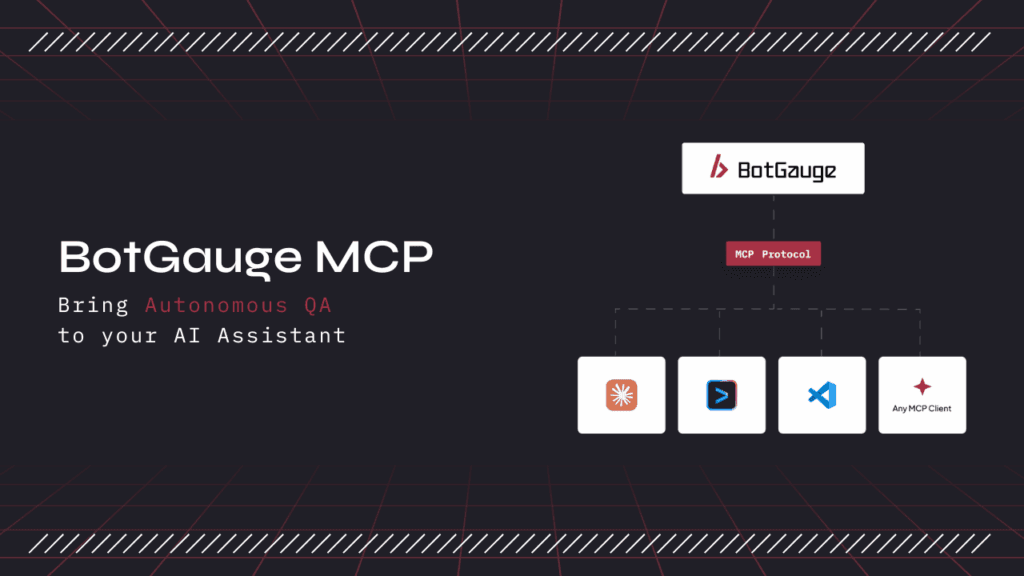
BotGauge MCP is an MCP server that brings BotGauge’s autonomous QA engine into any MCP-compatible AI client. Once it’s connected, your AI assistant can generate end-to-end test cases from a PRD or user story, execute test runs, investigate failures with full log and screenshot context, and manage your test suite from a chat prompt. You don’t write or maintain automation scripts, and you don’t switch to a separate dashboard to see what happened.
It’s currently in beta. The rest of this guide covers the protocol it’s built on, what it does in detail, and how to start using it.
What Is MCP (Model Context Protocol)?
MCP is an open standard that Anthropic released in November 2024 to let AI applications connect to external tools and data through one shared interface, instead of a custom integration for every tool.
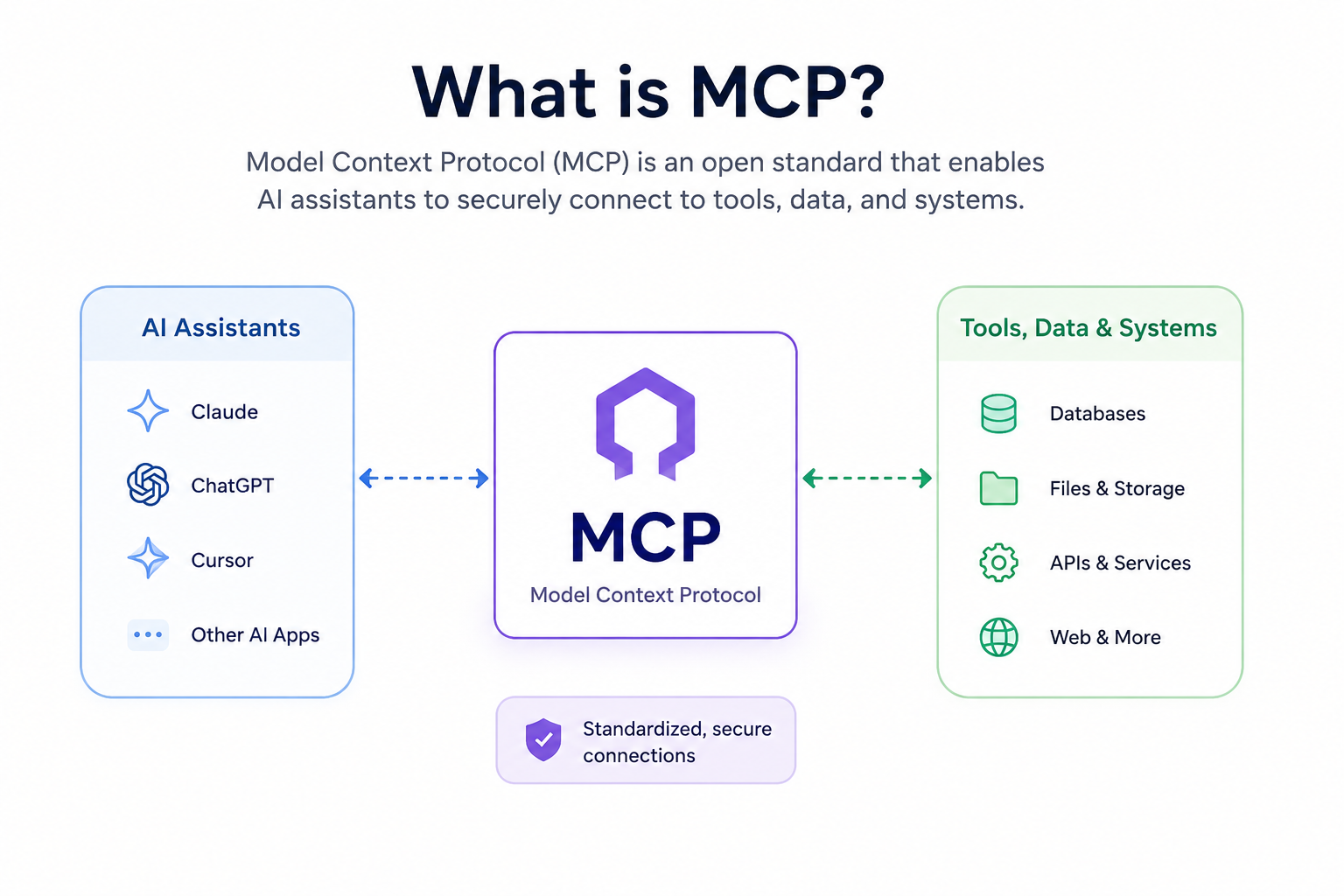
Before MCP existed, every AI model needed its own plugin for every tool it touched. A test runner needed a separate build for Claude, another for Copilot, another for Cursor. Connect N tools to M AI applications that way, and a team ends up maintaining N times M custom integrations. MCP collapses that math to N plus M: build the connection once, and every MCP-compatible client can use it. BotGauge MCP is that connection for QA.
Adoption has moved quickly since 2024. OpenAI adopted MCP for ChatGPT in March 2025, and Google DeepMind followed in April 2025. By the time Anthropic donated the protocol’s governance to the Agentic AI Foundation under the Linux Foundation on December 9, 2025, MCP had crossed 97 million monthly SDK downloads and more than 10,000 active public servers, according to Anthropic’s own announcement. The foundation was co-founded by Anthropic, Block, and OpenAI, with Google, Microsoft, AWS, Cloudflare, and Bloomberg backing it as supporting members. For enterprise buyers, that governance shift matters almost as much as the download numbers: it removes the single-vendor lock-in objection that used to slow adoption.
That’s the actual problem MCP solves, and it’s why people call it “the USB-C of AI.” One standard, many devices.
MCP Architecture: How MCP Works
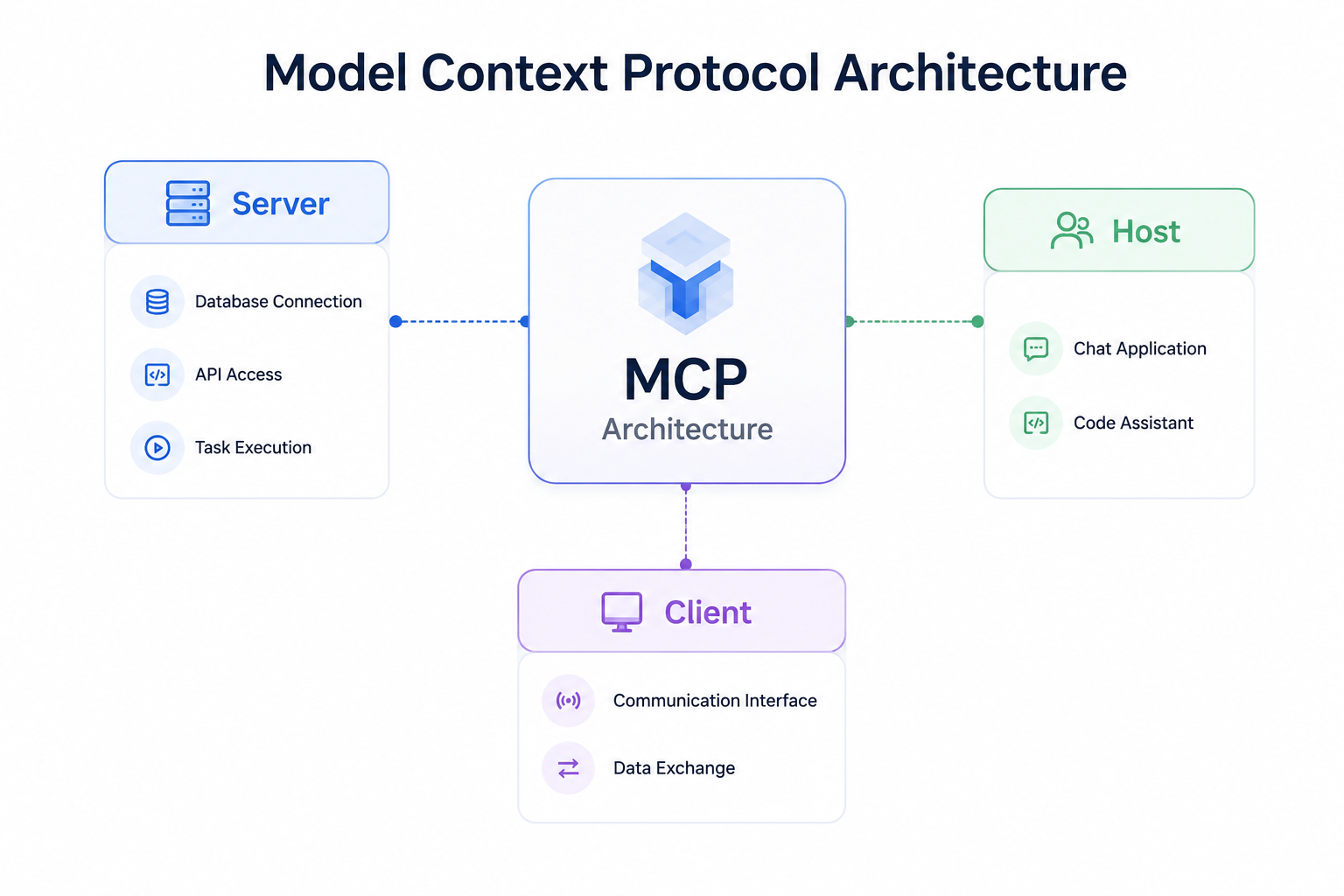
MCP connects an AI assistant to external tools through three components, laid out in Anthropic’s original specification:
MCP Server. The service that exposes tools, data, or actions, executes what’s requested, and returns results to the AI. BotGauge MCP is a server in this sense. It’s what exposes BotGauge’s testing engine to your AI client.
MCP Host. The application where the AI runs: Claude Desktop, Cursor, or VS Code.
MCP Client. The connector inside the host that sends requests and receives responses using the MCP standard.
The Three Primitives Every MCP Server Exposes
Every MCP server communicates through the same three building blocks. Tools are functions the AI can execute, like running a test suite or creating a test case. Resources are data the AI can read, like test reports, console logs, or screenshots. Prompts are predefined workflows that keep the AI’s output consistent for common tasks.
Communication runs over JSON-RPC 2.0, typically standard input and output for local tools, or streamable HTTP for remote ones. None of that is visible day to day, but it’s why MCP integrations feel instant compared to older API-key-and-webhook setups. The model asks the server what it can do the moment it needs to, rather than a developer hardcoding that connection months earlier.
MCP vs APIs vs RAG vs Function Calling
These four terms get used almost interchangeably in AI conversations, but they solve different problems.
| Technology | What it does | Best for |
| MCP (Model Context Protocol) | A standard protocol that lets AI discover and call tools, data, and services through one interface. | Giving an AI assistant consistent, reusable access to external systems. |
| APIs | Individual endpoints that applications use to exchange data or trigger actions. | Connecting two specific, known systems. |
| RAG (Retrieval-Augmented Generation) | Retrieves relevant documents before the AI generates a response. | Answering questions with current, accurate information. |
| Function Calling | Lets an AI invoke one predefined function or API during a conversation. | Executing a single, specific action, such as sending an email or running a test. |
Think of APIs as the building blocks and function calling as what picks which one to use in the moment. RAG supplies the AI with the right information to reason over. MCP standardizes how the AI discovers and uses all three, which is why a single BotGauge MCP connection can replace what used to be a custom integration built separately for every AI client.
Why MCP Matters for AI Test Automation
Large language models are only as good as the context they’re given, and testing is an unusually context-heavy job.
Ask a model to write a test for a checkout flow with nothing but a prompt, and it guesses at selectors. It invents API response shapes that don’t match reality. The test passes on the first run, then breaks the moment the app changes, which is the exact failure mode that gave early AI-generated tests a reputation for being flaky and disposable.
MCP fixes that at the input level. A testing tool exposed through MCP, like BotGauge MCP, hands the model the framework actually in use (Playwright, Selenium, Cypress), the files that changed in the most recent commit, the current DOM or accessibility tree, and the console and network logs from the last failed run. The model reasons from what’s actually on the page rather than what a prompt implies. That’s the mechanical reason MCP-native testing tools produce fewer hallucinated tests, find root causes faster, and need less manual cleanup after every AI-generated suite.
What BotGauge MCP Does
BotGauge MCP lets you manage the entire testing lifecycle from your AI assistant, in natural language, without switching between dashboards or hand-writing automation scripts.
It generates end-to-end test cases from product requirements, user stories, or demo videos. When a locator breaks or a layout shifts, its self-healing engine reads the current DOM through MCP and patches the test before anyone notices the failure. You can search and retrieve existing test cases across projects, features, or execution history, and bulk-update priorities, tags, ownership, or steps in a single request.
On the execution side, it runs autonomous test runs without you writing or maintaining automation scripts, validates new features against expected user journeys before a release ships, and investigates failures with AI-powered root cause analysis that pulls command logs, network traces, and console errors into one chat thread instead of five browser tabs. It also reviews visual regressions in plain language (so a reviewer catches a real bug instead of squinting at two screenshots), runs WCAG and ADA accessibility checks against a URL or local build with remediation guidance in the IDE, and generates bug reports with configurable fields for severity, module, reproduction steps, and environment.
The bigger picture: it surfaces coverage and execution insights so you know what’s tested, what’s failing, and what’s still a risk, and it runs regression, smoke, or feature-specific tests on demand from a conversational prompt. All of it lives inside your existing QA process, not a separate tool you have to remember to open.
Related reading: Why Your Selenium and Playwright Scripts Keep Breaking, and How AI Can Fix That
Connect your AI assistant to autonomous QA. Generate, run, and analyze tests using natural language.
Explore BotGauge MCP BetaMCP Security Testing: Risks to Address Before You Adopt It
MCP’s openness is also its biggest risk, and MCP security testing deserves its own line item before you connect any server, BotGauge MCP included, to something real.
Security researchers at Invariant Labs documented prompt injection and “tool poisoning” attacks as early as April 2025: a compromised MCP server can describe a tool in a way that tricks the model into leaking data or taking an action nobody approved. That risk isn’t abstract for a QA team specifically. Test fixtures and staging environments routinely hold real customer data, screenshots, and API keys, so an over-permissioned MCP server is a genuine exposure, not a theoretical one. Industry surveys through mid-2026, including Stacklok’s State of Model Context Protocol in Software report, have consistently flagged authentication and access scoping as the leading blocker to enterprise MCP adoption, and independent scans have found a meaningful share of internet-facing MCP servers running with no authentication at all.
Before connecting an MCP server to a production or staging environment, it’s worth working through a short checklist. Scope permissions narrowly, so a test-runner MCP server doesn’t also carry write access to production data. Require host-mediated consent for anything that modifies or deletes, rather than letting it fire silently. Use OAuth 2.1 and scoped, short-lived tokens instead of static API keys sitting in a config file. Isolate test data by encrypting test runs and segmenting environments, especially in fintech and healthcare. And vet the server itself, not just the vendor name, by checking exactly which tools and resources it exposes before connecting it to anything real.
How to Get Started With BotGauge MCP
Getting started is mostly a matter of sequencing. Start by auditing your current stack to see which testing tools already ship an MCP server and which don’t. Pick your MCP client. Claude Code, Cursor, GitHub Copilot, and OpenAI’s Codex CLI are the common starting points.
From there, request beta access to BotGauge MCP and connect it as a server in your chosen client. It’s worth starting with something this well-scoped rather than connecting every tool you own at once. Before granting broader access, review exactly which tools and resources the server can touch, and begin with read-only workflows like test generation and failure triage, since those carry far less risk than anything that writes or deletes. Add write actions, CI/CD orchestration, and additional servers once your team has had a chance to build trust with the setup.
BotGauge MCP vs Traditional Test Automation
| Traditional Automation | BotGauge MCP | |
|---|---|---|
| Test creation | Hand-coded scripts or record-and-playback | Plain-English generation from PRDs, flows, or a chat prompt |
| Maintenance | Manual fixes when locators or UI change | Self-healing, callable on demand from your AI assistant |
| Debugging | Switch tools to read logs, network traces, screenshots | Logs and context pulled into one chat thread automatically |
| Where it runs | A separate dashboard or CLI | Directly inside Claude, Cursor, Copilot, and other MCP clients |
| Setup | Custom integration per tool and per model | One MCP connection, reusable across every MCP-compatible client |
Conclusion
MCP standardized how AI models connect to tools, and in doing so, it raised what those tools can reasonably be expected to do. BotGauge MCP puts that to work for QA specifically: an AI assistant that generates real tests against your actual application, triages failures using real logs, and stays useful as your app keeps changing underneath it, all inside the tools your team already uses every day.
Talk to our team to get beta access and connect your first MCP-native test in minutes.
Sources referenced in this guide: Anthropic’s December 2025 announcement donating MCP to the Agentic AI Foundation; the official Model Context Protocol specification; Invariant Labs’ research on MCP tool poisoning attacks; Stacklok’s State of Model Context Protocol in Software report.