Your suite was green Friday. Monday morning, 40 tests are red.
Nobody touched a single test file. Someone on the frontend team renamed a button ID, or wrapped a form in a new container. That’s the whole story behind most “flaky” test failures.
If you’ve spent an afternoon staring at “element not found” instead of shipping features, you already know the pattern. Here’s why it happens, and why the usual advice never really fixes it.
AI Summary
- Scripts break for six reasons, not one: regenerated attributes, DOM restructuring, timing races, stale elements, environment drift, and reordered flows.
- Better locators fix the first two reasons on that list. The rest keep breaking suites anyway.
Most self-healing tools patch broken locators with a backup selector list, but miss restructured pages and reordered flows entirely. - Locator-free testing resolves each step by intent, reading the live DOM and workflow instead of matching a fixed string. BotGauge does that.
- Low-confidence fixes get routed to a human QA reviewer before they’re trusted, so a real bug never gets rubber-stamped as “healed.”
The Locator Trap
Every Selenium or Playwright script starts the same way. You open dev tools, grab an ID, a class, or an XPath, and paste it into your test.
That locator is a bet. You’re betting “submit-btn” never changes. You’re betting nobody wraps that button in a new container for a redesign. You’re betting the copy team never swaps “Sign Up” for “Get Started.”
Frontend teams ship changes every week. Sooner or later, that bet loses.
Most blogs answer this with locator strategy: pick IDs over XPath, avoid absolute paths, add data-testid attributes. Good advice. It buys a few extra weeks before the next break, and nothing more.
The real issue sits one level deeper. Your test’s success depends on a string matching one exact spot in a DOM tree. The DOM is the one part of your stack guaranteed to change.
Six Reasons Your Selenium/Playwright Scripts Actually Break
Script failures are rarely random. Most Selenium and Playwright tests break because the application changes while the test code stays rigid. Understanding the common failure points helps teams build more stable automation and reduce the maintenance effort that slows down releases.
1. Frameworks Regenerate Attributes on Every Build
React, Angular, and Vue often generate IDs and class names at build time or runtime. A class like ng-tns-c12-4 can change on the next deploy even though nothing visible moved. Your CSS selector was never targeting a stable feature. It was targeting a build artifact.
2. The DOM Gets Restructured, Not Just Relabeled
A designer adds a tooltip wrapper. A developer swaps a div for a section for accessibility. Nothing about the button itself changed, but an XPath counting sibling positions now points at empty space.
3. Timing Wins More Fights Than Logic Does
Selenium and Playwright both run faster than the apps they test. A modal fades in over 300 milliseconds, an API call resolves 200 milliseconds late, and the script clicks before the element is ready. That’s a race, not a locator problem, and most teams patch it with a hard sleep that makes suites slower without making them stable.
4. Elements Go Stale the Moment the DOM Re-Renders
Selenium caches a reference the instant it finds an element. Refresh the page, or let one component re-render, and that reference expires, even if an element with the exact same locator now sits right there on the page.
5. Test Data and Environments Drift Under You
A seeded test account gets deleted. A staging database resets overnight. A feature flag flips in one environment but not another. The test logic never changed. The environment underneath it did.
6. Flows Change Shape, Not Just Elements
Add one new step to a checkout flow, say an address verification screen, and every test built around the old five-step flow breaks in a way no locator fix can touch. The elements might still exist. The order does not.
Why “Just Write Better Locators” Keeps Failing You
Better locators fix reason 1, and maybe reason 2. They do nothing for reasons 3 through 6.
That’s the ceiling on most Selenium tutorials: pick a stronger selector, add a wait, wrap it in a retry. Each fix targets the last failure, not the next one.
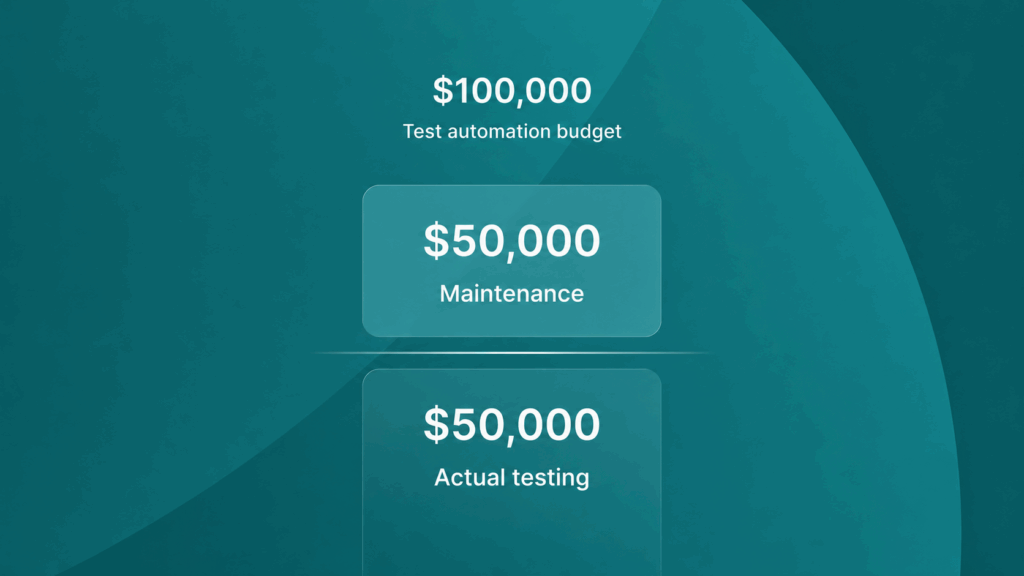
According to a report, organizations spend 30-50% of their testing resources simply maintaining and updating existing test scripts. In fact, test script maintenance alone can consume up to 50% of the total test automation budget.
What Self-Healing Actually Means (and Where Most Tools Stop)
Most self-healing tools solve one problem: the broken locator. They store a handful of backup selectors, an ID, then a CSS selector, then an XPath built on visible text, and try each one in order when the primary fails.
That covers reason 1 well. A button renamed from submit-btn to submit-button still has the same text and role, so a fallback list catches it fine.
It falls apart on reasons 2 and 6. If the page was restructured or a new step was inserted into the flow, the fallback list was built against the old page. There’s nothing in it to catch a problem the tool has never seen before.
Worse, a locator-only healer can succeed in the wrong way. It finds an element that matches the old selector well enough, clicks it, and the test goes green, while quietly testing the wrong flow. A confident wrong answer is worse than an honest failure.
Traditional Locators vs Locator Fallback vs Locator-Free Testing
| Approach | How It Finds Elements | Survives Renamed Attributes | Survives DOM Restructuring | Survives Reordered Flows | Ongoing Maintenance |
| Hardcoded locators (ID / XPath / CSS) | Exact string match against one fixed spot in the DOM | No | No | No | High, grows every sprint |
| Locator fallback self-healing | Tries a stored list of backup selectors in order | Yes, in most cases | Rarely | No | Medium, list still needs updates |
| Locator-free / intent-based testing | Resolves each step from the live DOM and the step’s intent, not a stored string | Yes | Yes, in most cases | Yes, with human review on low-confidence changes | Low, close to zero for most teams |
BotGauge: How a Locator-Free Engine Actually Works
Locator-free testing flips the starting question. Instead of asking where an exact string sits in the DOM, it asks what a step is trying to accomplish, and what the live page looks like right now.
Here’s the mechanism in practice:
- Every test step carries intent, not just a selector: “fill in the email field” or “click the primary submit action,” described in a way that survives a rename.
- On each run, the engine reads the current DOM and, where needed, the surrounding workflow: role, visible text, position relative to other elements, and the recent history of what has worked.
- If the page matches what the engine expects, the step runs at full speed with no AI call needed.
- If something changes (an ID, a wrapper div, or an inserted step), the engine re-resolves the correct element or step order from the live page and assigns a confidence score to that fix.
- High-confidence fixes get cached and reused instantly on the next run.
- Low-confidence fixes get routed to a human QA reviewer before anyone trusts them, so a genuinely broken feature never gets rubber-stamped as “healed.”
This is the model BotGauge runs on. It tracks DOM and workflow changes together, so a reordered checkout flow is remapped rather than replayed in the wrong sequence. Every fix carries a logged reason, so your team sees why a test changed, not just that it did.
What This Looks Like on a Real Flow
Take a checkout flow: cart, shipping, payment, confirm.
The product team adds a promo code field between shipping and payment. No ID changed. No class changed. The flow just grew a step.
A hardcoded locator suite fails outright. The payment step tries to run right after shipping and can’t find what it expects.
A locator fallback healer might still find the payment button (same ID, same text) and click it, skipping the new promo field entirely. The test passes. Nobody notices the promo path is untested until support tickets show up.
A locator-free engine reads the updated flow, recognizes a new step now sits between shipping and payment, and adjusts the sequence to include it, flagging the change for review if confidence is low. The test still exercises the real user path, and your team gets a log entry explaining what changed and why.
A Checklist for This Week
Even before you touch a self-healing tool, a few habits cut breakage by a wide margin:
- Ask developers to add data-testid or data-qa attributes to anything a test touches. Cheap to add, hard to break by accident.
- Separate “wait for state” from “take action.” Don’t bury a 5 second sleep inside a click helper. Make waits explicit and tied to a condition, not a clock.
- Track flaky failures and genuinely broken tests in separate buckets. If you can’t tell them apart, you’ll waste hours debugging tests that were never wrong.
- Review your 10 most-changed locators every quarter. If the same element keeps needing a new selector, it’s a candidate for self-healing, not another manual patch.
- Before adopting any self-healing tool, ask how it handles a reordered flow, not just a renamed ID. That answer tells you whether you’re buying real stability or a longer runway to the next break.
Conclusion
Your test suite shouldn’t need a maintenance sprint every time someone ships a redesign. If your team spends more hours fixing tests than writing them, the testing approach is the problem, not your engineers.
BotGauge’s self-healing engine monitors DOM and workflow changes, resolves each step by intent rather than a fixed string, and routes anything uncertain to a QA expert before it ships.
Frequently Asked Questions
What actually causes Selenium and Playwright tests to break after a UI update?
Is self-healing test automation the same thing as locator-free testing?
Why Selenium scripts keep breaking?
