
Software quality doesn’t happen by chance. It comes from a well-defined QA process that identifies risks early, verifies requirements, and ensures every release meets quality standards before it reaches users.
AI Summary
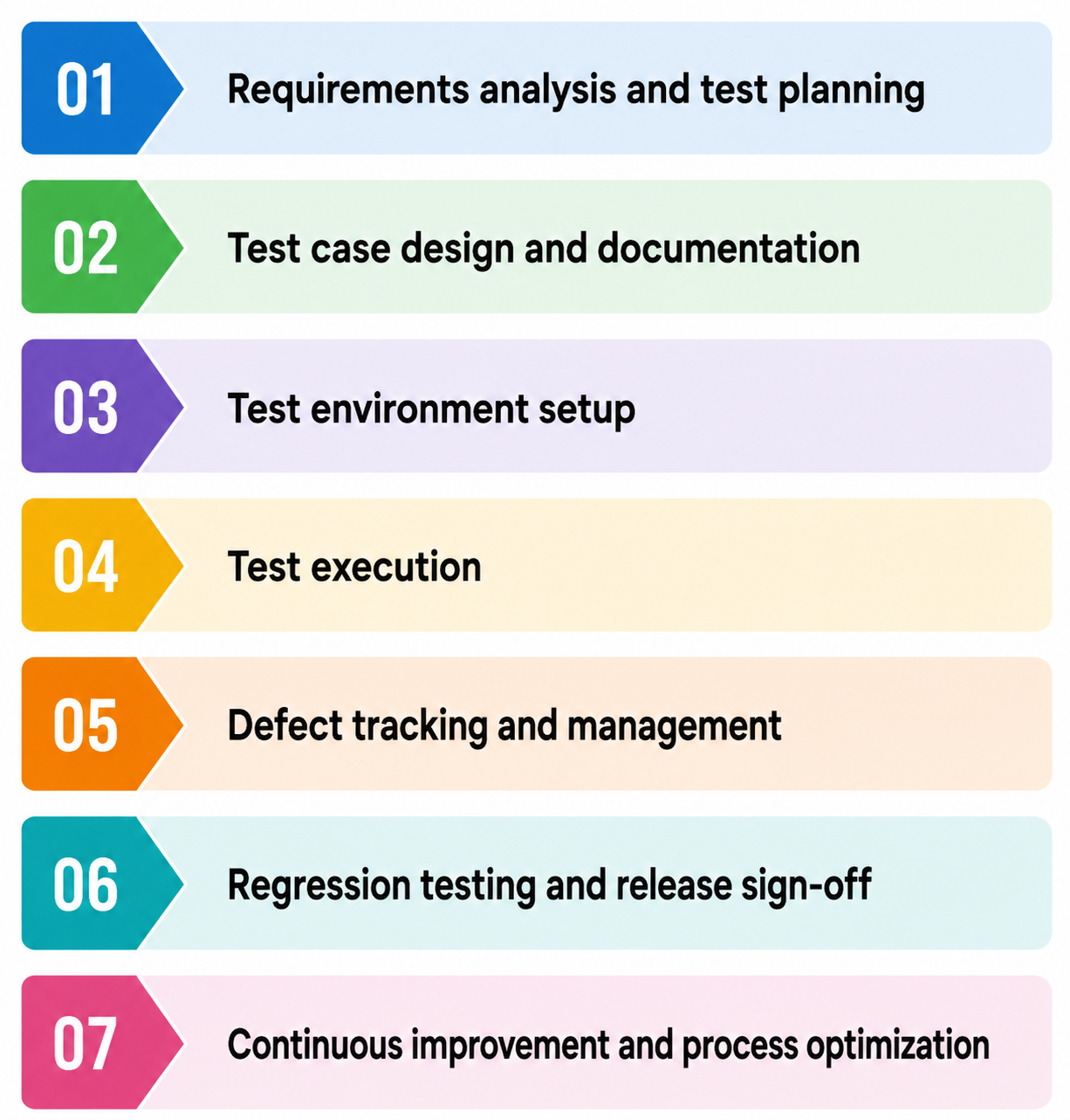
The 7 stages of the QA process include requirements analysis, test planning, test case design, environment setup, test execution, defect management, and regression testing before release.
An effective QA process improves software reliability, reduces production risks, and supports faster, more predictable releases.
QA practices vary across Agile, Scrum, DevOps, and Waterfall, but all focus on continuous quality throughout the development process.
Regular process reviews, test automation, risk-based testing, and continuous testing help improve QA efficiency.
Modern AI-powered solutions, like BotGauge, can automate test generation, execution, and maintenance, allowing QA teams to focus on business-critical validation and exploratory testing.
Whether you’re building a new testing workflow or improving an existing one, understanding the QA process is essential. In this guide, you’ll learn the 7 stages of the QA automation process, its objectives, best practices, common mistakes, and how modern AI-powered testing is changing the way teams deliver reliable software.
What Is a QA Process?
Quality Assurance (QA) is a structured, preventive approach focused on ensuring that products or services consistently meet defined quality standards throughout the development process. Instead of identifying defects only after they occur, QA emphasizes improving processes and embedding quality into every stage of the product lifecycle to minimize issues before they reach end users.
People constantly mix up QA, testing, and QC. They’re related but not the same thing.
| Focus | When it happens | Goal | |
|---|---|---|---|
| QA (Quality Assurance) | The process itself: standards, planning, prevention | Throughout the entire development lifecycle | Build quality in before bugs exist |
| Testing | Running specific checks against the software | During and after development | Find defects in the current build |
| QC (Quality Control) | Inspecting the finished product | Near the end, before release | Confirm the output meets the standard |
Testing is one activity inside QA. QC is the final check. QA is the whole system that makes both of those things effective instead of chaotic.
Why a Structured QA Process Matters
Here’s the math nobody argues with: a bug caught during requirements review costs a few minutes of conversation. The same bug caught in production costs a hotfix, a postmortem, and probably an apology email to a customer.
Teams without a defined QA process run into the same failures, over and over:
- Testers duplicate work because no one tracked what had already been covered.
- Critical paths ship untested because there’s no system for flagging them.
- Regressions surface in production that a 20-minute regression suite would’ve caught.
- New hires spend two weeks asking “how do we test things here?” and get five different answers.
And there’s a newer problem making all of this worse. AI coding assistants let engineering teams ship 2x faster than before. QA didn’t get the same upgrade. Most teams are still running the same manual, phase-gated process they had three years ago, except now it’s fed by three times as much code. The bottleneck moved. It’s sitting right in front of QA now. Autonomous QA solutions like BotGauge close that gap by enabling testing to keep pace with AI-speed software development.
The 7 Stages of the QA Process
Every framework calls these something slightly different. The work underneath is the same. Here are the QA process steps, stage by stage.
Stage 1: Requirements analysis and test planning
QA reviews user stories, specs, and acceptance criteria before a single line of code gets written. The job is to find ambiguity: vague requirements, missing edge cases, assumptions nobody stated out loud.
Who owns it: the QA lead, the business analyst, and sometimes the product manager.
Stage 2: Test case design and documentation
QA turns the test plan into actual test cases: specific steps, expected results, test data. This is where “test login” becomes 15 concrete scenarios covering valid credentials, invalid credentials, locked accounts, expired sessions, and SSO edge cases.
Who owns it: QA engineers.
Stage 3: Test environment setup
Building a testing environment that mirrors production closely enough that a pass there actually means something. Test data, staging servers, device/browser configs, third-party integration mocks.
Who owns it: QA engineers with DevOps support.
Stage 4: Test execution
Running the test cases. Manual testing handles exploratory work, usability checks, and anything requiring human judgment. Automated testing handles repetitive, high-volume, and regression-prone areas.
Who owns it: QA engineers, automation engineers.
Stage 5: Defect tracking and management
Every bug gets logged with reproduction steps, severity, and priority. Then it gets triaged, assigned, fixed, and retested. Not “someone mentioned it in Slack.” Logged.
Who owns it: QA engineers log it, engineering fixes it, QA verifies the fix.
Stage 6: Regression testing and release sign-off
Before release, the team reruns critical test suites to confirm nothing that used to work got broken by recent changes. Once that’s clean, QA signs off.
Who owns it: QA lead gives final sign-off.
Stage 7: Continuous improvement and process optimization
After release, the team reviews what worked and what didn’t. Defect trends, test coverage gaps, process bottlenecks, tooling gaps. Then they adjust.
Who owns it: QA lead, with input from the whole team.
QA process flow diagram
This is what the QA workflow process looks like in the SDLC:
Real World Examples of QA Process
The QA process varies across industries, but its objective remains the same: ensure products meet quality standards before release. The following examples show how organizations apply QA practices to prevent defects, reduce risk, and deliver reliable software.
1. E-commerce checkout
Before releasing a new checkout flow, the QA team reviews requirements, verifies payment gateway integrations, tests discount codes, validates tax calculations, and ensures orders are processed correctly across different browsers and devices. This helps prevent failed transactions and revenue loss.
2. Banking application
When a bank introduces a new fund transfer feature, QA validates transaction accuracy, authentication flows, regulatory requirements, and security controls. The process also includes performance and reliability testing to ensure the system handles high transaction volumes without errors.
3. Healthcare software
For electronic health record (EHR) systems, QA verifies that patient data is captured, stored, and displayed accurately. It also confirms compliance with healthcare regulations, validates role-based access controls, and tests critical workflows to reduce the risk of clinical errors.
4. SaaS product
A SaaS company releasing a new feature follows a QA process that includes requirement reviews, functional testing, regression testing, API validation, and compatibility testing. Automated regression testing helps ensure new changes do not break existing functionality before deployment.
Explore how BotGauge generates, executes, and maintains tests with AI, backed by human QA experts
Book a DemoCore QA Process Objectives
Every QA process has the same goal: to release software that works as expected and continues to work after every update. Teams get there by building quality into the development process rather than relying on testing at the end. A good QA process focuses on a few measurable objectives.
Prevent defects early
The earlier a defect is found, the less it costs to fix. QA starts long before execution begins. Reviewing requirements, validating acceptance criteria, and identifying edge cases during planning helps teams avoid expensive rework later.
Verify business requirements
Software isn’t successful because it passes tests. It succeeds because it solves the problem it was built to solve.
QA checks that every feature behaves in accordance with the documented requirements, user stories, and acceptance criteria. If a feature works technically but doesn’t meet the business need, it’s still a defect.
Improve software reliability
Users expect software to work every time they use it. A structured QA process verifies that applications remain stable across browsers, devices, operating systems, APIs, and different user scenarios.
Regression testing plays a big role here. Every release should prove that existing functionality still works after new code is added.
Reduce production risks
Bugs found in production are expensive. They lead to customer complaints, emergency fixes, downtime, and lost revenue.
QA lowers that risk by validating critical workflows before deployment. Functional testing, integration testing, performance testing, and security testing all contribute to safer releases.
Support faster releases
A mature QA process helps teams release more frequently because they trust their test results.
Automation handles repetitive regression tests, while manual testing focuses on exploratory scenarios, usability, and new functionality. Together, they give developers quick feedback without sacrificing confidence.
Maintain compliance and quality standards
Industries like healthcare, finance, and insurance often have strict regulatory requirements. QA verifies that software follows security policies, audit requirements, accessibility guidelines, and industry standards before it reaches customers.
Improve customer satisfaction
Every bug that reaches production affects someone’s experience. Slow pages, broken forms, failed payments, or missing data reduce user trust.
A consistent QA process catches these issues before release, leading to fewer support tickets, better product reviews, and higher customer retention.
Adapting the QA Process to Your Methodology
There’s no single QA process that works for every team. A startup shipping every day won’t test software the same way as an enterprise releasing once a quarter.
Your development methodology shapes how QA fits into the software delivery cycle. The goal stays the same: catch issues early, continuously validate quality, and release with confidence.
- QA in Agile
Agile teams build software in short iterations. QA works alongside developers instead of waiting until development is complete.
Testing starts as soon as a user story is ready. QA engineers review acceptance criteria, prepare test cases, automate regression scenarios, and validate new features within the same sprint.
A typical Agile QA workflow includes:
- Reviewing user stories before sprint planning
- Writing test cases alongside development
- Running functional and regression tests during the sprint
- Reporting defects immediately
- Verifying fixes before sprint completion
This continuous feedback loop helps teams identify issues while the code is still fresh.
- QA in Scrum
Scrum follows Agile principles but organizes work into time-boxed sprints.
QA participates throughout the sprint instead of treating testing as the final task. Testers attend sprint planning, daily stand-ups, backlog refinement sessions, and sprint reviews. That keeps quality visible from start to finish.
Many Scrum teams define a story as “Done” only after it passes functional testing, regression testing, and agreed acceptance criteria.
- QA in DevOps
DevOps focuses on continuous integration and continuous delivery (CI/CD). That means software moves from development to production much faster.
The QA process has to keep pace.
Automated testing becomes part of the deployment pipeline. Every code commit can trigger unit, API, integration, UI, and security tests before deployment continues.
If any test fails, the pipeline stops until the issue is resolved.
This approach gives developers immediate feedback and reduces the chance of unstable code reaching production.
- Continuous testing
Continuous testing supports modern software delivery by validating quality throughout development instead of waiting for a dedicated testing phase.
Tests run automatically whenever code changes. Developers know within minutes whether a change introduced a regression, broke an API, or affected an existing feature.
As applications grow, automated regression testing becomes essential. Running thousands of manual test cases before every release simply doesn’t scale.
- QA for Waterfall projects
Waterfall projects follow a sequential process in which requirements, design, development, testing, and deployment occur in separate phases.
QA activities are concentrated after development is complete. Teams prepare detailed test plans, execute comprehensive test cycles, log defects, and verify fixes before the product moves to production.
While this approach provides structured documentation, it usually delays feedback until later in the project. Fixing defects becomes more expensive because developers may need to revisit code written weeks or months earlier.
- Choosing the right QA approach
Your QA process should match how your team builds software.
If you release several times a day, automation and continuous testing become essential. If you work in regulated industries, documentation, traceability, and compliance checks deserve more attention. Teams maintaining legacy systems often rely on broader regression testing before every release.
The best QA process fits naturally into your development workflow. When testing becomes part of everyday engineering rather than a separate phase, releases become more predictable and software quality improves over time.
Best Practices for Effective QA Processes
A QA process works best when it’s built into development rather than sitting at the end. Teams that consistently ship reliable software usually follow the same habits, regardless of company size or release cadence.
- Start testing early
QA begins with requirements, not execution.
Review user stories, acceptance criteria, and technical designs before development starts. Catching ambiguous requirements early prevents defects that are much harder to fix later.
This practice, often called shift-left testing, reduces rework and keeps projects moving.
- Build a balanced test strategy
No single testing method catches every issue.
A healthy QA process combines:
- Unit testing for individual components
- Integration testing for connected services
- Functional testing for business workflows
- Regression testing after every change
- Performance testing for speed and scalability
- Security testing for vulnerabilities
- Exploratory testing to uncover unexpected issues
The right mix depends on your application and release cycle.
- Automate repetitive testing
Manual testing is valuable, but repetitive regression testing quickly becomes a bottleneck.
Automate scenarios that run frequently, have predictable outcomes, and cover critical user journeys. Login, checkout, account creation, API validation, and smoke tests are common candidates.
Automation gives teams faster feedback and makes frequent releases practical.
- Prioritize tests by business risk
Not every defect carries the same impact.
Focus testing effort on features that affect revenue, security, compliance, or the core customer experience. Critical workflows deserve broader test coverage than low-risk UI changes.
Risk-based testing helps teams spend time where it matters most.
- Keep test cases current
Outdated test cases create confusion and reduce confidence in test results.
Review and update your test suite whenever requirements change. Remove obsolete scenarios, add coverage for new functionality, and revise expected results as the product evolves.
A smaller, accurate test suite is far more useful than a large collection of outdated tests.
- Integrate QA into CI/CD
Modern development teams don’t wait until release day to validate software.
Connect automated tests to your CI/CD pipeline so every code change triggers validation. Failed tests should stop deployments until issues are resolved.
Continuous testing helps developers identify problems within minutes instead of days.
- Measure quality with meaningful metrics
Metrics should help teams improve, not simply generate reports.
Track indicators such as:
- Defect leakage
- Test coverage
- Automation coverage
- Test execution time
- Defect resolution time
- Escaped defects after release
These metrics reveal where the QA process needs attention and whether quality is improving over time.
- Encourage collaboration across teams
Quality isn’t the responsibility of QA alone.
Developers, product managers, designers, DevOps engineers, and testers all contribute to software quality. Regular communication during planning, development, and testing helps teams identify issues earlier and resolve them faster.
- Use AI where it adds value
AI is changing how software testing works.
Many teams now use AI to generate test cases, identify application changes, maintain automated tests, and analyze failures. These tools reduce manual effort, allowing QA engineers to spend more time on exploratory testing and complex validation.
Human oversight still matters. AI can speed up execution, but experienced testers provide the context and judgment needed for reliable software.
How to Improve QA Process
Every QA process reaches a point where it starts to slow releases rather than support them. Test suites become harder to maintain, regression cycles take longer, and defects still find their way into production.
Improving QA isn’t about adding more tests. It’s about identifying the gaps that most affect quality and fixing them first.
- Review your current process
Start with an honest assessment of how your team works today.
Look for bottlenecks such as long regression cycles, recurring production bugs, flaky automated tests, or delayed feedback. These issues often point to weaknesses in the process rather than individual mistakes.
Questions worth asking include:
- Where do most defects originate?
- Which tests consume the most time?
- How often do production issues escape QA?
- Which parts of the application have the least test coverage?
The answers help prioritize improvements instead of making changes based on assumptions.
- Shift testing earlier
The sooner issues are identified, the cheaper they are to fix.
Review requirements before development begins. Involve QA during planning, clarify acceptance criteria, and identify edge cases before developers start writing code.
Early collaboration reduces misunderstandings and improves the quality of both development and testing.
- Strengthen your automation strategy
Automation should reduce manual effort, not create more maintenance work.
Focus on stable, high-value test cases such as login flows, checkout journeys, API validations, and regression scenarios. Keep automated tests modular so they can adapt as the application changes.
Regularly remove duplicate or obsolete tests to keep the suite reliable.
- Reduce flaky tests
Tests that pass one day and fail the next quickly lose the team’s trust.
Flaky tests usually result from unstable environments, timing issues, shared test data, or weak test design. Review these failures regularly and fix them before expanding automation.
Reliable automation gives developers confidence to release faster.
- Improve collaboration between teams
Quality improves when developers and QA engineers work together throughout the development process.
Review requirements together, discuss risks during sprint planning, and investigate defects as a team. Shared ownership leads to faster fixes and fewer misunderstandings.
Many organizations also involve QA in design reviews and architecture discussions to identify risks before implementation begins.
- Measure the right metrics
Improvement starts with measurement.
Track metrics that reflect software quality instead of activity. Useful indicators include:
- Defect leakage rate
- Regression execution time
- Test automation coverage
- Escaped production defects
- Mean time to resolve defects
- Test execution success rate
Review these metrics after every release to identify trends and areas for improvement.
- Invest in continuous testing
Waiting until the end of development creates unnecessary delays.
Run automated tests throughout the development pipeline so every code change is validated immediately. Fast feedback helps developers resolve issues while the context is still fresh.
As release frequency increases, continuous testing becomes one of the biggest contributors to consistent software quality.
- Use AI to remove repetitive work
AI can help QA teams spend less time creating and maintaining tests.
Modern AI testing platforms generate test cases, adapt automated tests to UI changes, identify high-risk areas, and automatically analyze failures. This reduces maintenance overhead and speeds up regression testing.
QA engineers still play a critical role by validating business logic, exploring edge cases, and making decisions that require product context.
- Improve continuously
The strongest QA processes evolve with the product.
Review production incidents, analyze recurring defects, update test strategies, and refine automation after every release. Small, consistent improvements have a greater impact than occasional process overhauls.
How to Build a QA Process From Scratch
Building a QA process starts with understanding what you’re testing and how your team ships software. The process doesn’t need to be complicated on day one. It needs to be consistent, repeatable, and easy to improve as your product grows.
Here’s a practical framework you can follow.
1. Define quality goals
Start by agreeing on what “quality” means for your product.
For some teams, it’s application stability. Others prioritize security, performance, regulatory compliance, or release speed. These goals shape every testing decision that follows.
For example, an e-commerce platform may focus on checkout reliability, while a healthcare application may prioritize data accuracy and compliance.
2. Understand the product requirements
QA starts with clear requirements.
Review product specifications, user stories, acceptance criteria, and business rules before development begins. If requirements are incomplete or unclear, clarify them before writing test cases.
Strong requirements reduce defects long before testing starts.
3. Identify testing scope
Not every feature needs the same level of testing.
Classify the application into high-risk and low-risk areas based on business impact, user traffic, and technical complexity. Core workflows such as authentication, payments, account management, and data processing typically deserve the highest level of test coverage.
This helps your team spend time where it matters most.
4. Create a test strategy
Your test strategy defines how quality will be verified.
It should answer questions such as:
- Which types of testing will be performed?
- What will be automated?
- What requires manual validation?
- When will testing happen?
- What are the release criteria?
Documenting these decisions keeps the team aligned as the product evolves.
5. Design test cases
Write test cases that validate both expected behavior and edge cases.
Each test should include:
- Objective
- Preconditions
- Test steps
- Expected result
- Test data
Keep test cases simple and reusable. As the application changes, update or remove outdated scenarios instead of allowing the test repository to grow unchecked.
6. Set up the testing environment
A reliable testing environment produces reliable results.
Configure environments that closely match production, including databases, APIs, third-party integrations, user roles, and realistic test data. Differences between QA and production environments often lead to defects that are difficult to reproduce.
Whenever possible, automate environment setup to reduce configuration errors.
7. Choose the right tools
Select tools based on your team’s workflow rather than popularity.
You may need tools for:
- Test case management
- Bug tracking
- Test automation
- API testing
- Performance testing
- CI/CD integration
Avoid introducing too many tools early. A smaller, well-integrated toolset is easier to maintain.
8. Automate where it makes sense
Automation delivers the biggest return when applied to stable, repeatable tests.
Begin with smoke tests, regression suites, API validation, and business-critical user journeys. Leave exploratory testing, usability checks, and frequently changing features to manual testing until they stabilize.
9. Define release criteria
Before every deployment, the team should know what qualifies as a successful release.
Common release criteria include:
- Critical defects resolved
- Regression suite passed
- Acceptance criteria verified
- Performance benchmarks met
- Security checks completed
Clear release criteria remove ambiguity and make deployment decisions easier.
10. Review and improve continuously
A QA process in software testing is never finished.
After every release, review escaped defects, test coverage, automation performance, and feedback from developers and customers. Use those insights to refine your test strategy and remove inefficiencies.
As your product grows, your software QA process should evolve with it. Regular improvements keep testing effective without making it heavier than necessary.
How BotGauge Transforms the QA Process
Modern QA teams need to move quickly without compromising software quality. As applications grow, creating test cases, maintaining automation, and running regression tests can consume a significant amount of engineering time.
BotGauge helps reduce that effort by using AI agents to generate, execute, and maintain tests, while keeping human QA experts involved to validate results. This allows teams to spend less time on repetitive testing tasks and more time improving product quality.
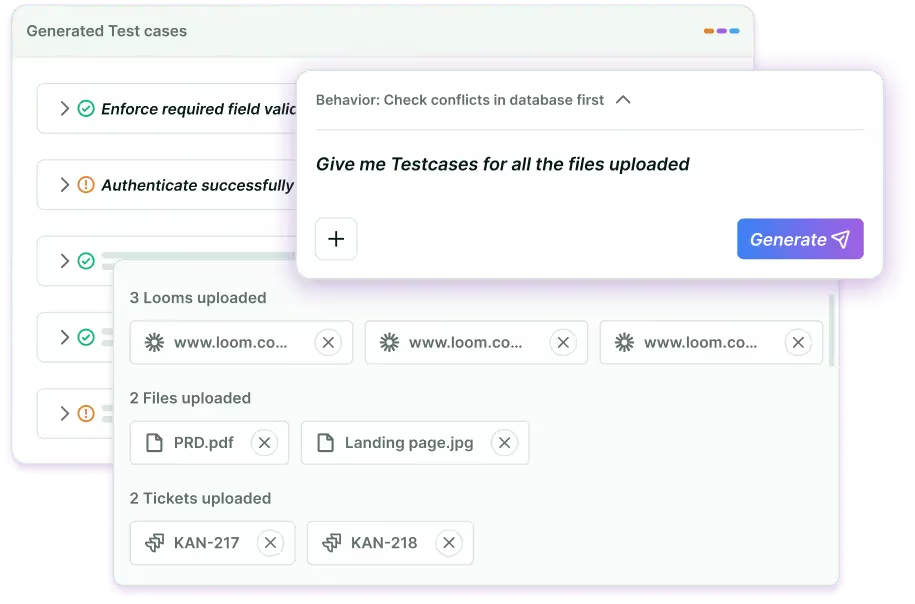
Some of the ways BotGauge supports the QA process include:
- AI-generated test cases: Create test cases from requirements, user stories, or application workflows to reduce manual effort.
- Autonomous test execution: Run end-to-end tests automatically and generate detailed execution reports.
- Reduced test maintenance: Adapt tests as the application evolves, minimizing the effort required to maintain automation.
- Human-validated results: Every test and execution result is reviewed by dedicated FDE pod (QA experts), combining AI speed with human judgment.
- CI/CD compatibility: Fit into existing development workflows to provide continuous feedback before deployment.
For teams looking to modernize their QA process, Autonomous QA as a Solution (AQaaS) combines AI-driven test generation and execution with expert human validation to improve regression coverage and ship reliable software faster.
Common QA Process Mistakes
Even experienced QA teams run into problems that reduce test coverage, slow releases, or allow defects to reach production. Most of these issues aren’t caused by poor testing. They’re caused by weaknesses in the process.
Here are the mistakes that appear most often.
- Waiting until development is complete
Testing at the end of a release leaves very little time to identify and fix defects.
When QA reviews requirements, participates in planning, and starts testing during development, issues surface earlier and cost less to resolve.
- Treating QA as one team’s responsibility
Quality is everyone’s job.
Developers write maintainable code, product managers define clear requirements, designers think through user flows, and QA validates the product from the user’s perspective. When these teams work independently, defects are more likely to slip through.
- Automating everything
Automation is powerful, but it isn’t the answer for every test.
Exploratory testing, usability testing, accessibility reviews, and new features often benefit from human judgment. Teams that automate every scenario usually spend more time maintaining tests than improving product quality.
- Ignoring test maintenance
Applications change constantly. Test suites should change with them.
Outdated test cases, broken automation scripts, and duplicate scenarios reduce confidence in test results. Regular maintenance keeps the QA process reliable and prevents technical debt from growing over time.
- Focusing only on happy paths
Users don’t always follow the expected workflow.
Effective QA also validates edge cases, invalid inputs, interrupted transactions, network failures, permission changes, and unexpected user behavior. These scenarios often reveal defects that standard functional tests miss.
- Using unrealistic test environments
A QA environment that doesn’t resemble production creates misleading results.
Differences in infrastructure, configurations, third-party services, or test data can hide issues until after deployment. Testing against production-like environments provides more accurate results.
- Measuring success by the number of test cases
A larger test suite doesn’t automatically mean better quality.
Meaningful coverage matters more than volume. A smaller set of well-designed tests that validates critical business workflows provides more value than thousands of outdated or repetitive test cases.
- Ignoring production feedback
The QA process shouldn’t end after deployment.
Customer support tickets, production incidents, crash reports, and usage analytics reveal gaps that automated testing may have missed. Reviewing this feedback after every release helps teams strengthen future test coverage.
- Depending entirely on AI
AI can generate tests, execute regressions, and analyze failures much faster than manual workflows.
But software quality still depends on people who understand business rules, customer expectations, and product context. The strongest QA processes combine AI-driven execution with human validation rather than relying on either alone.
The Future of QA Processes
Software development is changing quickly, and QA is changing with it. Faster release cycles, AI-assisted development, and increasingly complex applications have made traditional testing workflows harder to sustain.
The next generation of QA processes will focus on reducing manual effort while providing teams with faster, more reliable feedback.
- AI will automate more of the testing lifecycle
AI is already generating test cases, executing regression suites, analyzing failures, and updating tests when applications change.
Over the next few years, these capabilities will become part of everyday software development. QA teams will spend less time creating and maintaining tests and more time validating business logic, investigating edge cases, and improving product quality.
- Continuous testing will become the default
Many engineering teams already deploy multiple times a day.
To support that pace, testing has to happen continuously. Every code commit, pull request, and deployment should trigger automated validation that provides developers with immediate feedback.
As release frequency increases, long manual regression cycles will become increasingly difficult to justify.
- Autonomous testing will continue to mature
Traditional automation still requires engineers to create scripts, update locators, and maintain frameworks.
Autonomous QA shifts much of that work to AI agents that can generate, execute, maintain, and update tests with minimal human intervention. This reduces maintenance overhead and helps teams keep pace with rapidly changing applications.
Human review will remain an important part of the process, especially for validating business requirements and customer experience.
- Quality will become a shared engineering responsibility
QA is already moving beyond dedicated testing teams.
Developers, product managers, designers, DevOps engineers, and QA professionals increasingly work together to define quality standards, review requirements, and identify risks earlier in the development process.
This shared ownership shortens feedback loops and improves release confidence.
- Testing will start earlier
Shift-left testing has become standard practice for many software teams, but the trend continues to move even earlier.
QA engineers are becoming involved during requirement discussions, architecture reviews, API design, and feature planning. Identifying risks before development begins reduces defects and minimizes expensive rework later in the project.
- AI will support QA engineers, not replace them
AI can process thousands of test scenarios in minutes, but software quality still depends on human judgment.
Business rules, customer expectations, usability concerns, and exploratory testing require context that automated systems cannot fully understand. QA professionals will continue to guide testing strategies, review AI-generated results, and investigate complex issues that require experience and product knowledge.
- The focus will shift from writing tests to ensuring quality
As AI takes over repetitive work, the role of QA engineers will continue to evolve.
Instead of spending hours writing automation scripts or maintaining brittle test suites, teams will focus on defining quality standards, identifying high-risk areas, improving customer experience, and ensuring every release meets business expectations.
Organizations that combine AI-driven testing with experienced QA teams will be better equipped to deliver reliable software at the pace modern development demands.
Conclusion
A strong QA process does more than find defects. It helps teams build reliable software, reduce production risks, and release with confidence. Whether you follow Agile, DevOps, or another development methodology, the fundamentals remain the same: start testing early, automate repetitive tasks, measure quality, and continuously improve the process.
As software becomes more complex and release cycles get shorter, QA processes will continue to evolve. AI can reduce manual effort in test creation, execution, and maintenance, but experienced QA professionals remain essential for validating business logic and ensuring that software meets user expectations.
If your team is looking to modernize its QA process, managed AI QA as a Service like BotGauge can help automate repetitive testing tasks while keeping human expertise at the center of quality assurance.
Frequently Asked Questions
The initial step for QA includes which process?
How to implement a QA process in an organization?
What is QA automation process?
What metrics measure QA process effectiveness?
How does AI transform the QA process?
What are the steps in the QA process?
What is QA testing process?
