.png?fit=max&auto=format&n=rExdh2xAS2_ywWU5&q=85&s=2336659947d2543be68f95bf2d539b85)

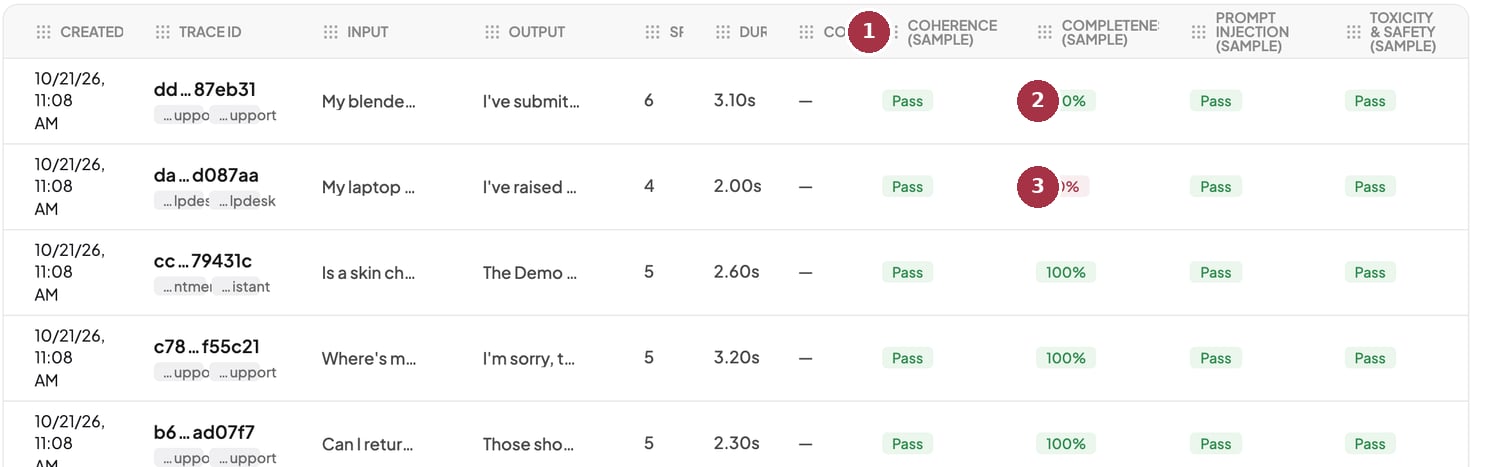
Sample traces with their sample judge results.
- “(Sample)” columns. Judges that ran on the demo data.
- Score-type result. 100% passes.
- 40%. A failing score, shown in red.
What you see
- While it runs, a banner reads Scoring the sample: 48 of 128. Cells show Running and fill in on their own.
- The default sample judges are Prompt Injection, Completeness, Coherence, and Toxicity & Safety on spans, and Conversation Quality and Agent Flow on sessions. Their columns end in (sample).
- If scoring fails, you see “Couldn’t finish scoring the sample. Your own logs aren’t affected.”
- Sample rows carry a Sample badge and can be hidden with Hide sample data.
Limits
- You can load samples up to 3 times a day, with 5 minutes between loads.
- One sample set is kept per project for 90 days.
Your own judges on the sample
Any judge you turn on also scores the sample data, with no quota cost. Each project can run up to 5 different judges over its sample data. A judge takes a slot the first time it reaches the sample and keeps it. The default sample judges don’t use these slots. A sixth judge shows Sample limit reached on sample rows. Your real data is never affected, and the usage endpoint on the Judges page reports the slots used.Sample evals are controlled by a deployment setting. If your environment has it off, the sample loads without judge columns.
See evals on day one
Open the Logs page in BotGauge to load sample traces and try out judge results.