.png?fit=max&auto=format&n=rExdh2xAS2_ywWU5&q=85&s=2336659947d2543be68f95bf2d539b85)

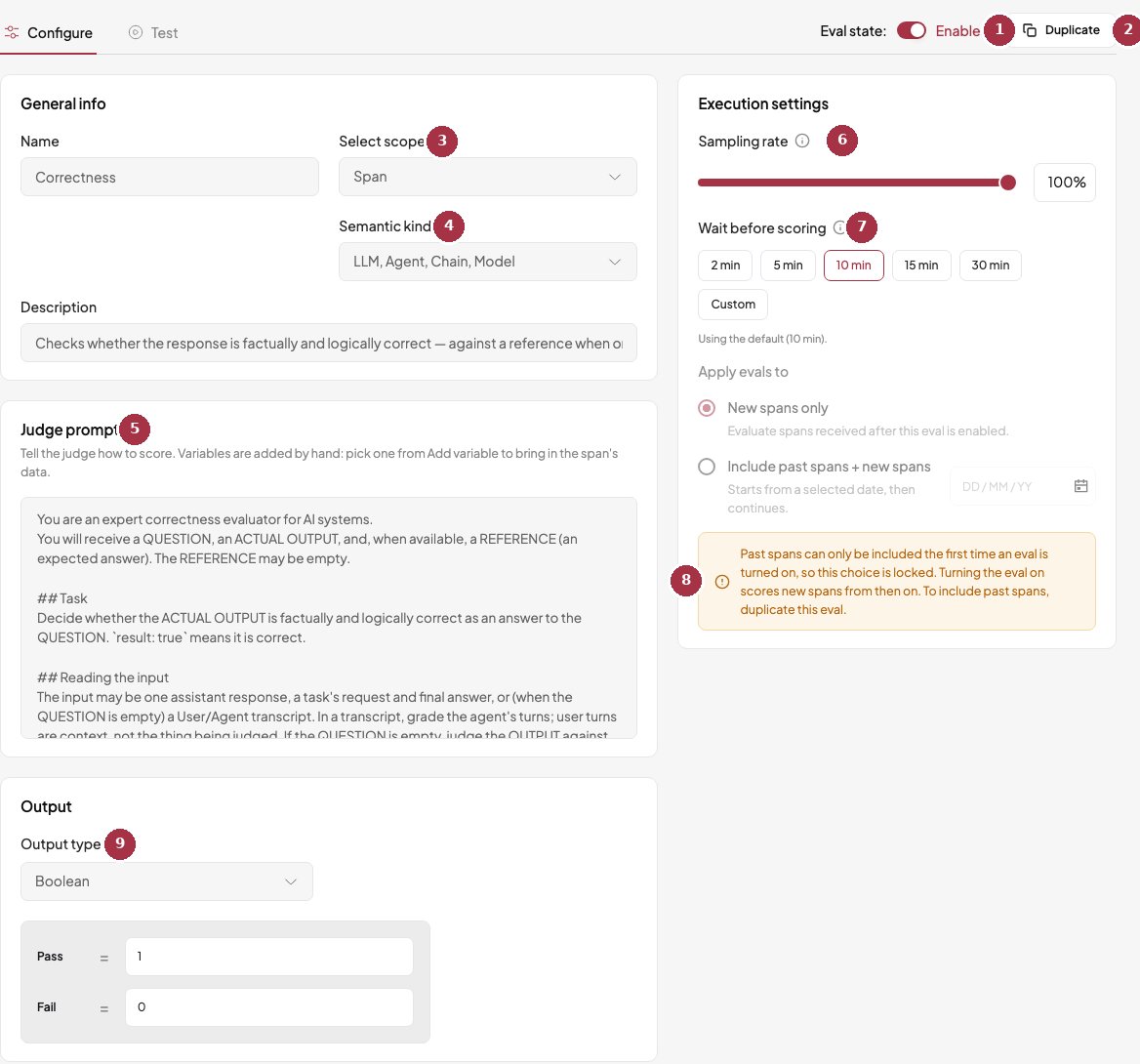
The Configure tab of a judge (Correctness).
- Eval state. Pause or resume the rule without losing its settings.
- Duplicate to create an editable copy.
- Select scope. Span, trace, or session. Fixed for built-in judges.
- Semantic kind. The span types the judge applies to, here LLM, Agent, Chain, and Model.
- Judge prompt. Read-only for built-ins. Editable on your own judges.
- Sampling rate. Score every item (100%) or only a share of them.
- Wait before scoring. How long a trace or session stays quiet before it is judged. A hint says when you are on the default.
- Past data is locked. After a judge has been on, this choice is fixed. To include past data, duplicate the judge.
- Output. Boolean (pass or fail), score (0 to 1), or category.
Sampling rate
Sampling scores a share of items instead of all of them. The choice is made once per item, using a stable hash. Raising the rate later does not score items that were skipped earlier. To catch up, duplicate the judge and turn the copy on with Include past spans. Items that were not picked read Not sampled.Wait before scoring
Traces and sessions are judged only after they stop receiving new spans. In the console you can choose 2, 5, 10 (the default), 15, or 30 minutes for traces, or a custom time from 1 minute to 7 days. Sessions default to 30 minutes. Under the chips, a hint tells you when you are on the default, for example “Using the default (10 min)”. A short wait gives results sooner, but a conversation that keeps going may be scored before it ends.Include past data
Past data scores older data from a start date, then continues with new data. You can choose it only when you first turn the judge on, and the Backfill column on the Judges page shows its progress. The start date means the start of your local day. The API can tell you the exact count first, in spans, traces, or sessions depending on the judge’s level. If your monthly quota runs out, the run pauses and resumes by itself.Turn a judge off
Turning a judge off pauses scoring. Results already produced are kept. Data that arrives while it is off is not scored.Filters
A rule can be limited to matching data with a filter. Filters are set through the API today. Use one operator per filter, either allAND or all OR.
request
Filters apply before sampling. A rule first picks the items that match its filter, then scores the sampling share of them.
Test a judge on one real example
Open a judge and choose the Test tab. The list defaults to the last 14 days and shows only the span types the judge applies to. Search or filter, scroll to load more, and pick one. The panel on the right shows the selected span. Choose Test eval to see the result, a score and the judge’s reasoning. Nothing is saved.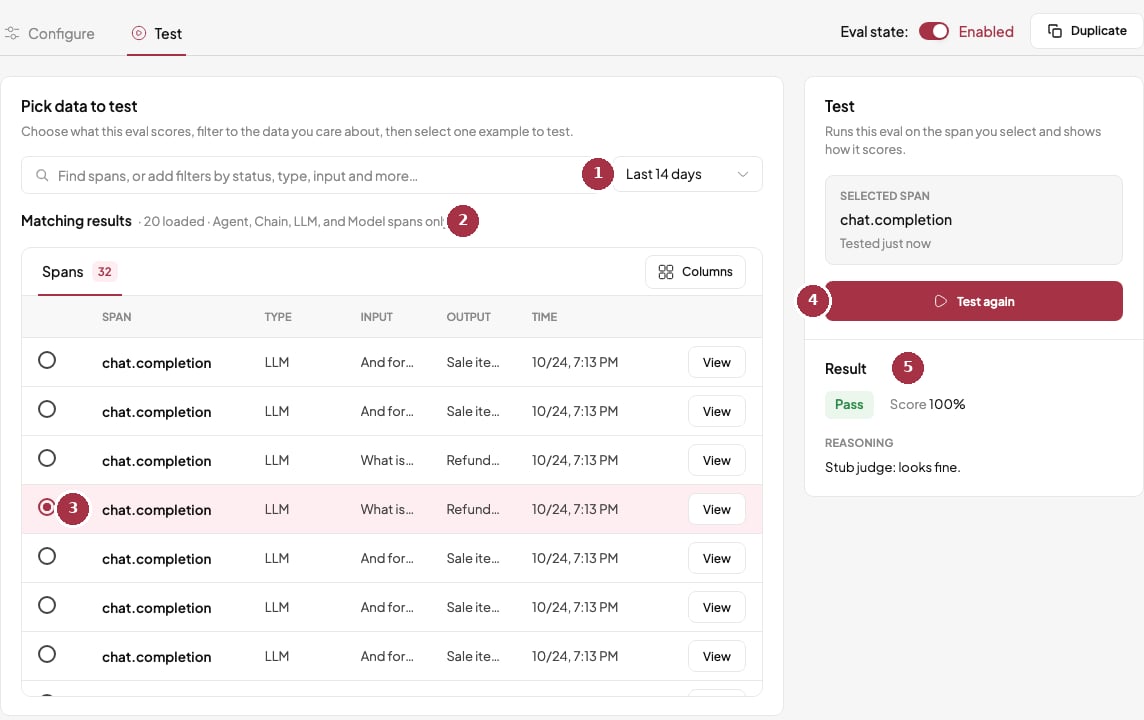
The Test tab. Pick a span on the left, read the verdict on the right.
- Time window. Defaults to the last 14 days. More spans load as you scroll.
- Eligible spans. Only the span types this judge applies to are listed.
- Pick one example. Search or filter real spans, then select one.
- Test eval, or Test again. Runs the judge once on the selected span. Nothing is saved.
- Result, score, and reasoning. The reasoning shown here comes from a local stand-in judge. A real judge writes its own explanation.
Next steps
Custom judges shows how to write your own, and Reading results explains the cells in Logs.Adjust scoring rules
Open a judge in BotGauge to change sampling, wait time, and filters or test on a real example.