TL;DR
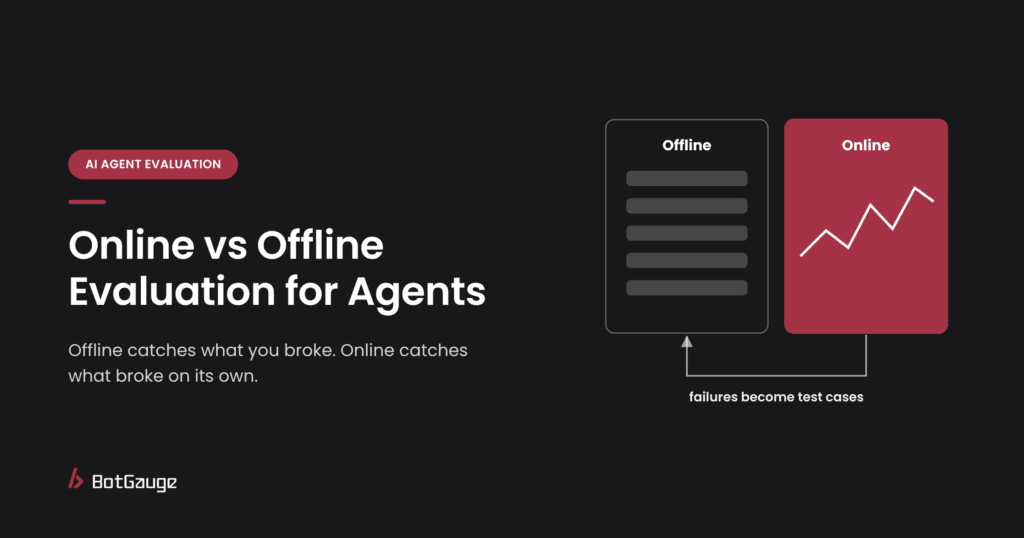
Offline evaluation runs your agent on a fixed test set before release and catches the regressions you introduce. Online evaluation scores a sample of live traffic after release and catches what breaks without anyone changing anything: provider model updates, new kinds of user requests, upstream changes. Each is blind to what the other catches, so production teams run both, bridge them with canary or shadow tests, and feed every production failure back into the offline set.
What each one is
Offline evaluation tests an agent against a precompiled dataset before deployment, scoring outputs against expected answers or rules (LangChain via getAbstract). It’s cheaper and simpler to run, but static test cases can’t capture the full range of situations an agent will meet (arXiv survey).
Online evaluation scores real production runs after release. Because production traces have no reference answers, it relies on reference-free checks such as safety, format, tone and LLM-judge quality scores (Developers Digest).
A third mode, in-the-loop evaluation, runs checks during the agent’s execution, before the final output is delivered, and suits high-risk or long-running tasks (LangChain via getAbstract).
All three are parts of one practice; see our guide to AI agent evaluation for the full picture.
How they fit together
offline, bridge and online evaluation
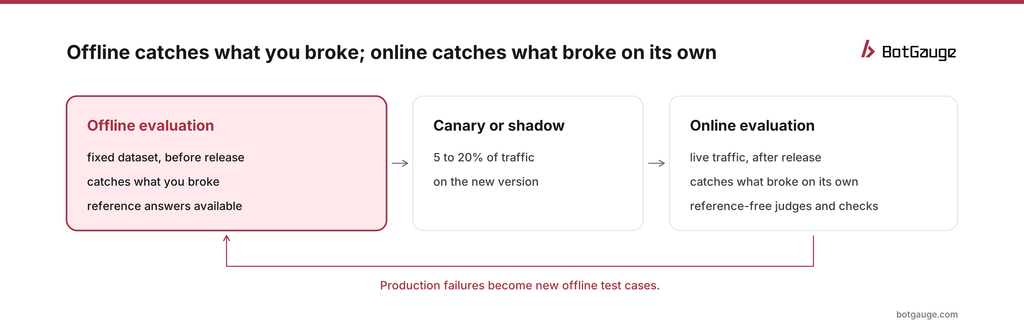
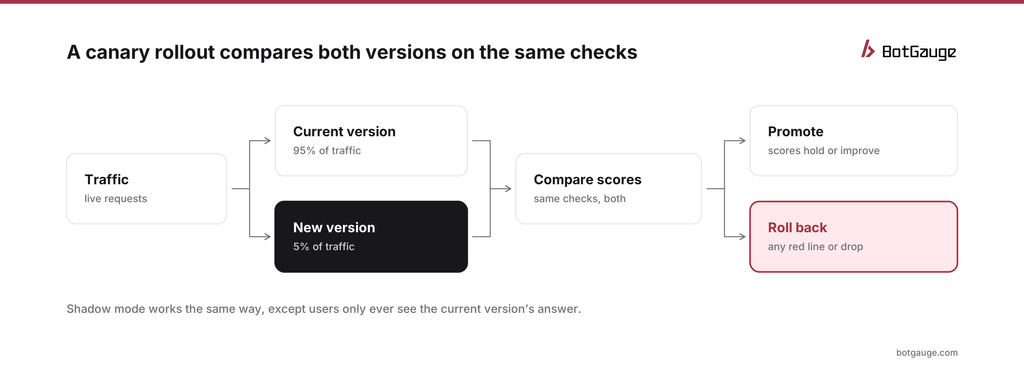
Offline evaluation catches what you broke; online evaluation catches what broke without anyone touching anything (Galtea). Between them sit two bridge techniques: canary evaluation, which routes a slice of production traffic, typically 5 to 20%, to the new version before full rollout, and shadow evaluation, which runs the new version on copies of live requests without showing users the result.
Canary vs. shadow evaluation
| Canary | Shadow | |
| Who sees the new version’s output | A small share of real users | Nobody; outputs are scored and discarded |
| Risk to users | Low, but real | None |
| Can it test actions? | Yes, with real effects on the canary slice | Only if side effects are blocked or simulated |
| Signals available | All scores plus real user reactions (feedback, escalations, repeat contacts) | Scores only |
| Best for | Final check before full rollout | Early check on risky changes, or agents that take irreversible actions |
canary rollout for a new agent version
For agents, shadow mode needs one extra precaution: a shadow copy of an agent must never actually call write tools such as refunds, emails or record updates. Run it against stubbed tools or a sandbox, and score the actions it would have taken.
Decide the promotion rules before the canary starts, not after you see the numbers. A sensible default: promote if no red-line check fails and no key score drops by more than a small, agreed margin over a minimum number of tasks; roll back immediately on any red-line failure.
Worked example: a model upgrade through a canary
A support team moves its agent to a newer model version. Offline, the new version passes 97% of the golden dataset against 96% for the current one, so it ships to a 5% canary. The numbers here are illustrative.
After two days, task success on the canary matches the current version, but two signals differ. Escalations to humans are down by a third, and the policy-compliance check on refund requests has slipped from 99% to 94%. The traces show why: the new model is more willing to resolve borderline refund requests on its own, including some it should have escalated. None of the golden cases covered that kind of borderline request.
The team rolls back, adds 15 borderline refund cases to the offline set, adjusts the prompt, and runs the canary again. The second time, policy compliance holds. Offline evaluation said the model was better; only online evaluation showed where it was worse.
What each catches and misses
| Offline | Online | |
| When | Before release, on every change | After release, continuously |
| Data | Fixed, versioned test set | A sample of live traffic |
| Reference answers | Usually available | Usually not |
| Catches | Regressions from your own prompt, model, tool or code changes | Provider model updates, input drift, new request types, upstream changes |
| Misses | Anything your test set doesn’t contain | Failures until real users trigger them |
| Cost per check | Predictable | Grows with traffic; sample to control it |
| Can block a release? | Yes | No; it can only trigger rollback or alerts |
The gap neither one fills
Offline sets contain what you thought of. Live traffic contains what users have already done. Neither contains what an attacker or an unusual user will try next week. That’s the job of adversarial testing, which deliberately searches for failures before they show up anywhere. Automated red teaming for AI agents explains how it works, and each confirmed finding becomes a new offline case.
How to run both
- Build the offline set first. Start with a golden dataset of everyday, edge, adversarial and regression cases; see golden dataset for AI evaluation.
- Gate every change on it. Run the offline suite in CI on each prompt, model or tool change, and block regressions.
- Roll out through a canary. Send a small slice of traffic to the new version and compare its scores with the current version before switching everyone. A/B testing agent versions covers the comparison.
- Score a steady sample in production. Use the same criteria as offline wherever possible, with reference-free judges, code checks on the trace, and user feedback.
- Close the loop. Every production failure, and every red-team finding, becomes a new offline case.
- Re-test when the system changes. New models, tools, data or policies are reasons to run both offline tests and a new red-team campaign; when to red team an AI agent lists the triggers.
What to score online when there’s no reference answer
Production runs don’t come with correct answers attached, so online checks have to judge the output on its own, against its context, or against what happened next:
| Check | How it works | What it catches |
| Rule checks on the trace | Code checks on tool calls, arguments, amounts and required steps | Policy violations, invented IDs, skipped approvals |
| Groundedness judge | A judge model compares the answer with the documents the agent retrieved | Unsupported claims and hallucinations |
| Task completion signals | Did the user’s request reach a final state, such as a closed ticket? | Agents that sound helpful but don’t finish |
| Behavioral signals | Escalations, repeat contacts, thumbs-down, users rephrasing the same question | Answers users didn’t accept |
| Safety checks | Injection detectors, personal-data scanners, policy classifiers | Attacks and leaks in live traffic |
| Drift signals | Changes in tool mix, steps per task, refusal rate and response length | Silent behavior changes after updates |
Wherever you can, use the same check definitions offline and online. When the two diverge, the offline suite slowly stops predicting what happens in production.
How much to sample
- Every run: cheap rule checks on the trace, and every high-risk action, such as payments or account changes.
- A steady random sample: judge-model scores on a fixed share of routine runs, large enough to show a trend each day.
- Targeted samples: extra scoring on new request types, new releases and anything users flagged.
Keep the sample steady over time. If you change the sampling rate, trends in your scores will move for reasons that have nothing to do with the agent.
Common mistakes
- Trusting offline scores alone. A version that wins offline can still lose online, because the test set only contains what someone thought to write.
- Different checks offline and online. If production uses a different rubric, you can’t compare the two or tell which one is right.
- Online evaluation with no route back. Production failures that never become offline cases will happen again on the next release.
- Shadowing agents with live tools. A shadow agent that can really send emails or issue refunds isn’t a shadow.
- Deciding promotion rules after the canary. Rules written after seeing the data tend to bend toward shipping.
The production side overlaps with observability: traces, alerts and dashboards. Our complete guide to AI agent observability covers it, and BotGauge LLM observability traces the prompts, tool calls and context behind each result.
The bottom line
Offline evaluation protects you from yourself; online evaluation protects you from everything else. Run both, connect them with a canary, and make every production failure a new offline case. Then add the third leg, adversarial testing, so you find tomorrow’s failures before either one does; what is AI agent red teaming explains how.
BotGauge LLM evaluations runs evaluations before release and keeps scoring in production. For tool options, see the 12 best AI observability and evaluation tools for agents; for proof, our customer stories.
Think your agent is safe? Prove it. BotGauge tests your agent before release and watches it after. Start for free or book a 30-minute demo.