Every software application contains bugs. Some affect functionality, while others impact performance, security, usability, or reliability. Left undetected, even minor defects can disrupt user experience, delay releases, and increase the cost of fixing issues later in the software development lifecycle.
Understanding the different types of bugs in software testing is essential for building an effective testing strategy. When QA teams know what to look for, they can design better test cases, improve defect coverage, and catch critical issues before they reach production.
This guide explains the various types of bugs in software testing methodologies, their causes, real-world examples, and the best practices for identifying and preventing them.
AI Summary
4 ways to classify bugs: by nature (functional, UI, security, and 13 more), severity (impact), priority (urgency), and testing level (where it surfaces).
Severity ≠ priority. A bug can be severe but low priority, or minor but urgent. Track both.
Different types of bugs, each with a real example and the test method that catches it.
Bug life cycle: New → Assigned → Open → Fixed → Retest → Verified/Closed.
Real cost: Bugs caught in production cost far more than ones caught in design. Ariane 5 and Knight Capital are proof.
A free bug report template included, with the fields that stop back-and-forth between QA and dev.
AI-driven testing now catches functional, regression, and UI bugs faster than manual scripting alone.
What Is a Bug in Software Testing?
In software testing, a bug is a defect or mistake that causes an application to behave differently from its intended behavior or generate incorrect results. It occurs when the software’s actual behavior does not match its defined requirements, design, or expected specifications.
Example of a bug in software testing: Clicking “submit” does nothing. A page takes 8 seconds to load when it should take under 2. The term covers everything from a typo in a button label to a flaw that lets someone bypass login entirely.
Bug Vs Defect Vs Error: What’s the Difference
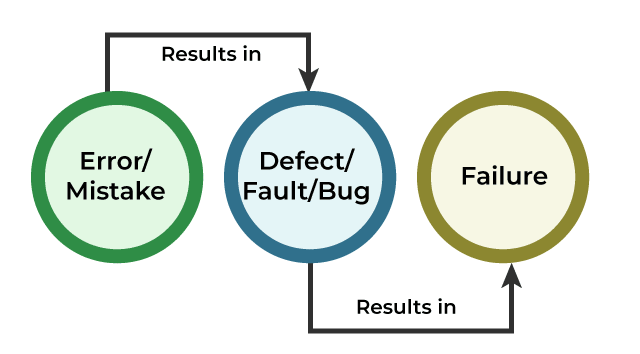
People often use bug, defect, and error interchangeably, but they describe different stages of the same problem. Understanding the difference helps QA teams communicate issues clearly and track them throughout the software development lifecycle.
| What it means | Example | |
|---|---|---|
| Error | An error is a human mistake made while writing code or defining logic | A developer writes i <= length instead of i < length |
| Defect | The flaw sitting in the code, found before execution | A code reviewer catches the off-by-one error before it merges |
| Bug | The defect confirmed through actual execution | A tester runs the loop, and it crashes on the last item |
Tired of chasing down bugs after they ship? BotGauge catches functional, UI, and regression bugs before they reach your users. Get Free 30-day Pilot
Why Understanding Different Types of Bugs Matters
Not every bug deserves the same response. A misaligned button and a broken payment flow are both “bugs,” but treating them the same way wastes time and, worse, ships the wrong one to production.
Classification tells you three things fast: which team should look at it, which test type would’ve caught it, and whether your test strategy has a hole in it. Skip the classification, and every bug report turns into “checkout broken,” which is useless the moment someone reopens the ticket six months later.
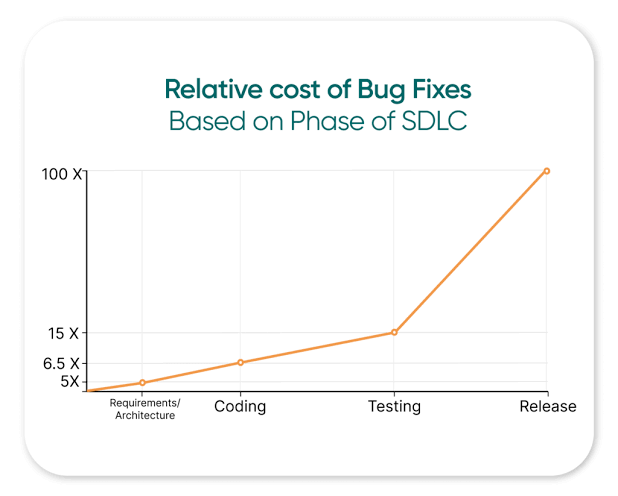
There’s a cost angle too. According to the IBM Systems Sciences Institute, the cost of fixing a bug increases significantly as it moves through the software development lifecycle. A defect identified during implementation costs about six times as much to fix as one caught during the design phase. If the issue reaches production, the cost rises even further, typically 4 to 5 times higher than fixing it during design and up to 100 times greater than addressing it earlier in the development process.
What Causes Bugs in Software?
Bugs rarely come from one bad decision. They stack up from a handful of recurring sources:
- Human error: Typos, off-by-one mistakes, misplaced conditionals. Everyone who writes code does this.
- Ambiguous or changing requirements: When specs are vague, developers guess. Guesses don’t match user expectations half the time.
- Environment mismatches: Code that works on a developer’s laptop and breaks in staging because of a different OS version, library, or config.
- Third-party and API changes: A vendor updates their API, and your integration silently breaks.
- Time pressure: Rushed releases skip edge-case testing. Edge cases are where bugs hide.
- Poor handoffs between teams: Design, dev, and QA working from different versions of the same document.
Different Types of Bugs in Software Testing
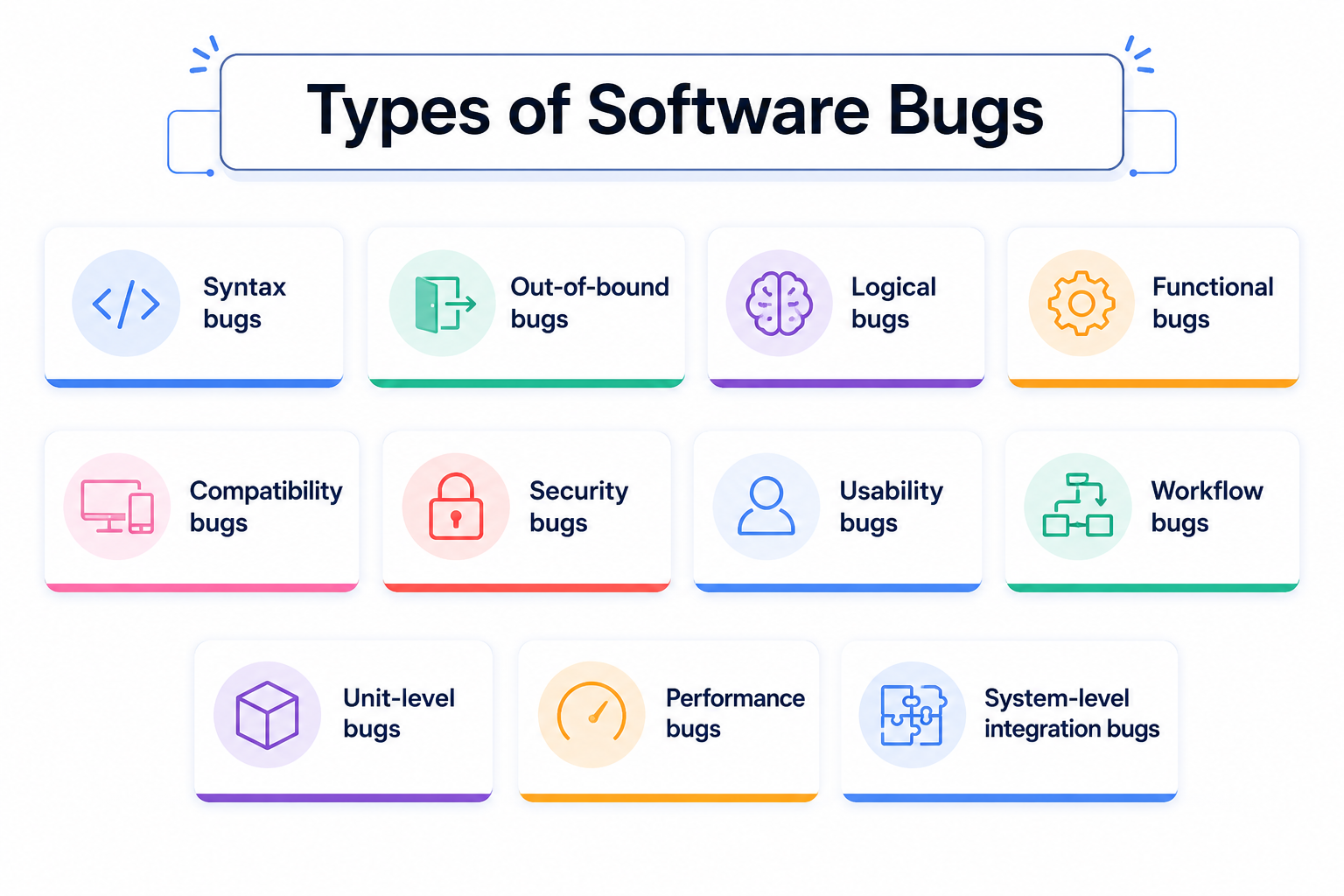
Software bugs come in many forms, from broken functionality and UI glitches to security flaws and performance bottlenecks. Each type affects software quality differently and requires a different testing approach to detect and fix. Understanding the various types of bugs in software testing helps QA teams prioritize testing, improve defect detection, and deliver more reliable software releases.
Classification by Nature
This is the most common lens: what part of the software actually broke.
- Functional bugs: A feature doesn’t do what the specification says. Example: the “Add to cart” button responds visually, but the cart remains empty.
- Logical bugs: The code runs fine, but the underlying logic is wrong. Example: a 10% discount is applied twice, slashing the price well below the intended price.
- UI/UX bugs: Visual or interaction problems: overlapping text, broken responsive layouts, a confirm dialog that looks like a cancel dialog.
- Performance bugs: Slow load times, memory leaks, crashes under load. Anything that degrades speed or stability.
- Security bugs: Vulnerabilities that expose data or let attackers in: SQL injection, weak authentication, unvalidated input.
- Compatibility bugs: Works on Chrome, breaks on Safari. Works on Android 14, crashes on Android 11.
- Usability bugs: The feature works, but users can’t figure out how to use it. Confirmed through real user testing more often than automated checks.
- Syntax bugs: A missing bracket or semicolon that stops code from compiling at all. Usually the easiest to catch, but can halt a whole build.
- Data bugs: Wrong content, broken links, mismatched labels, or corrupted values – not a functionality problem, a content and data-integrity one.
- Integration bugs: Two modules work fine on their own but fail together. Example: payment gateway returns success, but the order system marks it failed due to a schema mismatch.
- Regression bugs: A feature that worked yesterday breaks after an unrelated code change. The classic “we fixed one thing and broke two.” Explore how BotGauge automated 80% of regression in one week for Kitsa.
- Unit-level bugs: Errors inside the smallest testable piece of code, a single function or method. Caught (or missed) during unit testing.
- Boundary bugs: The system chokes on inputs at the edge of what it’s built to handle. A zip code field accepting 20 characters instead of 6. A field crashing on 10,000 pasted characters.
- Workflow bugs: The multi-step process itself breaks, even if individual screens work. A checkout flow that skips the shipping step under specific conditions.
- Concurrency bugs: Two processes or users hitting the same resource at once, causing race conditions or data corruption. Notoriously hard to reproduce.
- Localization bugs: Text overflow in translated languages, wrong currency formats, date fields that misread day/month order by region.
Classification by Severity
Severity measures damage: how badly the bug hurts the product if left alone.
| Severity | Description | Example |
|---|---|---|
| Critical | App-breaking. Core function is unusable. | Login fails for all users |
| Major (high) | Big feature broken, but a workaround exists | Export to PDF fails, but CSV export still works |
| Medium | Noticeable, but doesn’t block core tasks | A filter on a search page returns incomplete results |
| Minor (low) | Small functional glitch, low user impact | A tooltip shows outdated text |
| Cosmetic (trivial) | Visual only, no functional impact | A button is 2px off-center |
Classification by Priority
Priority measures urgency: how fast it needs to get fixed, based on business impact and timing, not just technical damage.
| Priority | Meaning |
|---|---|
| High | Fix now. Blocks a release or affects a large user base. |
| Medium | Fix in the current sprint or release cycle. |
| Low | Fix whenever there’s room. No pressing deadline. |
Severity Vs Priority: How They Work Together
Here’s where most teams get confused: severity and priority don’t move together. A bug can be severe but low priority, or minor but urgent.
| Severity | Priority | Example |
|---|---|---|
| High | High | A payment bug that leaks customer card data. Fix immediately. |
| High | Low | A crash in a feature that’s not live yet. Bad, but no rush. |
| Low | High | A typo in the homepage headline during a big product launch. Small bug, big visibility. |
| Low | Low | A misaligned icon on a rarely visited settings page. |
Severity is a technical judgment. Priority is a business judgment. Use both, and put them in every bug report as separate fields.
Skip the manual bug reports. BotGauge detects, logs, and documents bugs automatically
Start 30-day PilotClassification by Testing Level
Bugs also get sorted by where in the software development lifecycle they surface.
- Unit-level bugs, caught inside a single function during unit testing.
- Integration-level bugs, surfacing when modules connect.
- System-level bugs, found when the whole application runs end-to-end.
- UAT bugs, found by actual users or stakeholders during acceptance testing, often usability or workflow issues devs never hit.
- Production bugs, the ones that slipped through everything else. The most expensive kind, by far.
Comparison: Bug Type, Example, and Detection Method
| Bug type | Example | Caught by | Typical severity |
|---|---|---|---|
| Functional | Submit button does nothing | Functional/E2E testing | Major to critical |
| Logical | Discount applies twice | Unit testing, code review | Major |
| UI/UX | Overlapping text on mobile | Visual regression testing | Minor to medium |
| Performance | Page load takes 8 seconds | Load/performance testing | Major |
| Security | SQL injection in login form | Penetration testing | Critical |
| Compatibility | Breaks in Safari, works in Chrome | Cross-browser testing | Medium |
| Usability | Users can’t find the checkout button | Usability testing | Medium |
| Syntax | Missing semicolon halts build | Static analysis, compiling | Critical (build-blocking) |
| Data | Broken link in product description | Content/data QA | Minor |
| Integration | Payment succeeds, order marked failed | Integration testing | Critical |
| Regression | Old feature breaks after a new deploy | Regression testing | Varies |
| Unit-level | Date function returns invalid format | Unit testing | Medium |
| Boundary | Field crashes on max character input | Boundary value analysis | Medium |
| Workflow | Checkout skips a required step | End-to-end testing | Major |
| Concurrency | Two users overwrite the same record | Load/stress testing | Critical |
| Localization | Currency shows wrong symbol in EU | Localization testing | Minor |
You now know every type of bug that can hit your app. BotGauge makes sure you catch them before your users do.
Get your 30-day pilotTypes of Bugs Across Different Software Testing Methodologies
The bug types don’t change much between methodologies. Where and when you catch them does.
- In Agile and sprint-based testing, bugs are introduced and fixed quickly, which means regression bugs are a recurring headache. Every sprint adds new code on top of the last sprint’s code, and without a solid regression suite, old fixes quietly break.
- In Waterfall projects, bugs tend to surface late, often during UAT, because testing happens after development wraps rather than alongside it. That means workflow and usability bugs show up expensive and close to launch, when there’s little room to fix them without delaying the release.
- In DevOps and CI/CD pipelines, the goal is shift-left: catching syntax, unit-level, and integration bugs inside the pipeline before code ever merges. Automated checks run on every commit, which shrinks the window for a bug to reach staging, let alone production.
- Manual testing tends to catch usability and UI bugs that automation misses, because a human notices when something feels wrong even if it technically “works.” Automated testing is better at catching regression, performance, and boundary bugs at scale by running the same 500 checks on every build without getting tired.
- Black-box testing (testing without seeing the code) finds functional, UI, and usability bugs. White-box testing (testing with full code visibility) finds logical, unit-level, and syntax bugs because it requires examining the code itself.
Real-world Bugs That Cost Millions
A few bugs made it into engineering history because of what they broke.
1. Mars Climate Orbiter (1999)
NASA’s $125 million spacecraft disintegrated in the Martian atmosphere because one team’s software sent thrust data in pound-seconds while the navigation system expected Newton-seconds. A unit mismatch, technically a logical bug, that destroyed a spacecraft.
Y2K. Decades of software stored years as 2 digits to save memory. When 1999 rolled into 2000, systems worldwide risked reading “00” as 1900. A data bug baked into the design, decades before anyone paid the bill.
2. Knight Capital (2012)
A trading firm deployed new code to 7 of 8 servers, leaving the old test code live on the 8th server. That leftover code executed unintended trades, costing the company $460 million in 45 minutes. A deployment and configuration bug, not a coding one.
3. Ariane 5 (1996)
The rocket’s guidance software tried to convert a 64-bit number into a 16-bit space, causing overflow. The rocket self-destructed 37 seconds after launch. A textbook boundary bug, at rocket scale.
Every one of these traces back to a bug type covered above. The scale changes. The category doesn’t.
Stages of the Bug Life Cycle
A bug moves through a defined set of stages from discovery to closure:
- New: A tester finds the issue and logs it in the tracking system.
- Assigned: A developer or team gets ownership of the fix.
- Open/In progress: The bug is actively being worked on.
- Fixed: The developer has resolved the issue and updated the status.
- Retest: QA verifies the fix against the original steps to reproduce.
- Verified/Closed: The fix holds, and the bug is closed.
- Reopened: The fix didn’t hold, and the bug goes back to “open.”
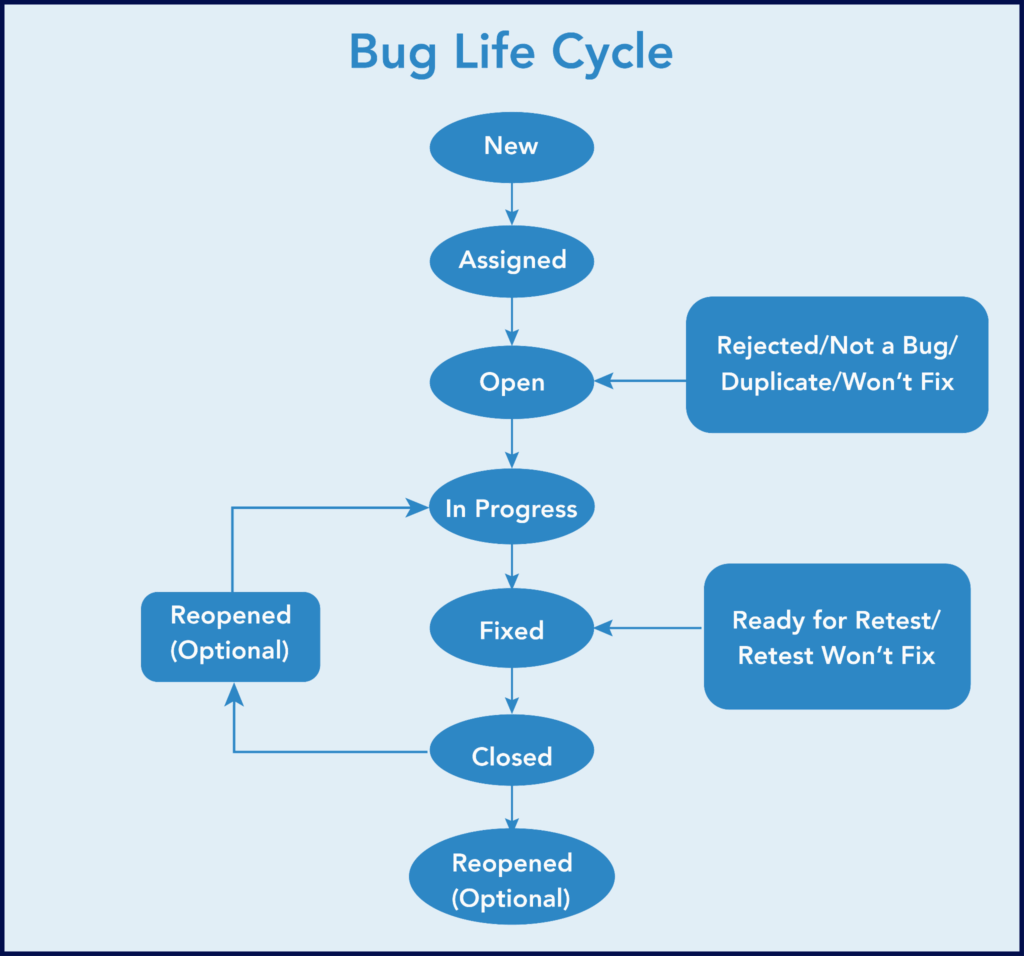
Bugs can also branch into deferred (valid, but fixed later), rejected (not a real bug), or duplicate (already logged) at various points in this cycle.
How Bugs Impact Software Development and Business
A single unresolved bug rarely stays contained to one line of code.
It slows releases, since teams hold back a launch to avoid shipping something broken. It inflates cost, since a bug caught in production needs a hotfix, a rollback plan, and support tickets instead of a 10-minute code review. And it erodes trust. Users who encounter a broken checkout flow once usually don’t come back to see if it’s fixed. A report states that 88% of users abandon an app after a bad experience.
The pattern holds across company size. A startup loses early users who won’t give it a second shot. An enterprise loses a support queue’s worth of hours and, in the worst cases, a compliance headache.
How to Find and Fix Bugs
By identifying defects early and addressing their root causes, teams can reduce rework, improve software quality, and prevent the same issues from recurring.
Manual Testing Techniques
Manual testing still catches what automation misses: usability friction, visual inconsistency, and the “this feels off” reactions a script can’t register. Core techniques include exploratory testing, boundary value analysis, and equivalence partitioning.
Automated and Agentic AI Testing
Automated testing runs the same checks on every build, which is exactly what regression and boundary bugs need. But traditional scripts break the moment a UI element moves, which is where most teams lose time to maintenance instead of actual testing.
Tired of test scripts breaking every time your code changes? BotGauge's self-healing agents fix that.
See how AQaaS worksAI test automation tools close that gap. Self-healing test scripts automatically adjust when a button moves or a selector changes, rather than failing and waiting for someone to fix the script. AI-generated test cases, built from a PRD or a Figma file, can cover functional, UI, and integration bugs without requiring a human to write each test manually.
Best Practices for Bug Management
- Shift testing left: Test earlier in the cycle, not after the build is “done.”
- Write clear test cases: Vague steps produce vague bug reports. Specific inputs, specific expected outputs.
- Run code reviews before merging: A second set of eyes catches logical and syntax bugs before they ever hit a test environment.
- Maintain a real regression suite: Every fixed bug becomes a permanent test case, so it can’t quietly come back.
- Track defect density and escape rate: Defect density shows how bug-heavy a module is. Escape rate shows how many bugs slip past QA into production. Both numbers tell you where your process is leaking.
- Hold a regular triage: Someone needs to sort new bugs by severity and priority on a set cadence, not whenever there’s spare time.
Key Elements of a Bug Report
A good bug report gets a developer from “what happened” to “fixed” without a single follow-up question.
| Field | What it captures |
|---|---|
| Bug ID | Unique identifier for tracking |
| Title | One-line summary of the issue |
| Description | What’s wrong, including the affected module |
| Steps to reproduce | Exact sequence to trigger the bug |
| Expected result | What should’ve happened |
| Actual result | What actually happened |
| Severity | Technical impact (critical to cosmetic) |
| Priority | Business urgency (high to low) |
| Environment | Browser, OS, device, app version |
| Attachments | Screenshots, screen recordings, console logs |
| Status | New, open, fixed, verified, closed, reopened |
| Reported by / date | Who found it, and when |
A report missing “steps to reproduce” is the major reason bugs bounce back and forth between QA and dev without getting fixed.
How BotGauge Helps You Catch Every Bug Type Faster
Most teams don’t have a bug-detection problem. They have a coverage problem. Writing and maintaining tests across various bug types, spanning UI, API, and functional layers, takes more hours than most QA teams get.
BotGauge fixes this with Autonomous QA as a Solution (AQaaS). Not another tool to configure. A QA function you plug in. AI agents generate test cases straight from your PRD, Figma files, or UX flows. When the DOM or workflow changes, self-healing tests adjust automatically rather than breaking and piling up in a backlog.
Teams reach 80% test coverage in 2 weeks, backed by a dedicated QA pod and a 10-minute response SLA. You pay for delivered test cases, not seats or headcount.
Conclusion
Software bugs are inevitable, but releasing them to production isn’t. Understanding the different types of bugs in software testing helps engineering teams build better test strategies, prioritize testing efforts, and catch defects before they impact users.
As applications become more complex with distributed architectures, frequent releases, and AI-driven features, manual testing alone can no longer provide the speed or coverage modern teams need. Automated, continuous testing plays a critical role in identifying functional, integration, performance, and security issues throughout the development lifecycle.
BotGauge takes this a step further by continuously testing real user workflows, adapting to application changes, and detecting defects before they reach production. The result is broader test coverage, faster releases, and reliable software quality without the overhead of maintaining test automation.
Frequently Asked Questions
What's the difference between a bug, a defect, and an error?
Can AI catch every type of bug?
How to Identify and Resolve Bugs?
What are some common Examples of these Bugs?
What is the difference between a bug and a defect?
Why do bugs reappear after being fixed?
How does Continuous Integration (CI) help in preventing bugs?
