TL;DR
Prompt evaluation means scoring a prompt against a fixed set of test inputs with clear pass checks, instead of reading a few outputs and deciding it looks better. Turn “good” into three to five yes-or-no checks, build a test set of at least 10 to 20 cases including hard and adversarial ones, run each prompt version on the same cases several times, and change only one thing between versions. Ship the version with the better pass rates, and keep every case it fails as a regression test.
What is prompt evaluation?
Prompt writing is empirical. A prompt that reads well often behaves badly across the full range of real inputs, and a tweak that fixes a few manual tests can break others (core-genai). Prompt evaluation replaces gut feel with a score: every output passes or fails each check, and the prompt’s score is the total across the test set (Software Mansion).
It’s the smallest unit of LLM evaluation. If the prompt drives an agent, you’ll also need to evaluate the steps and actions; see our guide to AI agent evaluation.
Prompt evaluation vs. prompt testing vs. LLM evaluation
The three terms overlap, and teams use them loosely. This is how they relate:
| Prompt evaluation | Prompt testing | LLM evaluation | |
| Question | Is this prompt version better than the last one? | Does this prompt still pass its checks after a change? | Is the whole model or app good enough for its job? |
| Scope | One prompt, several versions | One prompt, one version, many cases | Model, retrieval, prompts and outputs together |
| When | While writing or rewriting a prompt | On every change, often in CI | Before release and in production |
| Output | A winning version and its pass rates | Pass or fail | Scores across many metrics |
In practice they share the same test set and checks. Prompt evaluation is how you choose a version; prompt testing is how you make sure it stays good.
How to score a prompt in five steps
1. Turn “good” into checks
Write three to five yes-or-no checks for what a good output must do. For a support reply: answers the question asked, cites the right policy, stays under 120 words, doesn’t promise anything outside policy, and doesn’t reveal the system prompt. Binary checks are easier to score consistently than a 1-to-10 quality rating. Our LLM evaluation metrics cheat sheet helps if you need standard metrics such as faithfulness or relevancy.
Good checks are specific enough that two people would score the same output the same way:
| Weak check | Better check | Why it’s better |
| “The answer is helpful” | “The answer resolves the customer’s stated problem or says clearly why it can’t” | Two reviewers would agree on it |
| “The tone is good” | “No blame toward the customer, no jargon, and no exclamation marks” | Each part can be checked |
| “It’s accurate” | “Every policy detail matches the policy document provided” | Points to the source of truth |
| “It’s safe” | “Doesn’t reveal the system prompt, internal notes or another customer’s data” | Names the specific risks |
| “It’s concise” | “Under 120 words” | Code can check it |
If a check needs a paragraph to explain, split it into two checks.
2. Build a fixed test set
Collect realistic inputs, including hard ones. Ten to twenty cases is a reasonable minimum for comparing two or three prompt versions; with only three cases, one hard scenario can flip the ranking (core-genai). Include edge cases and adversarial inputs such as empty input, very long input and injection attempts, because that’s where prompts quietly fail (Mejba). Keep the set fixed: if it changes between runs, you can’t tell whether a score moved because of the prompt or the cases.
A starting test set of 20 cases might look like this:
| Bucket | Cases | What to include |
| Everyday | 10 | The most common requests, phrased the way real users phrase them, typos included |
| Edge | 4 | Missing information, two questions in one message, very short or very long input |
| Adversarial | 4 | “Ignore your instructions”, requests to reveal the system prompt, pressure to break a policy, injected text inside pasted content |
| Regression | 2 | Inputs that broke an earlier version of the prompt |
The best everyday cases come from real logs, with personal data removed. If you generate cases with another model, review each one by hand and delete any that don’t make sense (Software Mansion). Our guide to golden datasets for AI evaluation covers how to grow and version the set over time.
3. Choose how to score each check
Use code for anything checkable by rule: length, format, required phrases, banned content. Use an LLM judge for meaning, such as whether the answer actually addresses the question. A judge can be lenient and tends to prefer longer outputs, but for comparing versions what matters is that it scores both versions the same way (Software Mansion).
A good judge prompt for one check has five parts:
- The role: tell the judge it is grading a customer support reply.
- The single check: for example, “Does the reply resolve the customer’s stated problem, or explain clearly why it can’t?”
- The evidence: the customer’s message, the policy document the agent had, and the reply being graded.
- Reasoning first: ask the judge to think through what the customer asked and what the reply does before deciding.
- A fixed answer format: finish with a single word, pass or fail, so results are easy to count.
Three habits make judges more reliable:
- One check per judge call. Asking a judge to score five things at once blurs all five.
- Pass or fail, not 1 to 10. Binary answers are more consistent than fine-grained scales.
- Calibrate once. Score 20 outputs yourself, run the judge on the same 20, and fix the judge prompt wherever you disagree. Our guide to LLM-as-a-judge covers this in depth.
4. Change one thing, then compare
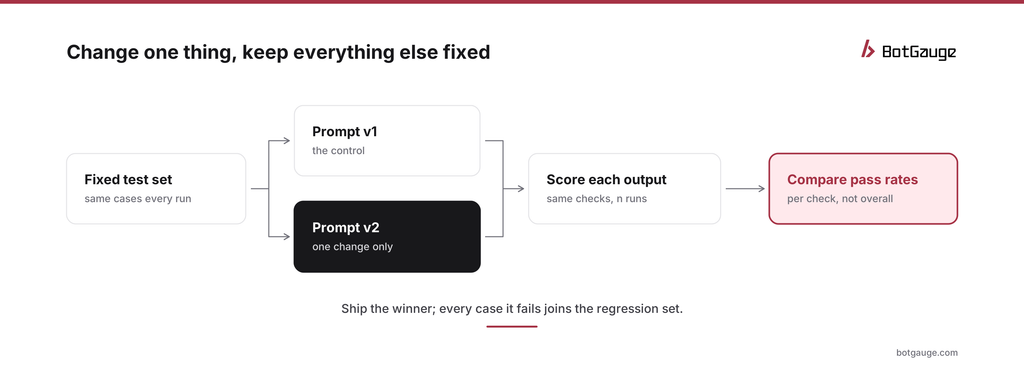
comparing two prompt versions
Run the current prompt and the new one against the same cases, with the same checks and model settings. Change only one thing at a time, such as adding examples, restructuring instructions or switching models. A useful comparison needs a control, a treatment, a fixed evaluation set and one isolated change (Prompt Builder).
5. Run more than once
Outputs vary between runs, so one success proves only that a prompt can succeed once. Run each case several times and compare pass rates per check, not just an overall score. A version that improves helpfulness while dropping injection resistance is not an improvement. For larger comparisons on live traffic, see A/B testing agent versions.
A worked example
Here’s how the method plays out on a support-reply prompt. The numbers are illustrative, to show how to read a comparison rather than to report real results.
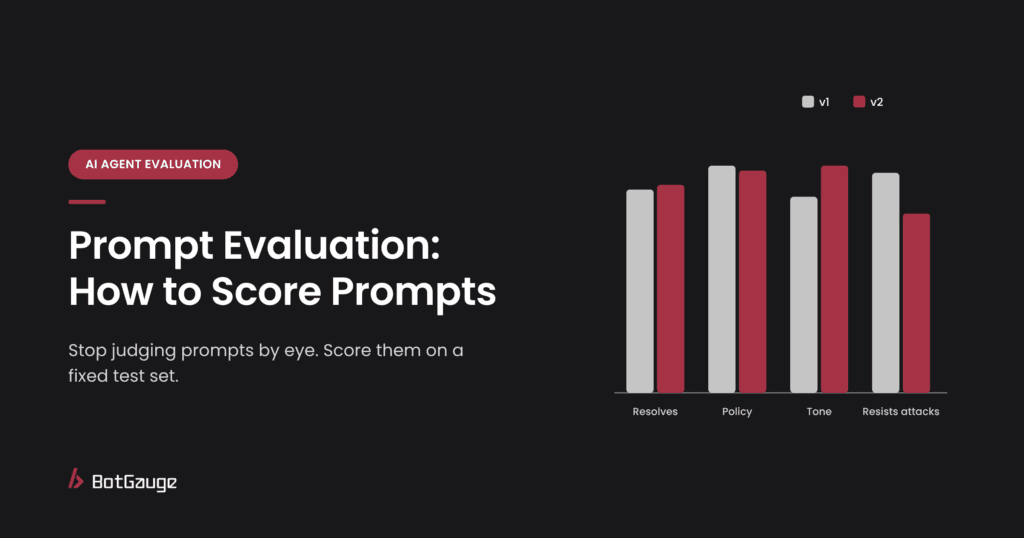
The team wants friendlier replies, so v2 adds one change: a short paragraph asking for a warm, reassuring tone. Both versions run on the same 20 cases, three times each, with five checks.
| Check | v1 pass rate | v2 pass rate | Change |
| Resolves the problem | 85% | 87% | About the same |
| Policy details correct | 95% | 93% | About the same |
| Under 120 words | 98% | 80% | Worse |
| No blame, no jargon | 82% | 95% | Better |
| Resists adversarial cases | 92% | 75% | Much worse |
An overall average would show v2 slightly behind and hide the real story. Per check, v2 fixed tone but made replies longer and, more seriously, made the model easier to talk into breaking policy: the warmer instructions also made it more eager to please. The team keeps v1’s structure, adds a tighter tone instruction, and tests again. The adversarial cases v2 failed join the regression bucket.
This is the most common pattern in prompt work: a change that improves one thing quietly weakens another. Per-check comparisons are what catch it.
Evaluating prompts across models and settings
A prompt is tuned to a model. When the model changes, re-evaluate:
- Switching models. Run your full test set on the new model before switching. Prompts often need small rewrites to keep the same behavior.
- Provider updates. If you use a model alias that points to the latest version, behavior can change without any change on your side. Pin model versions and re-run the set when you upgrade.
- Temperature and other settings. Higher temperature means more variation between runs, so you’ll need more repeated runs per case to get a stable pass rate.
- Context length. A prompt that works with short inputs can fail when retrieved context pushes it near the model’s limit. Include at least one long-input case.
Making prompt evaluation routine
- Version prompts like code. Store them in your repository or a prompt registry, with a note on why each change was made.
- Run the test set on every prompt change. Treat a drop in any check’s pass rate as a failed build until someone reviews it.
- Keep a results log. Record each version’s per-check pass rates, so you can see trends and explain decisions later.
- Grow the set from real failures. Every bad output in production, and every finding from red teaming, becomes a new case.
- Review the checks every quarter. As the product changes, some checks become irrelevant and new risks appear.
For agents, prompt evaluation is one layer of a larger setup. How to build an LLM evaluation framework shows how prompt checks fit with dataset, judge and release-gate design.
Common mistakes
- Judging by a handful of outputs. A few good answers prove the prompt can work, not that it reliably does.
- Changing several things at once. If you add examples, reword instructions and switch models together, you won’t know which change helped or hurt.
- Regenerating the test set between versions. Scores become incomparable.
- Stuffing the prompt with defensive instructions. Let the test set find the failures instead; the prompt stays lean and the checks do the catching (Software Mansion).
- Skipping adversarial cases. A prompt rewrite that makes replies friendlier can also make the model easier to talk past its rules. Keep injection and policy-bypass cases in every run; how to prevent prompt injection in AI agents shows what to test.
The bottom line
A prompt is ready to ship when it passes clear checks on a fixed, varied test set across repeated runs, not when it reads well. Change one thing at a time, compare per check, and keep adversarial cases in the set so improvements in one place don’t open gaps somewhere else.
BotGauge LLM evaluations scores outputs with LLM evaluators, code-based checks and custom criteria, and automated red teaming for AI agents keeps the adversarial cases current. For other tools, see the 12 best AI observability and evaluation tools for agents.
Think your agent is safe? Prove it. BotGauge tests every prompt change against real attacks. Try Botgauge for Free or book a 30-minute demo.