TL;DR
LLM evals (short for evaluations) are structured tests that check whether an AI feature gives good answers. Each eval runs a set of test inputs through your app, checks every output against a rule for what “good” means, and reports how many passed. They replace “it looks fine to me” with a number you can track. To start, you need about 20 realistic test questions, three to five clear checks, and a spreadsheet. Run them before every change, and grow the set every time something goes wrong.
What are LLM evals?
LLM evals are structured tests that measure the quality of a language model or an app built on one (TrueFoundry). A useful way to think about them: unit tests for AI outputs. Instead of checking whether a function returns the right number, you check whether a reply is accurate, helpful, safe, or whatever matters for your use case (Futurice).
The catch is that AI answers are fuzzy. There’s rarely one exact correct reply, so evals check whether an answer meets a standard, not whether it matches a sentence word for word.
Why evals matter
• AI is unpredictable. The same question can get a different answer each time, because language models are non-deterministic (Conffab). You can’t check one answer and assume the next will match.
• Demos aren’t production. A model can handle carefully chosen examples beautifully, then stumble on the messy questions real users send (ByteByteGo).
• Every change can break something. A new prompt, a model upgrade or a tweak to the documents the AI reads can fix one problem and create two others. Without evals, you only find out from users.
• Decisions need evidence. Which model should we use? Is the new prompt better? Is it ready to launch? Evals turn those debates into numbers.
Model evals vs. product evals
You’ll see two kinds of evals discussed. Model evals compare language models on general tasks, usually through public benchmarks. Product evals test your whole app, including your prompts, documents and tools, on your own tasks (Evidently). Benchmarks help you pick a model. Only product evals tell you whether your feature works. This guide is about product evals.
How an eval works
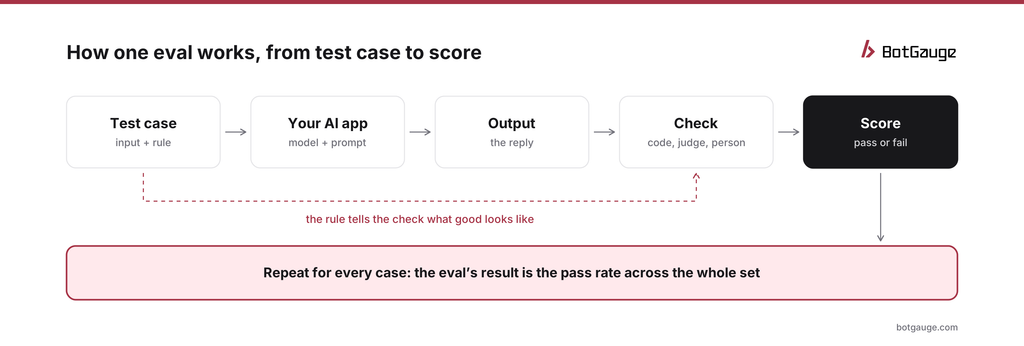
anatomy of an LLM eval
Every eval has the same parts. A test case is an input plus a rule for what a good output looks like. Your AI app produces an output. A check compares the output with the rule, and gives a score, usually pass or fail. Run that across all your cases, and the eval’s result is the pass rate.
If your AI does more than answer, such as calling tools or taking actions, you’ll eventually evaluate those steps too. Our guide to AI agent evaluation covers that next level.
The main types of evals
Evals differ in two ways: who or what does the checking, and when they run.
Who does the checking
| Checker | How it works | Good for | Watch out for |
| Rules | Simple, automatic checks, such as length, required words, banned words or format | Anything with a clear yes or no | Can’t judge meaning |
| AI judge | Another AI model reads the output and decides whether it meets a written standard | Meaning: is it relevant, accurate to the source, polite? | Can be too lenient; check it against people |
| People | A person reviews outputs and marks them | Setting the standard; tricky or high-stakes cases | Slow and costly at scale |
Most teams combine all three: rules for what’s easy to check, an AI judge for meaning, and people to set the standard and check the judge. Our guide to LLM-as-a-judge explains how to make AI judges trustworthy.
When they run
Offline evals run before anything reaches users, on a fixed set of test cases. Online evals score a sample of real conversations after launch. Teams that only run online evals ship changes without knowing in advance whether they made things better or worse, so you need both (Monte Carlo). For beginners, offline comes first.
Words you’ll hear
| Term | Plain meaning |
| Test case | One input plus a rule for what a good output looks like |
| Test set, eval set or golden dataset | Your collection of test cases, kept the same between runs |
| Check, scorer or metric | The thing that decides if an output passes |
| Pass rate | The share of test cases that passed |
| Ground truth or reference answer | A known correct answer to compare against, when one exists |
| LLM-as-a-judge | Using an AI model to score another model’s output |
| Hallucination | A confident answer that isn’t supported by facts or sources |
| Regression | Something that used to work and now doesn’t |
| Benchmark | A public, general test used to compare models, not your app |
| Red teaming | Deliberately trying to make the AI misbehave, to find weaknesses |
For a full list of metrics and what each one measures, see our LLM evaluation metrics cheat sheet.
Your first eval, step by step
Here’s a first eval anyone on the team can run with a spreadsheet. The example is a help assistant for an online store.
1. Decide what “good” means
Write three to five yes-or-no checks. For the store assistant: answers the question asked; facts match the store’s help pages; stays under 100 words; never promises refunds or discounts the policy doesn’t allow. Clear checks matter more than clever ones. A check is clear when two people would mark the same answer the same way.
2. Collect 20 test questions
Use real questions from your support inbox or chat logs, with personal details removed. Include a mix: about 12 everyday questions, 4 tricky ones (vague, two questions in one, missing information), and 4 that try to push the assistant off course, such as asking it to ignore its rules or promise a refund. If you don’t have real questions yet, ask colleagues to write them the way customers would, typos and all.
3. Set up the sheet
One row per question. Columns for the question, the assistant’s answer, and one column per check, plus a notes column. That’s your eval.
4. Run and mark
Paste each question into the assistant, paste the answer into the sheet, and mark each check pass or fail. Do it yourself the first time; it’s the fastest way to learn what your checks really mean. Run each question twice, because answers vary.
5. Read the results
Work out the pass rate for each check, not just an overall score. A result like “relevance 95%, policy 70%” tells you exactly what to fix. Then read every failure and write a one-line reason in the notes. Patterns appear quickly: the same kind of question failing, or the same rule being bent.
6. Fix, re-run, repeat
Change one thing, such as the prompt or the help pages the assistant reads, and run the same 20 questions again. If the pass rates go up and nothing else drops, keep the change. Every new failure you see in real use becomes question 21, 22 and so on.
That’s a real eval. It’s small, but it already beats “it seemed fine when I tried it”.
Where to go next
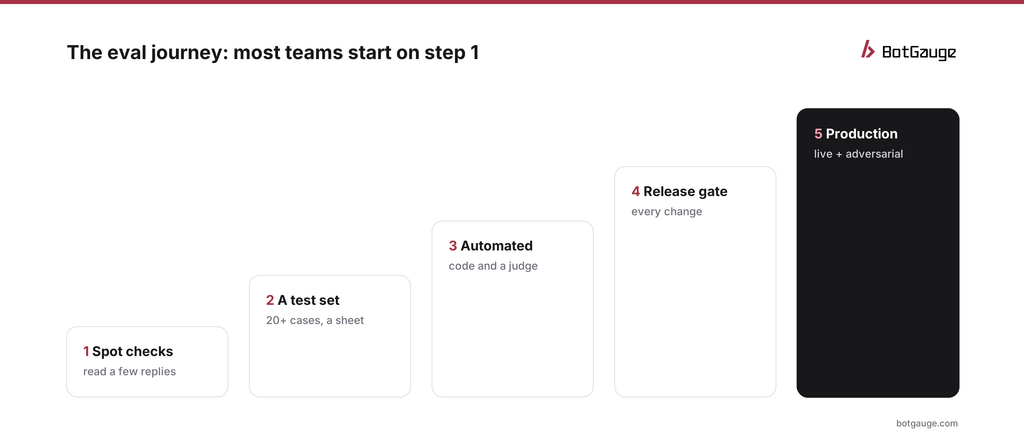
the eval journey in five steps
Most teams move through the same five steps. Spot checks become a test set; the test set gets automatic checks and an AI judge; the eval runs on every change and blocks bad releases; and finally the same checks score live traffic, alongside deliberate attacks that find failures before users do. How to build an LLM evaluation framework covers steps 3 and 4, and golden dataset for AI evaluation shows how to grow your test set.
You don’t need to reach step 5 on day one. Moving from step 1 to step 2 is the biggest single improvement most teams make.
Beginner mistakes to avoid
- Testing only the easy questions. If every test case is a question your AI already handles well, the eval will always pass and teach you nothing. Include tricky and adversarial ones from the start; how to prevent prompt injection in AI agents shows the kind of inputs to include.
- Vague checks. “Is it good?” can’t be scored consistently. “Does it answer the question asked?” can.
- Changing the test set between runs. If the questions change, you can’t tell whether the AI improved or the test got easier.
- Trusting one run. Answers vary. Run each question at least twice before deciding.
- Looking only at the overall score. One number hides which check is failing. Report each check separately.
- Waiting for the perfect setup. Twenty questions in a spreadsheet this week beats a sophisticated platform next quarter.
The bottom line
Evals are how you know your AI works, and keep knowing it as things change. Start small: a few clear checks, about 20 realistic questions including hard ones, and a spreadsheet. Run them before every change, read the failures, and add every new problem to the set. Everything else, from automated judges to release gates, builds on that habit.
When you’re ready to automate, BotGauge LLM evaluations runs your checks with AI evaluators, rules and custom criteria, and BotGauge LLM red teaming finds the hard test cases for you, which automated red teaming for AI agents explains. To compare tools, see the 12 best AI observability and evaluation tools for agents; for how teams use BotGauge, our customer stories.
Think your agent is safe? Prove it. BotGauge turns every failure it finds into an eval. Start for free or book a 30-minute demo.