TL;DR
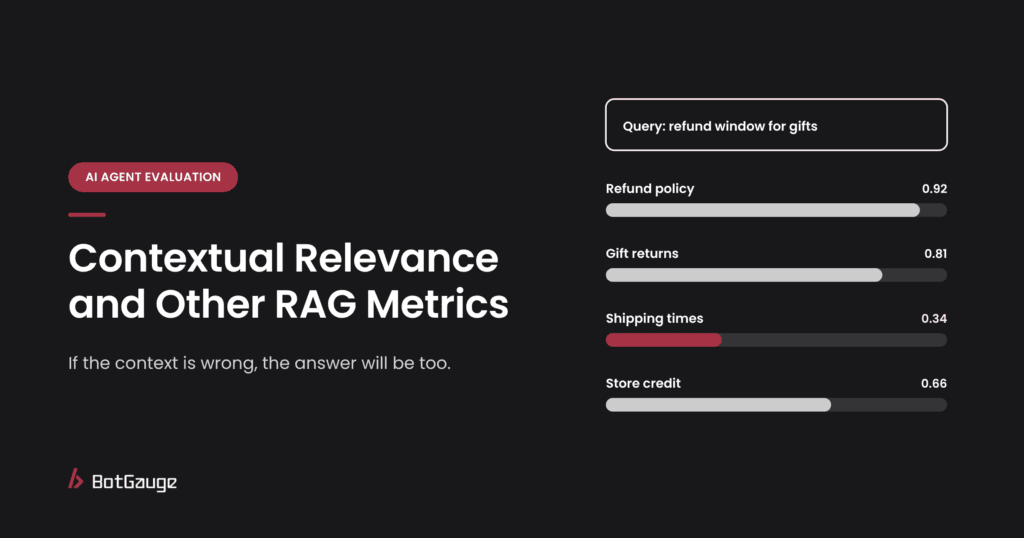
Contextual relevance (also called contextual relevancy) measures how much of what a RAG system retrieved is actually relevant to the question: its signal-to-noise ratio. It’s one of three retrieval metrics that work best together. Contextual relevancy tells you how much noise is in the context, contextual precision tells you whether the relevant chunks are ranked first, and contextual recall tells you whether everything needed was found at all. Read them together: each one points to a different fix, from chunking to reranking to search.
What is contextual relevance?
Contextual relevancy evaluates the overall relevance of the information in the retrieved context for a given question, typically using an LLM judge to measure its signal-to-noise ratio (Galtea). In practice, the judge breaks the retrieved chunks into statements, marks each one as relevant or not to the question, and reports the share that’s relevant.
It matters for two reasons. First, irrelevant context distracts the generator: a model handed five chunks, two of them off topic, is more likely to blend in the wrong facts. Second, a low score can signal that the retriever is misaligned with what users actually mean, pulling in vaguely related or off-topic material even when each piece is accurate (Codex and Compass). Noise also costs money, since every irrelevant chunk is tokens you pay for.
It’s part of the wider picture covered in RAG evaluation: metrics and test design, and of AI agent evaluation when retrieval is one of an agent’s tools.
Contextual relevancy, precision and recall
The three metrics answer different questions about the same retrieved list:
| Metric | Question it answers | How it’s scored | Needs a reference answer? |
| Contextual relevancy | How much of what was retrieved is on topic? | Relevant statements divided by all statements | No |
| Contextual precision | Are the relevant chunks ranked above the irrelevant ones? | A ranking-weighted precision across positions | Usually yes |
| Contextual recall | Did retrieval find everything the right answer needs? | Share of the expected answer’s claims supported by the context | Yes |
Contextual precision places extra weight on the top results, using a weighted cumulative precision, so a relevant chunk at rank 1 counts for more than one at rank 5 (Confident AI). Contextual recall works the other way round: it splits the expected answer into claims and checks what share the retrieved context supports (Assay).
A worked example
Two retrievers answer the same question and both return five chunks, three of them relevant. They tie on relevancy and recall, but not on precision.
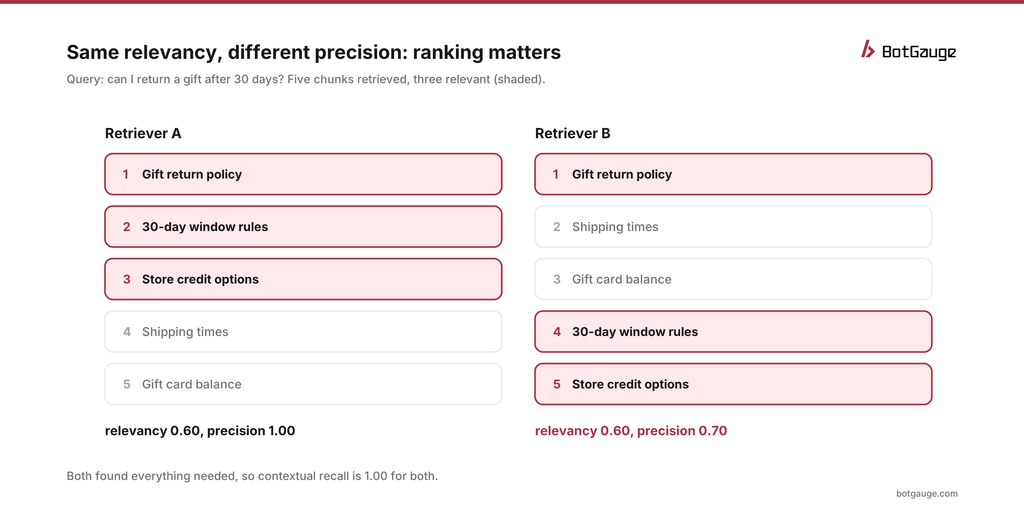
contextual relevancy vs contextual precision, worked example
Retriever A puts all three relevant chunks first. Its precision is perfect. Retriever B finds the same chunks but buries two of them under shipping times and gift card balances. Averaging precision at each relevant position gives (1/1 + 2/4 + 3/5) / 3, or about 0.70. Same documents, same relevancy, same recall; the difference is entirely in the ordering.
Why it matters: many systems only pass the top two or three chunks to the generator, or the model gives more weight to what comes first. Retriever B’s answer is more likely to miss the 30-day rule.
Other retrieval metrics you’ll see
| Metric | What it measures | When to use it |
| Precision@k | Share of the top k results that are relevant | Quick check on a labeled set |
| Recall@k | Share of all relevant documents that appear in the top k | Checking whether k is large enough |
| Hit rate | Share of questions where at least one relevant document appears in the top k | Simple pass or fail per question |
| Mean reciprocal rank (MRR) | How high the first relevant result appears, on average | When one good result is enough |
| NDCG | Ranking quality, with more credit for relevant results near the top | Comparing rerankers |
| Noise sensitivity | Whether answers stay correct when irrelevant chunks are mixed in | Testing generator robustness to bad context |
The classic metrics need labeled relevant documents for each question. The contextual metrics use an LLM judge instead, which makes them easier to run but means the judge needs checking; see LLM-as-a-judge.
Reading the scores together
One retrieval metric on its own is easy to game. Precision alone rewards returning one perfect chunk; recall alone rewards returning everything. The scores only mean something side by side (Future AGI):
| Relevancy | Precision | Recall | What it means | What to try |
| High | High | High | Healthy retrieval | Leave it alone; watch for drift |
| High | High | Low | Focused but missing facts | Retrieve more chunks, or improve multi-part query handling |
| Low | High | High | Right chunks first, but too much noise after them | Retrieve fewer chunks, or filter low-scoring ones |
| Medium | Low | High | Everything found, badly ordered | Add or tune a reranker |
| Low | Low | Low | Search isn’t matching user intent | Revisit chunking, embeddings and search method |
A useful shortcut: precision mostly tunes the reranker, while recall mostly tunes the retriever (Future AGI).
How to improve each score
To raise contextual relevancy:
• Use smaller, more focused chunks, so each one covers a single topic.
• Retrieve fewer chunks, or drop those below a relevance threshold.
• Add metadata filters, such as product, region or document date, so off-topic content never enters the candidate set.
To raise contextual precision:
• Add a reranker that reorders candidates using the full question, not just keyword or vector similarity.
• Combine keyword and vector search (hybrid search), so exact terms like product codes rank properly.
• Rewrite vague user questions into clearer search queries before retrieving.
To raise contextual recall:
• Retrieve more candidates before reranking, then keep the best.
• Split multi-part questions into separate searches.
• Fix gaps in the knowledge base itself; no retriever can find a document that doesn’t exist.
Change one thing at a time and rerun the same test set, so you know which change helped. Our guide to golden datasets for AI evaluation covers how to keep that set stable.
Relevant isn’t the same as safe
Retrieval metrics measure whether a chunk is on topic. They don’t measure whether it’s trustworthy. A poisoned document, written to look exactly like the content a user is asking about, will score as highly relevant, and may carry hidden instructions the generator then follows. That’s why RAG test sets need adversarial cases, not just relevance labels. How to prevent prompt injection in AI agents explains the attack, how to build an AI red teaming dataset for agents shows how to test for it, and automated red teaming for AI agents covers running those tests at scale.
Which metrics should you track?
• Starting out, no labeled data: contextual relevancy plus faithfulness of the final answer. Both work without reference answers.
• With a labeled test set: add contextual precision and recall, and track them together.
• Comparing rerankers or search setups: NDCG or MRR on a labeled set, alongside contextual precision.
• In production: contextual relevancy on a sample of live traffic, plus the share of questions where retrieval returns nothing useful.
The bottom line
Contextual relevance tells you how much noise your retriever brings back. On its own, it can hide a badly ordered list or a missing fact, so track it with contextual precision and recall, read the three together, and let them point you to the right fix. Then test what happens when a relevant-looking chunk is actually hostile.
BotGauge LLM evaluations scores retrieval and answers with LLM evaluators and custom criteria. For tool comparisons, see the 12 best AI observability and evaluation tools for agents.
Think your agent is safe? Prove it. BotGauge tests what your RAG agent does with hostile documents. Try Botgauge for Free or book a 30-minute demo.