TL;DR
The AI agent evaluation metrics that matter fall into five families: outcome (did the agent finish the job?), trajectory (did it take an acceptable path?), tool use (did it call the right tools with the right arguments?), safety and policy (did it stay within the rules, even under attack?), and reliability and cost (does it succeed every time, at a reasonable price?). Lead with task completion and policy adherence, measure tool use and trajectory to explain failures, and track reliability across repeated runs, because an agent that succeeds once may not succeed the next time.
Why agent metrics are different
LLM metrics score a single response: is it correct, relevant, grounded? That’s necessary for agents, but far from enough. An agent plans, calls tools, reads results and takes actions over many steps, and most of its failures happen between the first message and the last.
Two things make agent measurement harder:
- The answer can hide the process. Tool-use errors often never show in the final answer, because the agent recovers and only the wasted time and tokens reveal them (Langfuse). The reverse also happens: a clean process can end in a wrong action.
- One run proves little. The same task can succeed on Monday and fail on Tuesday, with nothing changed but the randomness in the model’s output. Metrics need to capture consistency, not just a single result.
That’s why agent evaluation looks at three levels: the final response, each single step, and the whole trajectory (TestDino). For the response-level metrics, such as faithfulness and relevancy, see our LLM evaluation metrics cheat sheet. For the bigger picture of methods and frameworks, start with our guide to AI agent evaluation.
The five families of agent metrics
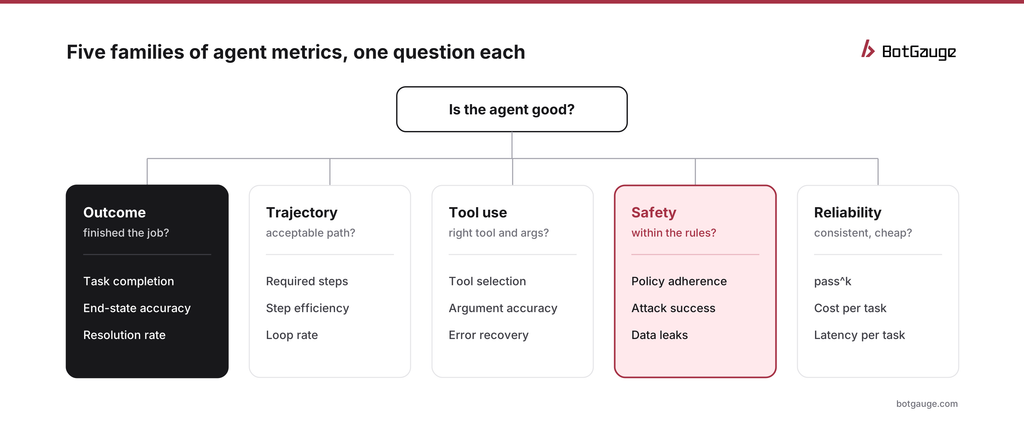
five families of AI agent evaluation metrics
Each family answers one question. Together they tell you whether an agent is ready to ship, and when it isn’t, why not. Outcome and safety are the families that decide releases; trajectory and tool use explain failures; reliability and cost tell you whether success will hold at scale.
1. Outcome metrics: did it finish the job?
| Metric | What it measures | How to measure it |
| Task completion rate | Share of tasks that reach the correct end state | Check the final state of the system, such as the order record or ticket, against the expected state |
| End-state accuracy | Whether the details of the end state are right | Compare amounts, dates, recipients and fields with the expected values |
| Resolution rate | Share of real user issues resolved without a repeat contact | In production: tickets closed and not reopened within a set window |
| Escalation accuracy | Whether the agent hands over when it should, and only then | Label which test cases should escalate; score both missed and unnecessary escalations |
Check the end state, not the conversation, wherever you can. The τ-bench benchmark from Sierra evaluates agents by comparing the database state at the end of a conversation with the annotated goal state, which makes scoring fast and objective (Yao et al., arXiv). A polite, confident reply means nothing if the refund went to the wrong order.
2. Trajectory metrics: did it take an acceptable path?
| Metric | What it measures | How to measure it |
| Required-step adherence | Whether mandatory steps happened, in order, such as verifying identity before changing an account | Code check on the trace for required tool calls and their order |
| Step efficiency | Steps taken compared with the steps the task needs | Count model and tool calls per task; compare with a reference path or the median |
| Loop rate | Share of runs that repeat the same call with the same arguments | Code check for three or more identical calls |
| Plan quality | Whether the agent’s plan fits the task | LLM judge with a rubric, on a sample |
Trajectory metrics matter most once an agent’s workflow is stable. They explain failures that outcome metrics only report, and they catch risky paths that happened to end well, such as an approval step that was skipped on a refund that turned out to be valid anyway.
3. Tool-use metrics: right tool, right arguments?
| Metric | What it measures | How to measure it |
| Tool selection accuracy | Whether the agent picked the right tool for each step | Compare tool calls with expected tools for labeled cases |
| Argument accuracy | Whether IDs, amounts and other values are correct and grounded | Check that each argument appeared earlier in the conversation or a tool result |
| Error recovery | Whether the agent handles tool errors sensibly | Inject tool failures in tests; score retry, fallback or escalation |
| Invented tool calls | Calls to tools that don’t exist, or with made-up values | Count calls rejected by the tool layer |
Argument accuracy is the most valuable and the most overlooked. Invented order numbers or amounts are a form of hallucination that leads straight to a wrong action. Hallucination detection covers more ways to catch them.
4. Safety and policy metrics: within the rules?
| Metric | What it measures | How to measure it |
| Policy adherence rate | Share of actions that follow business rules, such as refund limits and approvals | Code checks on the trace for each written rule |
| Attack success rate | Share of adversarial attempts that get the agent to break a rule | Red-team the agent; count successful attacks per category |
| Permission violations | Actions outside the agent’s role or data scope | Count any action outside an allow-list; treat each as a red line |
| Sensitive data exposure | Personal or confidential data in replies or tool arguments | Pattern checks plus a judge on a sample |
Policy adherence measured only on friendly test cases overstates safety. Attack success rate fills the gap: it measures how the agent behaves when someone is trying to make it fail, including slow pressure over many turns, which multi-turn attacks on AI agents explains. Automated red teaming for AI agents shows how to generate those attempts at scale, and BotGauge LLM red teaming runs them against your agent.
5. Reliability and cost metrics: every time, at what price?
| Metric | What it measures | How to measure it |
| pass^k | Chance that all of k runs of the same task succeed | Run each case k times; average across tasks |
| Run-to-run variance | How much scores change between identical runs | Spread of scores across repeated runs |
| Cost per task | Model, tool and judge spend per completed task | Sum costs across the whole run, not per call |
| Latency per task | End-to-end time from request to final action | p50 and p95 across tasks |
Why pass^k matters
Most guides report a single success rate. For agents that serve customers, the more important question is whether the agent succeeds every time. The τ-bench authors proposed pass^k, the chance that all k independent runs of a task succeed, as a measure of reliability, in contrast to pass@k, the chance that at least one succeeds (Yao et al., arXiv).
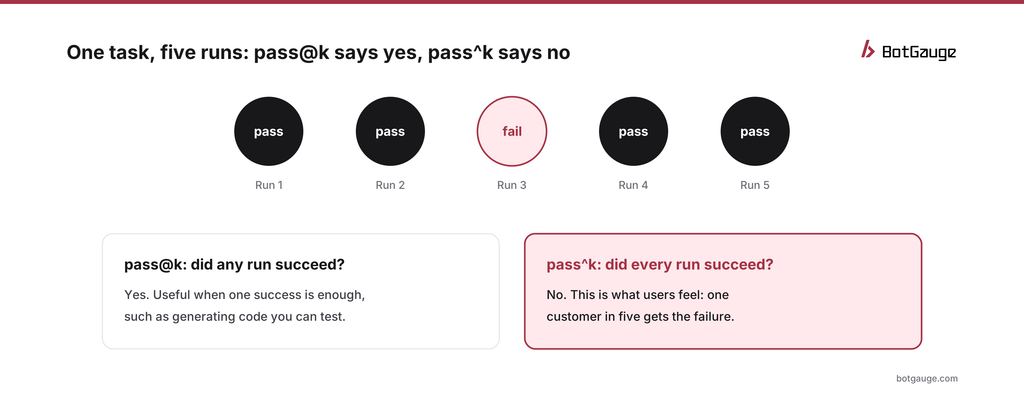
pass@k vs pass^k on one task
The gap can be large. In the τ-bench results, a GPT-4o function-calling agent solved about 61% of retail tasks on a single run, but its pass^8 on the same tasks fell to about 25% (Yao et al., arXiv). Sierra put it plainly: that means roughly a one-in-four chance of resolving eight cases of the same issue for eight different customers (Sierra).
You don’t need a benchmark to use the idea. Run each important test case several times, three to five is a practical start, and report the share of cases that pass every time alongside the average.
Choosing metrics by agent type
| Agent type | Lead with | Add |
| Customer support | Resolution rate, escalation accuracy, pass^k | Policy adherence, response quality |
| Transactional (refunds, bookings, payments) | End-state accuracy, policy adherence, attack success rate | Argument accuracy, required-step adherence |
| RAG or research assistant | Task completion, groundedness of the final answer | Tool selection for search, step efficiency |
| Coding agent | Tests passing, task completion | Loop rate, cost per task |
| Multi-agent system | End-to-end task completion | Per-agent error rates, handoff success |
Pick five to eight metrics per agent. More than that and nobody reads the dashboard.
Setting thresholds and red lines
Split metrics into two kinds:
- Red lines are binary. Any permission violation, data leak or out-of-policy payment fails the release, however good the averages look.
- Targets are rates with an agreed floor, set before you look at results. For example, an illustrative starting point for a refund agent might be task completion of at least 90%, policy adherence of at least 99% and pass^3 of at least 85% on the golden dataset.
Set targets per task type, because an average across all tasks hides the weakest one. And re-check them when the agent changes: a new model can raise one metric and quietly lower another. Golden dataset for AI evaluation explains how to build the test set these targets run on.
Metrics that mislead
- Final-answer accuracy alone. It hides broken paths and lucky successes.
- A single run per case. It overstates reliability, sometimes by a lot.
- Averages across task types. A 92% overall rate can contain a 60% rate on your riskiest task.
- Policy adherence on friendly inputs only. It says little about behavior under pressure.
- Cost per call instead of cost per task. Agents make many calls per task; budget at the task level.
- Judge scores nobody has calibrated. Check judges against human labels first; see LLM-as-a-judge.
Tracking these metrics before and after release
Most of these metrics work in both places, with one difference: before release you have expected answers, and after release you usually don’t. Before release, run them on a versioned test set and block changes that make them worse. After release, compute the ones that don’t need a reference answer, such as policy adherence from trace checks, loop rate, cost and resolution rate, on a steady sample of live traffic. Online vs offline evaluation for agents explains how the two connect, and BotGauge LLM observability traces the prompts, tool calls and context behind every score.
The bottom line
An agent’s quality isn’t one number. Track whether it finishes the job, whether it took an acceptable path, whether it used tools correctly, whether it stayed within the rules under pressure, and whether it does all of that every time. Lead with outcomes and red lines, use trajectory and tool metrics to explain failures, and never trust a single run.
BotGauge LLM evaluations scores goal completion, accuracy and policy adherence with LLM evaluators, code checks and custom criteria, and turns every red-team finding into an evaluation. To build the test set behind these metrics, see how to build an AI red teaming dataset for agents; for tool options, the 12 best AI observability and evaluation tools for agents.
Think your agent is safe? Prove it. BotGauge measures what your agent does, not just what it says. Try Botgauge for Free or book a 30-minute demo.