System Testing Definition
System testing is the level of software testing where a complete, fully integrated application is evaluated as a whole against its specified requirements. It runs after integration testing and before acceptance testing (UAT), and it’s a form of black-box testing — testers validate what the system does, not how the code is written. The goal is to confirm the entire application meets both functional requirements (does it do what it’s supposed to) and non-functional requirements (is it fast, secure, and stable enough).
System testing is a critical phase in the software testing lifecycle that validates the fully integrated application against its specified requirements. Before a product reaches end users, it must be rigorously evaluated as a whole, not just the individual components.
In this blog, we will talk about what system testing is, how it works, the various types, and how you can execute it effectively to ship reliable, high-quality software.
What is System Testing?
System testing is a level of software testing in which the complete, integrated system is evaluated against its defined requirements. It is conducted after integration testing and before acceptance testing, serving as a black-box test that focuses on the behavior and capabilities of the entire software system rather than individual components or modules.
The goal of system testing in software testing is to verify that the application meets both functional and non-functional requirements. Testers validate that the system performs correctly in a simulated production-like environment, checking everything from business logic and data flows to performance, security, and usability.
System Testing Examples
Understanding system testing is easier with concrete examples. Here are a few examples of system testing scenarios:
A simple system testing example: on an e-commerce site, a tester runs through the full purchase flow – browsing, adding to cart, applying a discount code, checking out, and receiving a confirmation email – as one continuous, end-to-end scenario rather than testing each step in isolation.
E-commerce Application: A tester validates the complete purchase flow, that is, browsing products, adding items to the cart, applying discount codes, making payment, and receiving a confirmation email. The entire journey is tested end-to-end.
Banking System: Verifying that a customer can log in securely, check account balances, transfer funds between accounts, and generate statements, all while ensuring data integrity and transaction accuracy.
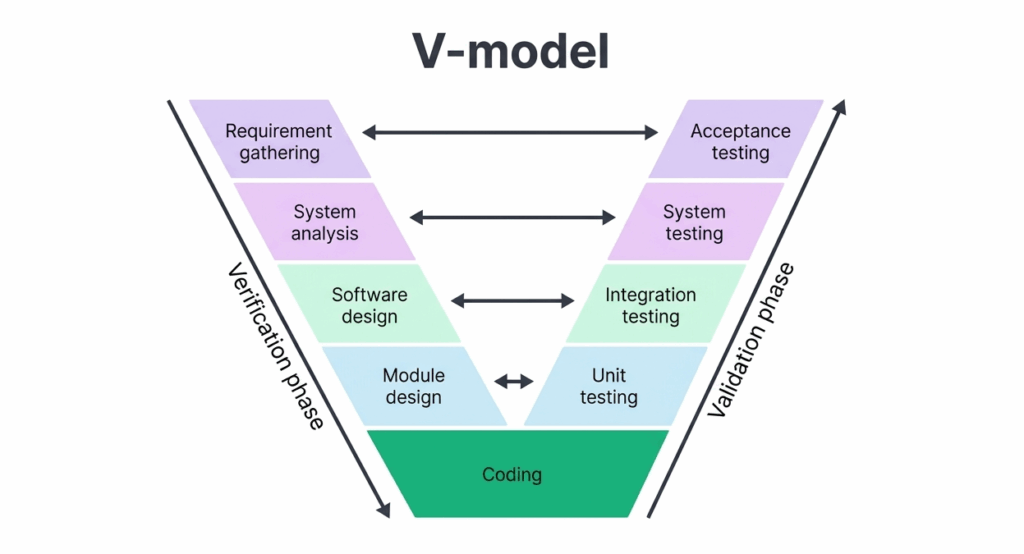
System Testing Diagram: Where It Fits in the SDLC
System test sits at level 3 in the V-Model (Verification and Validation model) of software testing. It is typically performed by an independent testing team, separate from the development team, to maintain objectivity.
When Should You Perform System Testing?
System testing should be performed after integration testing is complete and before user acceptance testing (UAT) begins. At this stage, all individual modules have been developed, unit tested, and integrated, making the system ready for end-to-end evaluation.
Key conditions to check before you begin system test include:
- All modules have been integrated into a working build
- Integration testing has been completed with no critical open defects
- A stable test environment that mirrors production has been set up
- System test cases have been reviewed and approved
- All necessary test data has been prepared
Also, it is typically carried out in a staging or pre-production environment that closely resembles the live production environment to ensure test results are representative.
System Testing vs. Integration Testing vs. Acceptance Testing
These three levels are often confused because they all happen late in the testing lifecycle, but they answer different questions:
| Level | What it checks | Who runs it | When |
| Integration Testing | Do individual modules work correctly together? | Developers / QA | After unit testing |
| System Testing | Does the entire integrated application meet its requirements? | Independent QA team | After integration testing |
| User Acceptance Testing (UAT) | Does the system meet real business and user needs? | End users / stakeholders | After system testing |
In short: integration testing checks the seams, system testing checks the whole machine, and UAT checks whether the machine actually solves the user’s problem.
System Testing Process
A step-by-step breakdown on how to do system testing for reliable, end-to-end validation:
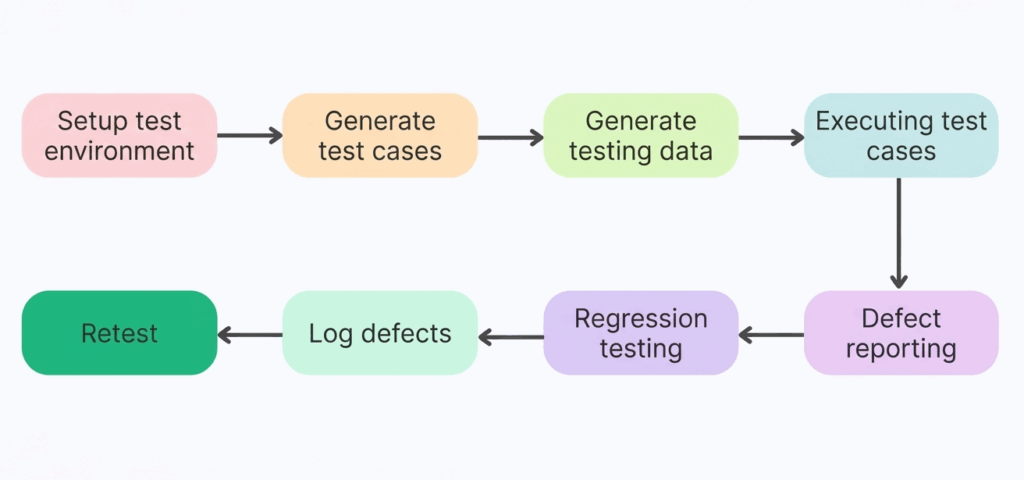
1. Set up the test environment
Create a stable environment where testing can run reliably.
2. Define test scenarios
Identify and structure the key workflows that need validation.
3. Prepare test data
Generate realistic data to simulate real-world usage.
4. Run test cases
Execute tests to validate system behavior across scenarios.
5. Capture defects
Identify and report any issues that surface during execution.
6. Run regression tests
Ensure new changes haven’t broken existing functionality.
7. Track and resolve issues
Log defects and verify fixes as they are implemented.
8. Retest for validation
Re-run tests to confirm everything works as expected.
Types of System Testing
There are many types of system tests, each designed to evaluate a specific aspect of the application. The most common types of system tests include:
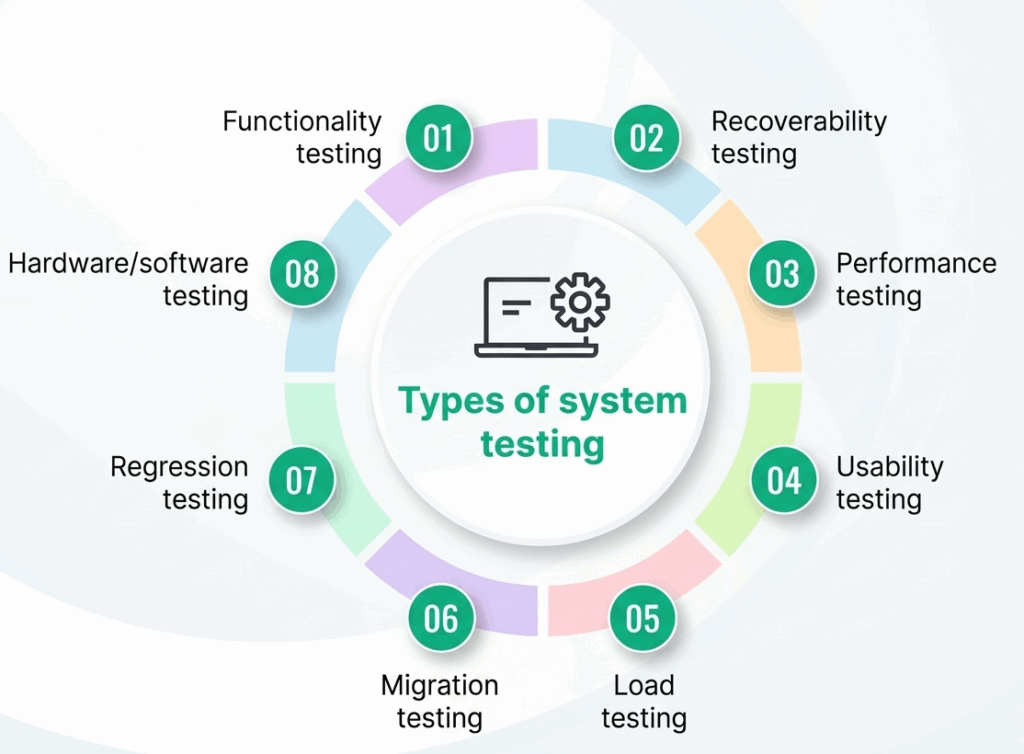
Functional Testing: Validates that the application behaves according to functional requirements.
Performance Testing: Evaluates speed, responsiveness, and stability under expected and peak load conditions.
Load Testing: Tests the application under heavy traffic to identify bottlenecks and capacity limits.
Stress Testing: Pushes the application beyond normal operating conditions to determine breaking points.
Usability Testing: Assesses how user-friendly and intuitive the application is for end users.
Security Testing: Identifies vulnerabilities and ensures the application is protected against unauthorized access, breaches, and data leaks.
Regression Testing: Re-runs existing test cases after code changes to ensure previously working functionality has not been broken.
Compatibility Testing: Checks that the application works correctly across different browsers, operating systems, devices, and environments.
Recovery Testing: Validates the application’s ability to recover gracefully from crashes, failures, or unexpected interruptions.
Installation Testing: Ensures the application installs, upgrades, and uninstalls correctly on target environments.
Advantages of System Testing
How system tests improve software quality, reliability, and release confidence:
- Validates End-to-End Functionality: Ensures all integrated components work together as expected, providing confidence in the complete system behavior.
- Detects Integration Issues: Issues that may not surface during unit or integration testing, such as interface mismatches or data flow errors, are caught at the system level.
- Reduces Production Defects: Catching defects before production release significantly reduces post-deployment incidents and costly hotfixes.
- Improves Software Quality: Comprehensive system tests improve the overall reliability, stability, and quality of the final product.
- Supports Multiple Testing Types: A single system test cycle can cover functional, performance, security, and usability aspects, making it highly efficient.
- Increases Stakeholder Confidence: Successful system test results give product owners, clients, and stakeholders confidence that the system is ready for release.
Disadvantages of System Testing
Some of the limitations and challenges teams may face when implementing system tests, include:
- Time-Consuming: Testing a fully integrated system is considerably more time-intensive than testing individual units or modules.
- Resource-Intensive: Requires dedicated environments, skilled testers, and often specialized tools, all of which increase cost.
- Complex Debugging: When a defect is found at the system level, tracing it back to its root cause across multiple components can be difficult and time-consuming.
- Late in the SDLC: Since system tests occurs late in the development cycle, defects discovered at this stage can be expensive to fix compared to those found earlier. Reports suggest that fixing defects after release can cost up to 100× more than catching them early.
- Environment Maintenance: Keeping the test environment in sync with a constantly evolving production environment requires ongoing effort and attention.
Common System Testing Challenges
Some of the common system test challenges that can slow down or compromise quality:
- Incomplete Requirements: Ambiguous or incomplete requirements lead to poorly designed test cases and gaps in coverage.
- Unstable Test Environment: Frequent environment changes or mismatches with production cause false failures and reduce testing efficiency.
- Inadequate Test Data: Tests that rely on incomplete or synthetic data may not expose real-world defects.
- Tight Deadlines: Time pressure often leads to incomplete test execution, cutting corners on coverage or skipping re-test cycles.
- Communication Gaps: Poor coordination between development and testing teams can result in missed defects, delayed fixes, or duplicated work.
Best Practices for Reliable System Testing
Key strategies and proven approaches to ensure effective, reliable system tests:
Start Test Planning Early: Begin test planning as soon as requirements are defined, and don’t wait until development is complete.
Maintain Requirement Traceability: Map every test case to a specific requirement to ensure 100% functional coverage.
Use Realistic Test Data: Wherever possible, use production-like data to surface defects that synthetic data may miss.
Automate Regression Testing: Automate repetitive regression test suites to free testers for exploratory and complex test scenarios. BotGauge helps you automate regression testing 10x faster than traditional approaches.
Prioritize Test Cases by Risk: Focus testing effort on high-risk, high-impact areas first, especially business-critical workflows.
Define Clear Entry and Exit Criteria: Establish measurable conditions for when testing starts and when it is considered complete.
Keep the Test Environment Stable: Make sure test failures are caused by real software defects and not unstable environments.
Detailed Documentation: Maintain thorough records of test plans, test cases, execution logs, defects, and sign-offs to support audits and knowledge transfer.
Top System Testing Tools
Here are some of the top system testing tools that cover end-to-end, functional, UI, API, and system-level testing:
- Selenium: An open-source test automation framework for automating browser-based functional testing for web applications.
- JMeter: An open-source performance and load testing tool from Apache, ideal for testing web services and APIs under stress.
- TestRail: A test case management platform that helps teams plan, track, and report on all phases of testing.
- Postman: A popular API testing tool that enables testing of RESTful services through automated collections and assertions.
- Cypress: A modern JavaScript-based end-to-end testing framework for web applications, offering fast and reliable test execution.
- Katalon Studio: An AI test automation tool supporting web, mobile, API, and desktop application testing.
- BotGauge: It delivers Autonomous QA as a Solution (AQAAS), combining AI agents with human QA expertise to own the entire testing lifecycle.
- JIRA with Zephyr or Xray: Combines issue tracking with test management for seamless defect reporting and traceability.
Why BotGauge for Reliable System Testing
BotGauge brings a new standard to system testing with its Autonomous QA as a Solution approach, combining Agentic AI-driven automation with human QA expertise to deliver consistent, end-to-end reliability. Instead of relying on brittle scripts and manual effort, BotGauge owns the entire testing lifecycle, helping teams achieve up to 80% test coverage in just 2 weeks, while ensuring faster releases, stable environments, and accurate defect detection.
Why it stands out:
- End-to-end QA ownership: Deploys various AI agents to own every phase of the testing lifecycle, from test creation to execution and maintenance.
- AI-generated test cases: Builds context-aware test cases from UX flows, PRDs, and demo videos.
- Self-healing automation: Tests automatically adapt to code changes, eliminating flaky tests.
- CI/CD testing: Seamlessly integrates into your pipelines for continuous, reliable testing.
- Human + AI advantage: Backed by domain-specialized QA experts to ensure quality beyond automation.
Conclusion
By validating the fully integrated application against its requirements, system testing acts as the last line of defense before the product reaches end users. Whether you are performing functional checks, load tests, or security assessments, a well-executed system testing process ensures your software is reliable, functional, and ready for production.
But in fast-moving engineering teams, traditional approaches often struggle to keep up with modern release cycles, leading to gaps in coverage, flaky tests, and delayed feedback.
With BotGauge’s Autonomous QA as a Solution, teams can move beyond these limitations. By combining agentic automation with human QA expertise, BotGauge takes full ownership of the testing lifecycle. The result is faster feedback loops, stable and reliable test environments, and the ability to achieve meaningful coverage in just weeks, without adding manual overhead.
It enables engineering teams to ship confidently, knowing their systems are thoroughly tested, resilient, and ready for scale.
Frequently Asked Questions
When should the system testing phase begin?
The system testing phase should begin after integration testing has been completed and a stable, fully integrated build is available. This means all modules have been developed, unit tested, and integrated successfully, and the test environment has been set up to mirror production.
Is system testing a QA process?
Yes, system testing is a core part of the Quality Assurance (QA) process. It is typically performed by a dedicated testing team to evaluate the complete system against its specified requirements, and it encompasses multiple QA activities including test planning, test case design, execution, defect reporting, and test closure.
How does system testing fit with other QA methods?
System testing is one level within a layered QA strategy. It builds on unit testing and integration testing, but takes a broader, black-box perspective, validating the system as a whole from the user’s point of view. After system testing is successfully completed, the product proceeds to User Acceptance Testing (UAT), where actual end users or business stakeholders verify that the system meets their expectations.
Is system testing manual or automated?
System testing can be done either way. Manual system testing is common for exploratory and usability checks where human judgment matters. Automated system testing, the more common approach for regression-heavy applications, uses tools to re-run the same end-to-end scenarios on every build. Most mature QA teams run a mix of both.
What is the difference between system testing and end-to-end testing?
They overlap heavily and are sometimes used interchangeably. Strictly speaking, system testing validates the application against its own specified requirements in isolation, while end-to-end testing validates the complete user journey across integrated systems, including third-party services, APIs, and infrastructure the application depends on.
Who performs system testing?
System testing is typically performed by an independent QA or testing team, separate from the developers who built the feature, to keep the evaluation objective. This is different from unit and integration testing, which are usually developer-driven.