TL;DR
LLM security testing checks whether an LLM application can be pushed into unsafe output or action. There are five methods: static prompt suites, fuzzing, benchmarks, scripted multi-turn paths and adaptive red teaming. The first three test the model; the last two test the agent. Open-source tools such as garak, PyRIT, promptfoo and Inspect cover model-level checks. BotGauge adds agent-aware attacks and trace-level findings.
What is LLM security testing?
Short answer: LLM security testing checks whether a language model application can be pushed into unsafe output or unsafe action. There are five main methods, from fixed prompt suites to adaptive multi-turn red teaming, and the right mix depends on whether you ship a chatbot or an agent with tools.
Testing is the third pillar of our guide to AI agent security, after threats and controls. This post compares the methods and the tools that run them.
What are the main LLM security testing methods?
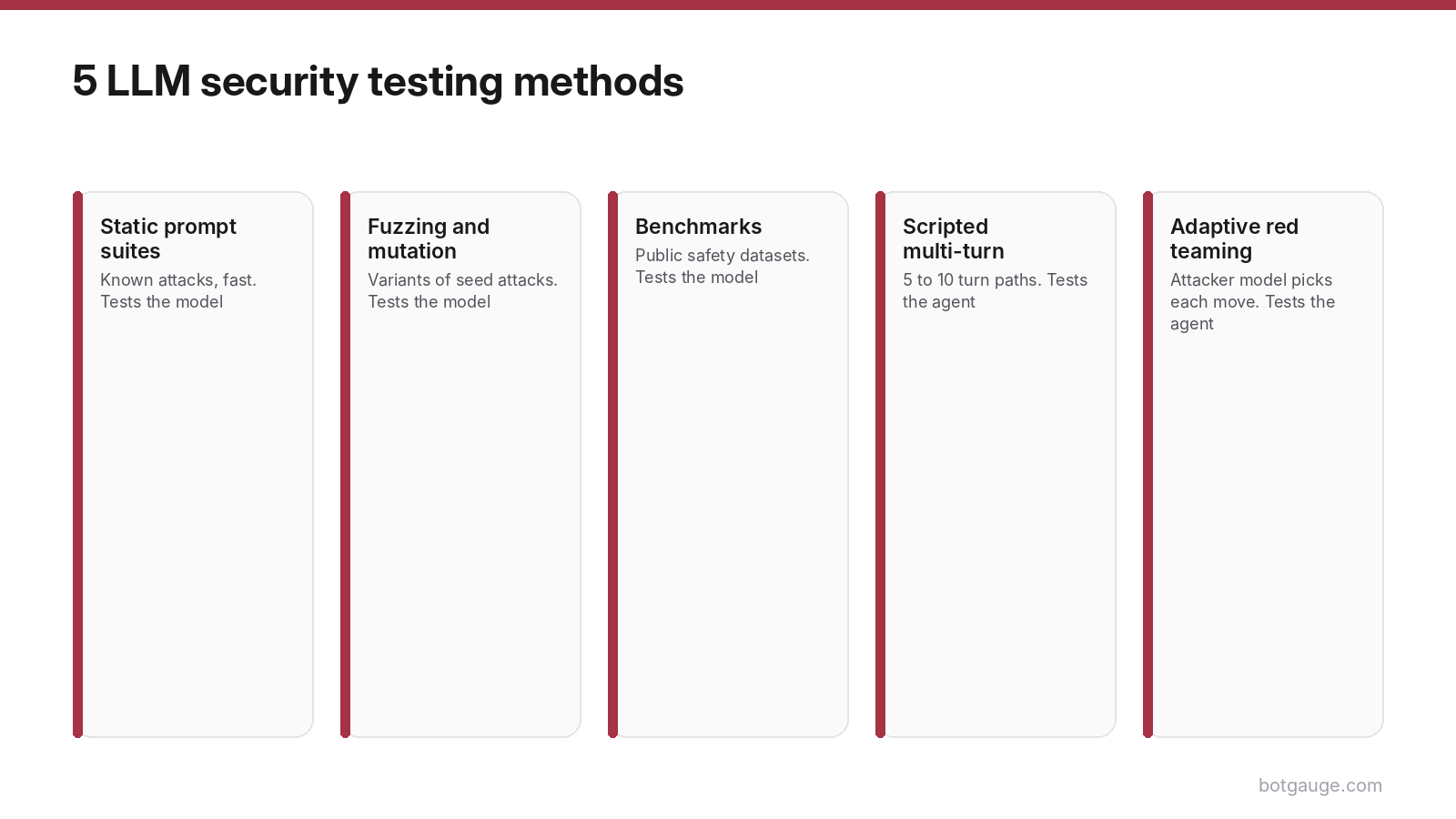
Short answer: Static prompt suites, fuzzing and mutation, benchmarks, scripted multi-turn paths, and adaptive red teaming.
| Method | What it does | Catches | Misses |
| Static prompt suites | Run a fixed list of known attack prompts | Known injections and jailbreaks | New phrasings, multi-turn attacks |
| Fuzzing and mutation | Auto-generate variants of seed attacks | Filter gaps, encoding tricks | Attacks that need context or tools |
| Benchmarks | Score the model on public safety datasets | Model-level regressions | Your app’s specific tools and policies |
| Scripted multi-turn | Replay 5–10 turn escalation paths | Gradual escalation, permission creep | Paths nobody scripted |
| Adaptive red teaming | An attacker model picks each next move | Unknown failures, policy bypasses | Little, but costs more to run |
The first three test the model. The last two test the agent. If your application calls tools, you need at least one of the last two. Jailbreak resistance is a good example: single prompts rarely reveal it, but conversations do, as our guide to LLM jailbreak techniques and defenses explains.
Which tools are used for LLM security testing?
Short answer: Open-source tools such as garak, PyRIT, promptfoo and Inspect, plus commercial platforms that add agent-aware attacks, traces and reporting.
- garak (NVIDIA, open source): a vulnerability scanner with many probe types for model-level testing.
- PyRIT (Microsoft, open source): a framework for scripting red-team attacks, including multi-turn orchestration.
- promptfoo (open source): an eval and red-team runner that fits into CI.
- Inspect (UK AI Security Institute, open source): an evaluation framework used for model safety testing.
- Commercial platforms: managed tools that add agent-aware attack planning, trace capture and reporting on top.
Open-source tools are strong for model-level checks and custom harnesses. The gap usually shows up with agents: knowing which tools exist, defining failure as a tool call, and linking each finding to a trace. For a full side-by-side of these and other tools, see our guide to the best AI red teaming tools, open source and commercial.
How do you choose an LLM security testing approach?
Short answer: Match it to what your app can do: static suites for chatbots, multi-turn and indirect tests for read-only agents, and adaptive red teaming for agents that move money, data or permissions.
- Chatbot with no tools? Start with static suites and benchmarks in CI.
- Agent with read-only tools? Add scripted multi-turn paths and indirect injection tests.
- Agent that can move money, data or permissions? You need adaptive red teaming on every release, plus traces.
For a hands-on version of methods 4 and 5, follow our guide to LLM red teaming vs agent red teaming.
How do you run an LLM security test, phase by phase?
Short answer: Scope it, map the attack surface, test against a known risk list, score results across repeated runs, then report and re-test.
- Scope and rules of engagement. Agree what’s in scope, which environment to use and what counts as a finding.
- Map the attack surface. List every input, retrieval source, tool, API and data store the application touches.
- Test against a risk list. Cover each OWASP LLM Top 10 category, and use MITRE ATLAS techniques to name what you tried.
- Score across repeated runs. LLM output varies, so report an attack success rate, not a single pass or fail. Automated judges speed this up; spot-check them by hand.
- Report and re-test. Give each finding a severity, the exact input and the evidence, then re-run the same test after the fix.
The bottom line
LLM security testing should match what your application can do. If it calls tools, test the agent, not just the model, and keep testing after launch.
BotGauge evals keep every finding as a permanent regression test, and the BotGauge AI agent red teaming platform runs adaptive attacks across inputs, documents, tools and conversations.
Go from one-off tests to continuous coverage. BotGauge is an AI agent red-teaming platform. Start for free or book a 30-minute demo.