
Writing effective test cases is crucial for ensuring the quality and reliability of software applications. In this guide, we will explore the process of creating cucumber test cases, provide examples, and discuss best practices to follow.
What Cucumber Testing?
Cucumber Testing is a powerful tool that supports Behavior-Driven Development (BDD), allowing teams to write test cases in a language that is easily understandable by all stakeholders, including non-technical members. By using this approach, we help teams communicate better, fostering better communication and collaboration throughout the software development process.
Understanding Cucumber Test Cases
Cucumber test cases are written in Gherkin, a domain-specific language that uses a simple syntax to describe the behavior of the application. The primary components of a Cucumber test case are:
Feature:
This is a high-level description of a software feature. It typically includes a title and a brief description.
Scenario:
Each feature can have multiple test scenarios that describe specific examples of how the feature should behave. Each scenario is composed of steps.
Steps:
Steps are written using specific keywords:
Given (preconditions)
When (actions taken)
Then (expected outcomes)
Why are Cucumber Test Cases Important?
It’s crucial in the BDD (Behavior Driven Development) approach to software development. They bring several benefits:
Clarity:
They offer a clear, understandable format for technical as well as non-technical team members, enhancing collaboration.
Coverage:
By outlining scenarios that encompass various features it ensures thorough test coverage.
Documentation:
They act as dynamic documentation that grows with the software, simplifying maintenance and understanding the system’s behavior over time.
Early Detection:
Well-designed Cucumber test cases facilitate the early identification of issues during development, minimizing the cost and complexity of bug fixes later on.
How to Write Cucumber Test Cases?
Writing Cucumber test cases involves several steps:
1. Identify the Feature:
Pinpoint the specific functionality or behavior that requires testing.
2. Define the Scenario:
Detail the exact conditions under which the test will be conducted and the anticipated results.
3. Write the Gherkin Steps:
Utilize the Given-When-Then syntax to clearly articulate the scenario.
4. Implement Step Definitions:
Develop step definitions in your preferred programming language that align with the Gherkin steps.
5. Run and Refine:
Execute the test cases to verify their functionality and refine them based on the outcomes and feedback received.
How to Write Cucumber Test Cases Using BotGauge
BotGauge is a low-code tool that simplifies writing and managing Cucumber test cases, helping teams adopt behavior-driven development (BDD) with ease. Here’s how you can create and manage test cases using BotGauge:
1. Create a Feature File:
Start by defining the application behavior in plain language. This involves writing a .feature file that describes different test scenarios using “Given, When, Then” steps.
2. Autogenerate Test Cases:
Boat Gauges AI feature helps you generate test cases automatically from the provided user stories or requirements. Simply input the necessary details, and the tool will create scenarios.
3. Test Execution:
BotGauge allows you to run these test cases across different browsers and environments, ensuring compatibility and reliability across platforms.
4. Debugging & Reporting:
If a test fails, BotGauge provides detailed logs and AI-assisted debugging suggestions to quickly resolve issues.
Best Practices
Keep scenarios concise and focused on a single behavior.
Reuse step definitions to make tests easier to maintain.
Run parallel tests across environments for faster execution.
BotGauge makes Cucumber test case automation easy, letting you focus on delivering quality software faster.
What is Scenario in Cucumber Testing?
In Cucumber testing, a scenario represents a single test case written in a natural language that describes a specific behavior of the system. It is a high-level description of a feature from the user’s perspective, allowing both technical and non-technical stakeholders to understand the test’s intent.
Standard Cucumber Test Cases Format
The format of Cucumber test cases follows the Gherkin syntax, which consists of the following components:
Feature:
Provides a description of the functionality being tested.
Scenario:
Defines a particular test case, including its context and expected behavior.
Given:
Sets up the initial context or state.
When:
Describes the action or event.
Then:
Specifies the expected result.
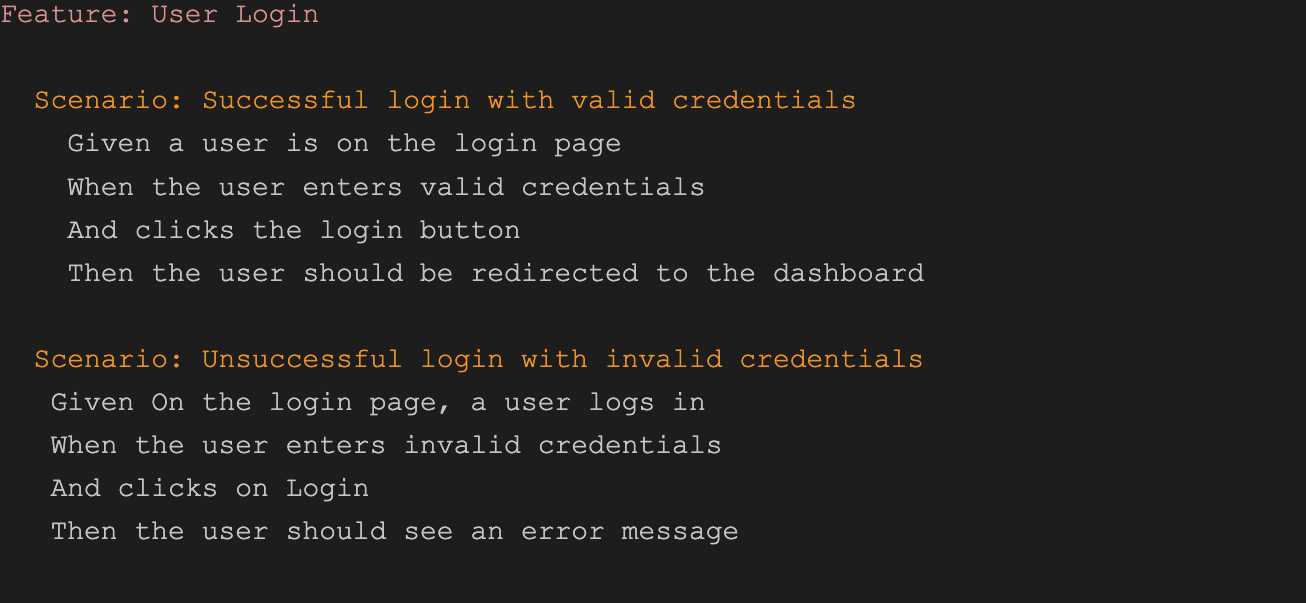
Example of a Cucumber Test Case
Here’s an example of a Cucumber test case for a login feature:
Conclusion
Cucumber is a vital part of the BDD approach, offering clarity, coverage, and effective documentation for software testing. By understanding and implementing the best practices for writing Cucumber test cases, you can ensure that your software meets the required standards and performs as expected.